36D-Link DIR-840 User Manual
Section 3 - Setup
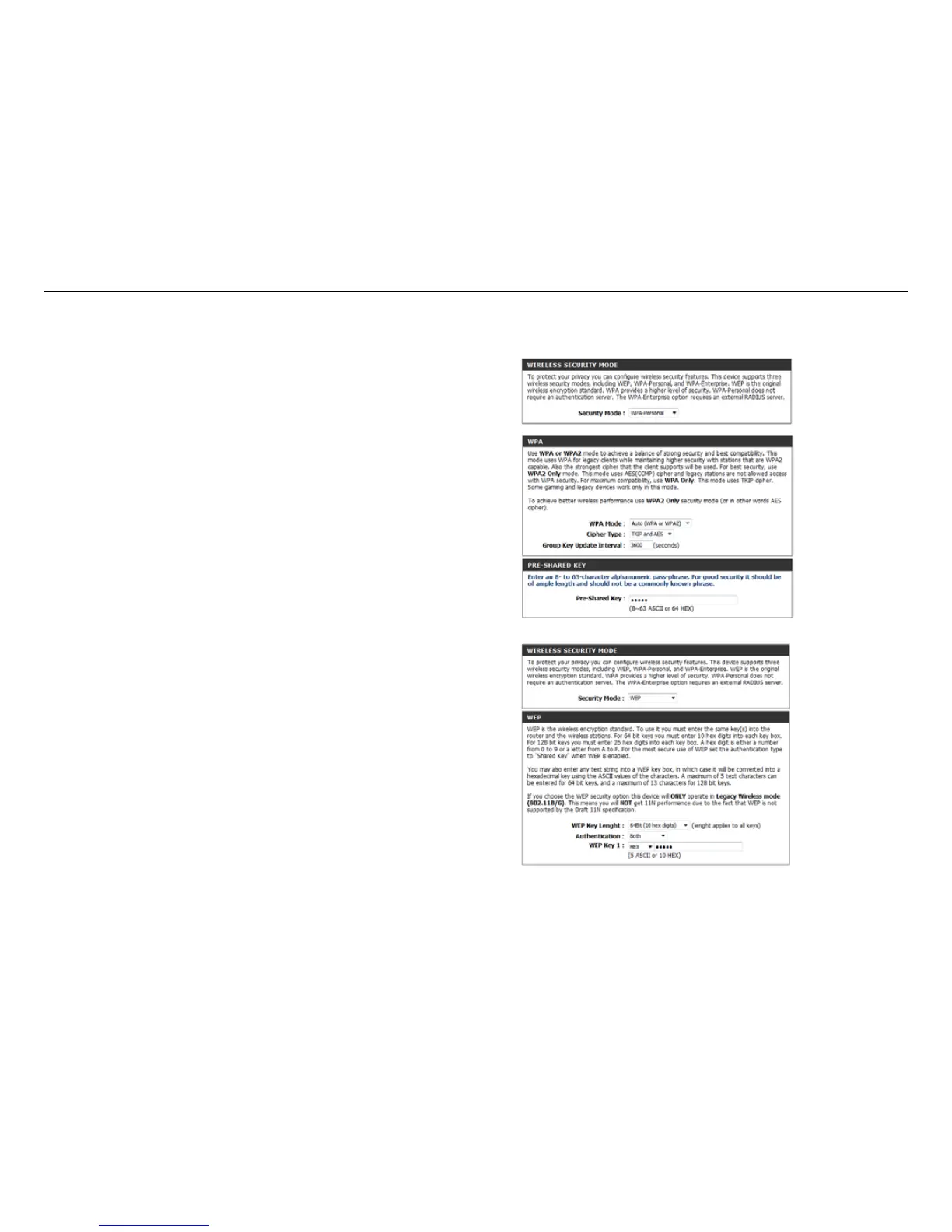
Select the type of security or encryption you would like to
enable. You can choose from WPA Personal, WEP, or WPA
Enterprise from the drop-down menu.
Security Mode:
If you selected WPA Personal security, choose the type of
WPA security to use from the drop-down menu: WPA, WPA2,
or Auto (WPA or WPA2).
Choose the cipher type from the drop-down menu.
Set the length of time before the group key is updated.
Enter the network pass key phrase to use.
WPA Mode
(WPA):
Cipher Type:
Group Key Update
Interval:
Network Key:
If you selected WEP security, select the length you would
like to set for your key.
Choose your authentication method from the drop-down
menu.
Enter your pass key.
WEP Key Length
(WEP):
Authentication:
WEP Key 1:
Each wireless band (2.4 GHz and 5 GHz) can be congured independently.
The following settings can be applied:



 To Next Page