DWR-956 Wireless AC1200 4G LTE Router
with Gigabit Ethernet Ports and 1 FXS Port
User Manual
Configuring via Web-based Interface
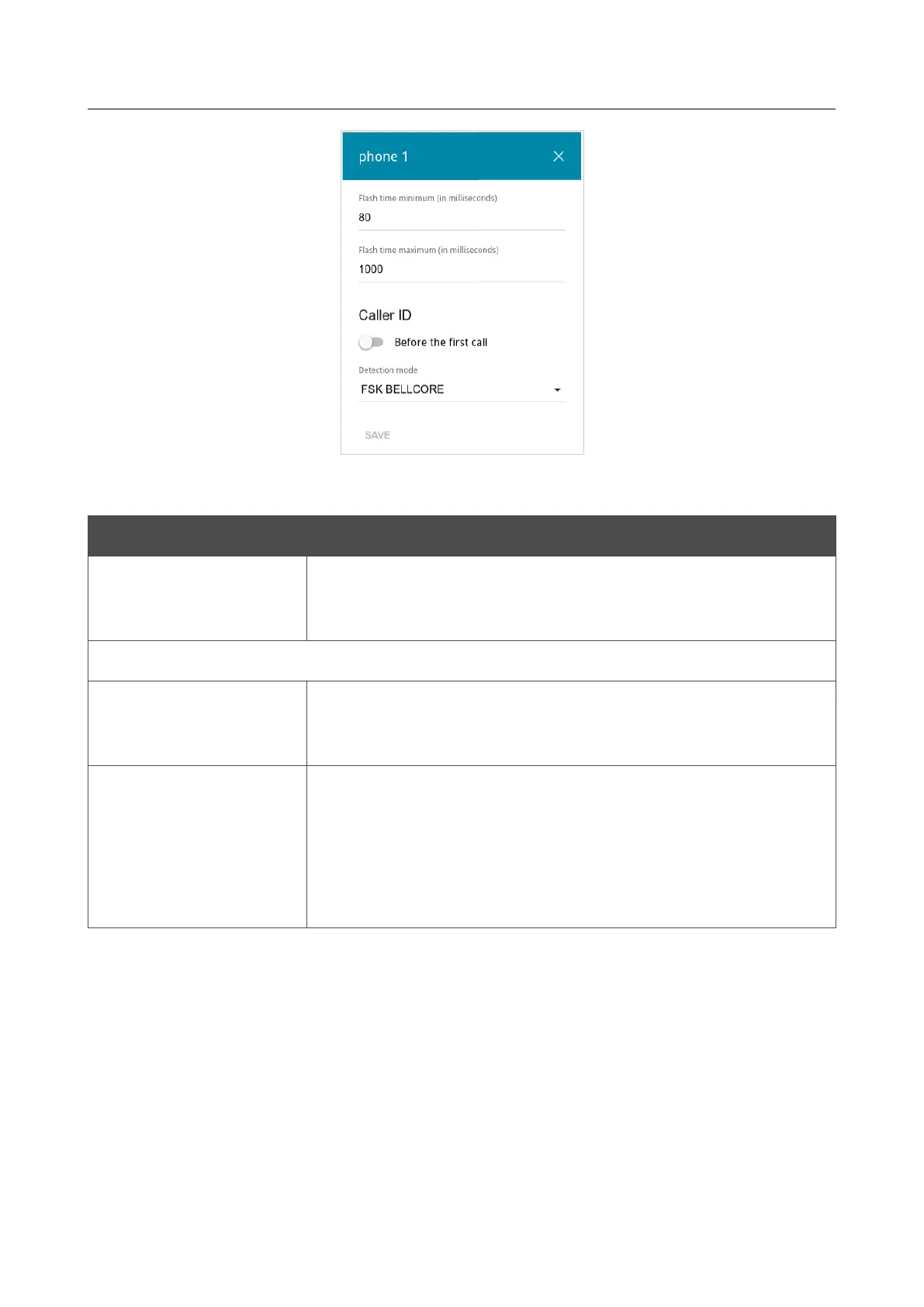
Figure 165. The window to change FXS port parameters.
In the opened window, you can specify the following parameters:
Parameter Description
Flash time minimum /
Flash time maximum
The maximum and minimum value for flash time (the user hangs up
the receiver and lifts it again) in milliseconds which the router will
regard as pressing the FLASH key.
Caller ID
Before the first call
Move the switch to the right to deliver a phone number to the phone
connected to the FXS port of the router before the first phone ring
when receiving an incoming call.
Detection mode
From the drop-down list, select an operation mode of the automatic
caller identification function for the phone connected to the FXS
port of the router.
To disable the automatic caller identification function for the phone
connected to the FXS port of the router, select the Do not use
value from the drop-down list.
Click the SAVE button.
When all needed settings are configured, click the APPLY button.
Page 214 of 302


 To Next Page
 Loading...