DWR-956 Wireless AC1200 4G LTE Router
with Gigabit Ethernet Ports and 1 FXS Port
User Manual
Configuring via Web-based Interface
!
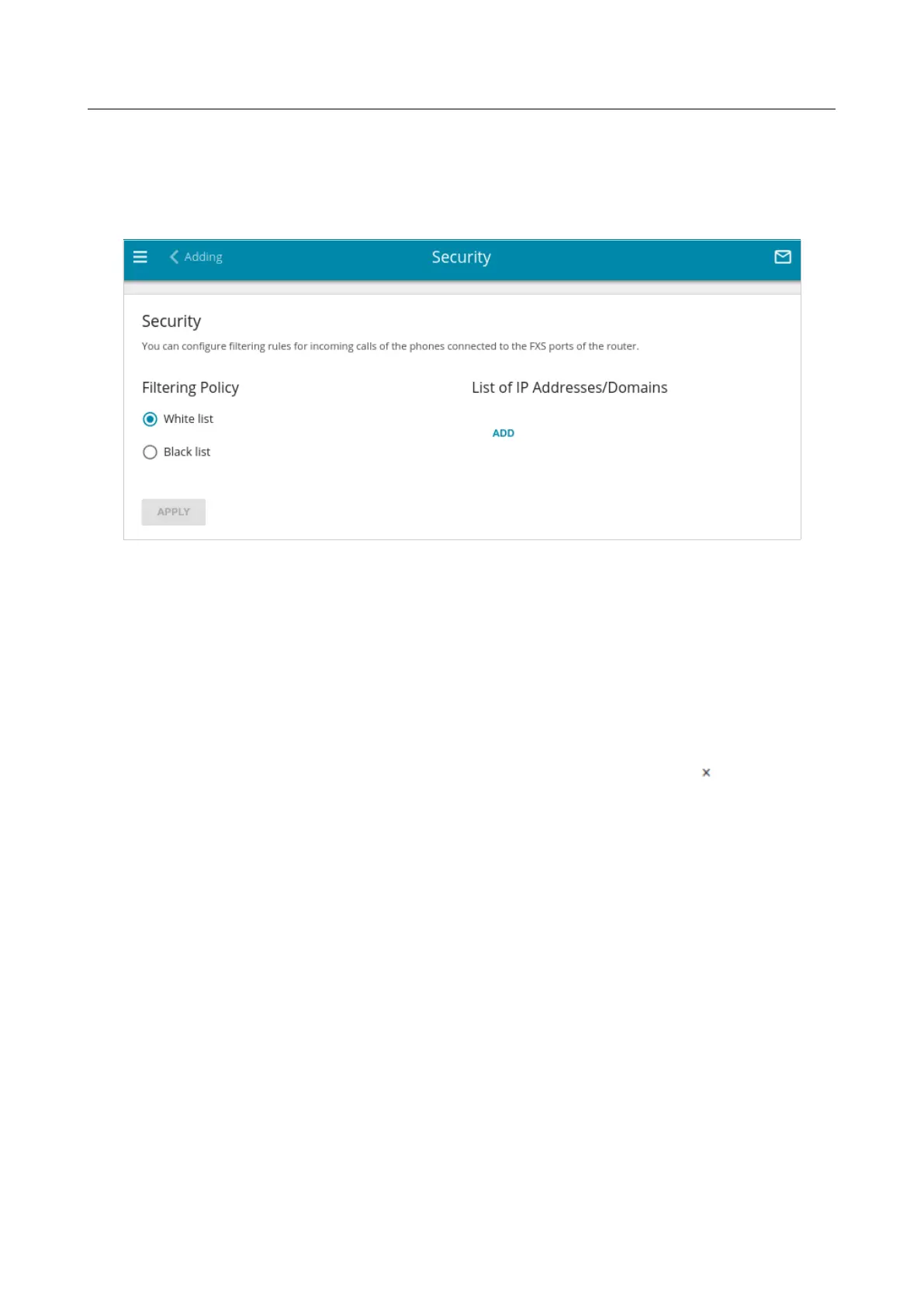
On the VoIP / Security page, you can configure filtering rules for incoming calls of the phone
connected to the FXS port of the router.
Figure 169. The VoIP / Security page.
In the Filtering Policy section, select the needed choice of the radio button.
• White list: The router accepts incoming calls only from IP addresses or domains specified
in the List of IP Addresses/Domains section.
• Black list: The router accepts incoming calls from any IP addresses or domains except for
those specified in the List of IP Addresses/Domains section.
To add an IP address or domain name, click the ADD button in the List of IP
Addresses/Domains section. In the line displayed, specify the needed value.
To remove an IP address or domain name from the list, click the Delete icon ( ) in the relevant
line.
After specifying the needed parameters, click the APPLY button.
Page 217 of 302



 To Next Page