129
Configuring Your Camera for External Trigger Based Recording
(continued)
I/O Connector (continued)
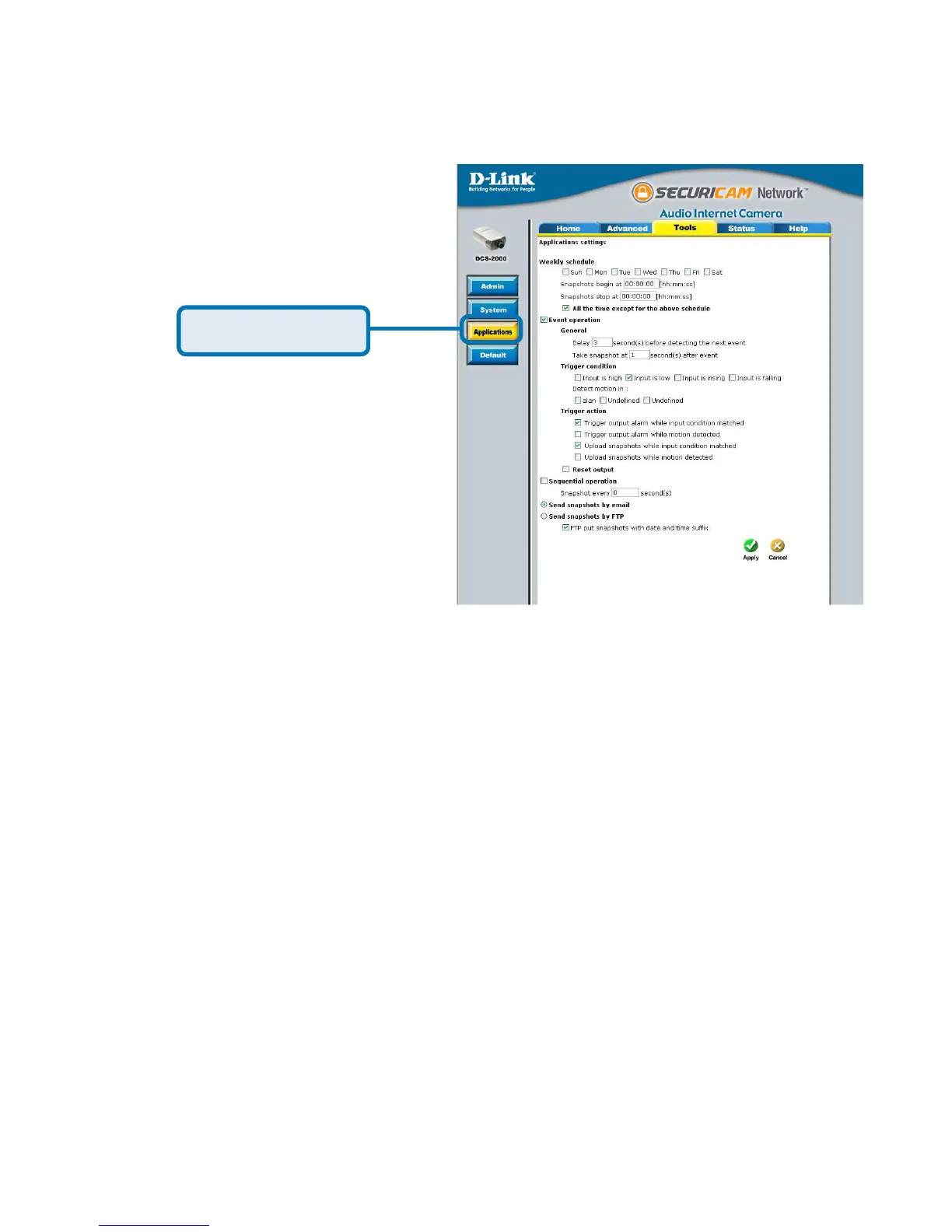
Next, click the Applications
button under the Tools tab to set
the application settings for the
DCS-2000.
In this window, follow the steps below to set the application settings for
snapshots to be sent to your e-mail account or FTP server when triggered by a
motion sensor or other external device:
Select the weekdays you would like to record and enter the
“Snapshots begin” time and “Snapshots end” time for the weekly
schedule, or select “All the time except for the above schedule” if you
want to enable full time snapshot recording.
Check “Event operation.”
Set the delay “before detecting next event” to avoid continuous false
alarms following the original event.
Set the delay to “take snapshots after event” to capture the direction
of the moving object.
55
55
5 Check the trigger condition for input and motion detection (in this
case “Input is Low”).
66
66
6 Check “Trigger output alarm while input condition matched” and
“Upload snapshots while motion detected.”
77
77
7 Select to either send snapshots by email or by FTP.
Click Applications
Click the apply button when finished. You are now able to send snapshots,
based on triggered recording, to your email account or FTP server.















 To Next Page