ENGLISH
53
Reset faults and
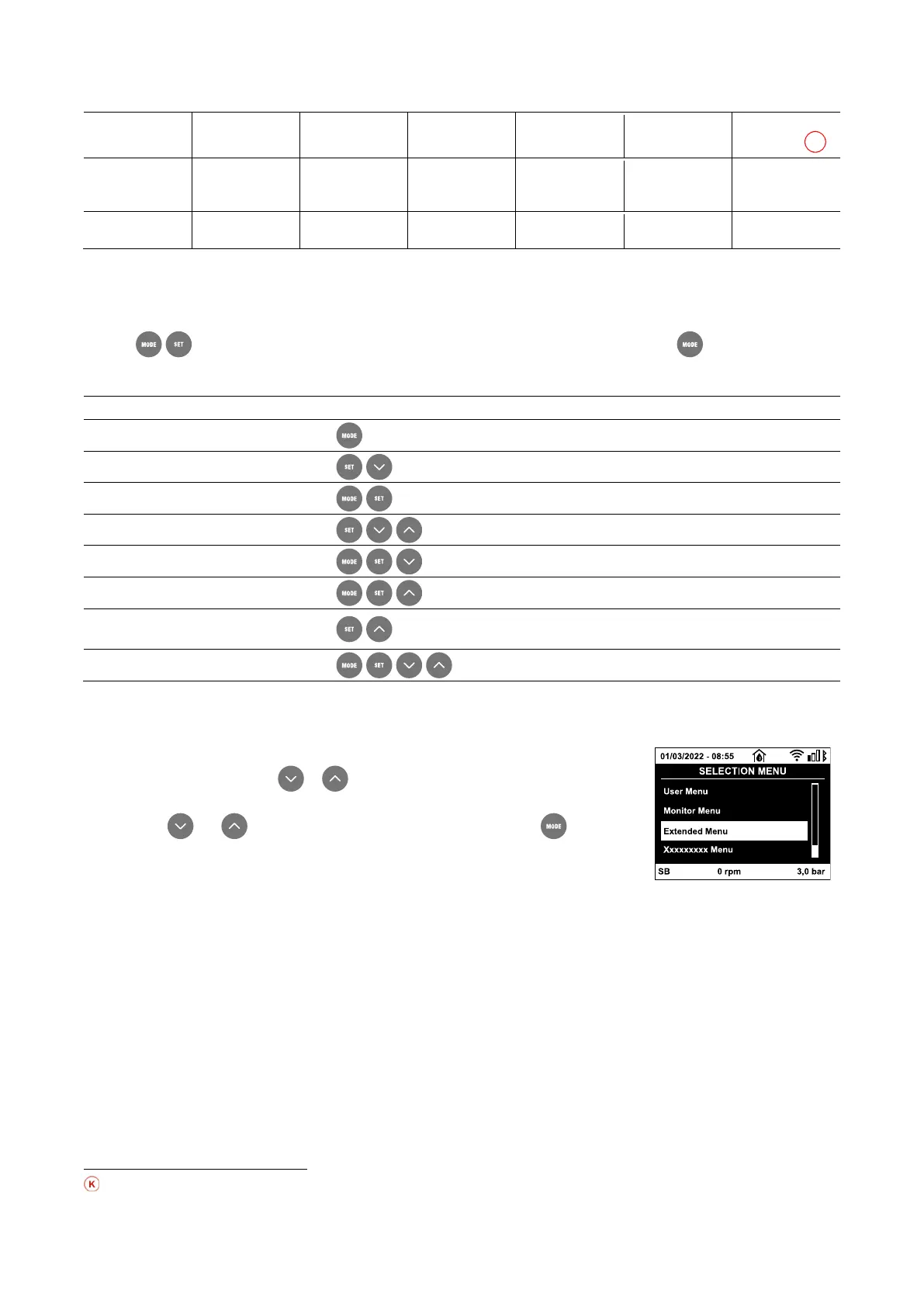
Table 5: Menu structure
13.1.2. Direct Access
The desired menu can be accessed directly by pressing simultaneously the appropriate combination of keys for the required time (for
example to enter the Setpoint menu) and the various items in the menu are scrolled with the key. Table 6 shows the
menus that can be reached with the combinations of keys.
During switching on appliance, and until the
appearance of “EE” text.
Table 6: Menu accesses
13.1.3. Access by name
The selection of the various menus is accessed by name. From the main menu you access menu
selection by pressing either of the or keys. The names of the menus that can be accessed
appear on the menu selection page and one of the menus is highlighted by a bar. Shift the highlighting
bar using the and to select the menu you want and enter it by pressing .
Fig. 19: Drop-down menu
The items available are MAIN, USER, MONITOR, followed by a fourth item, EXTENDED MENU; this item allows the number of menus
displayed to be extended. When EXTENDED MENU is selected a pop-up appears asking you to type in an access key. The access key
coincides with the combination of keys used for direct access (as in Table 6) and allows the extended display of the menus from the
menu corresponding to the access key to all those with a lower priority. The order of the menus is: User, Manual Setpoint, Manual,
Installer, Technical Assistance. When an access key is selected, the menus released remain available for 15 minutes or until they are
disabled manually by means of the item “Hide forward menus” which appears on the menu selection when using an access key. Nella
Fig. 20 shows an operating diagram for selecting the menus. The menus are in the centre of the page, from the right you reach them by
means of direct selection with a combination of keys, while from the left you reach them by means of the selection system with drop-
down menu.
Parameters available in version KIWA



 To Next Page