ENGLISH
78
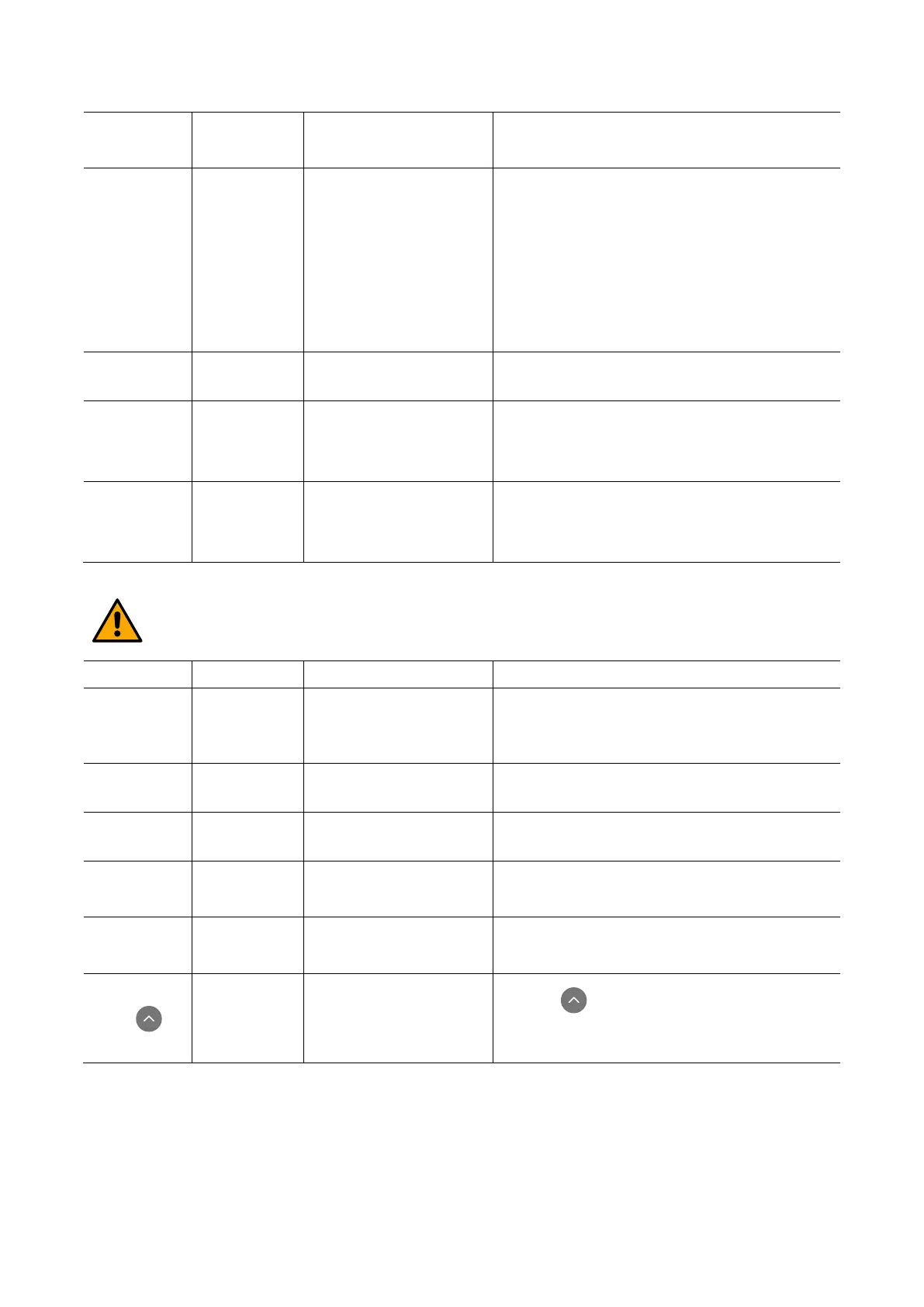
suction pipe.
• Check the suction pipe, find and eliminate the cause
of air getting in.
• Contact the assistance centre.
Insufficient
delivery
Red: off
White: on
Blue: off
• Suction depth too high.
• Suction pipe clogged or
diameter insufficient.
• Impeller or hydraulic part
clogged.
• As the suction depth increases the hydraulic
performance of the product decreases (par. 12).
Check whether the suction depth can be reduced.
• Use a suction pipe with a larger diameter (but never
smaller than 1”).
• Check the suction pipe, find the cause of choking
(obstruction, dry bend, counterslope,…) and remove
it.
• Dismantle the system and remove the obstructions
The pump starts
without utility
request
White: on
• Faulty non-return valve.
• Check the system, find and eliminate the leak.
• Service the non-return valve as described in par. 20.
The water
pressure when
turning on the
utility is not
immediate
Red: off
White: on
Blue: off
Expansion vessel empty
(insufficient air pressure) or
has broken diaphragm
Check the air pressure through the valve in the technical
compartment. If water comes out when checking, the
vessel is broken: assistance service. Otherwise restore the
air pressure according to the equation par.
18.
is turned on the
flow falls to zero
before the pump
Red: off
White: on
Blue: off
Air pressure in the expansion
vessel higher than the system
starting pressure
Calibrate the expansion vessel pressure or configure the
parameters SP and/or RP so as to satisfy the equation (par.
18).
21.1. Troubleshooting for Embedded Electronics
Before starting to look for faults it is necessary to disconnect the power supply to the pump.
shows BL
Red: on
White: on
Blue: off
• Pump not primed.
• Setpoint not reachable
• Prime the pump and check whether there is air in the
pipe. Check whether the suction or any filters are
blocked.
•
Set a RM value that allows the setpoint to be reached
shows BP1
White: on
Faulty pressure sensor Contact the assistance centre
shows BP2
White: on
Faulty pressure sensor Contact the assistance centre
shows OC
Red: on
White: on
Blue: off
•
• Pump blocked.
•
Fluid too dense. Do not use the pump for fluids other
than water.
• Contact the assistance centre.
shows PB
White: on
Blue: off
• Supply voltage too low.
•
Excessive drop in
voltage on the line.
• Check the presence of the correct supply voltage.
• Check the section of the power supply cables.
shows:
Press to
Red: off
White: on
Blue: off
One or more devices have
sensitive parameters not
aligned.
Press the key on the device which we are sure has
the most recent and correct configuration of the
parameters.



 To Next Page