ENGLISH
54
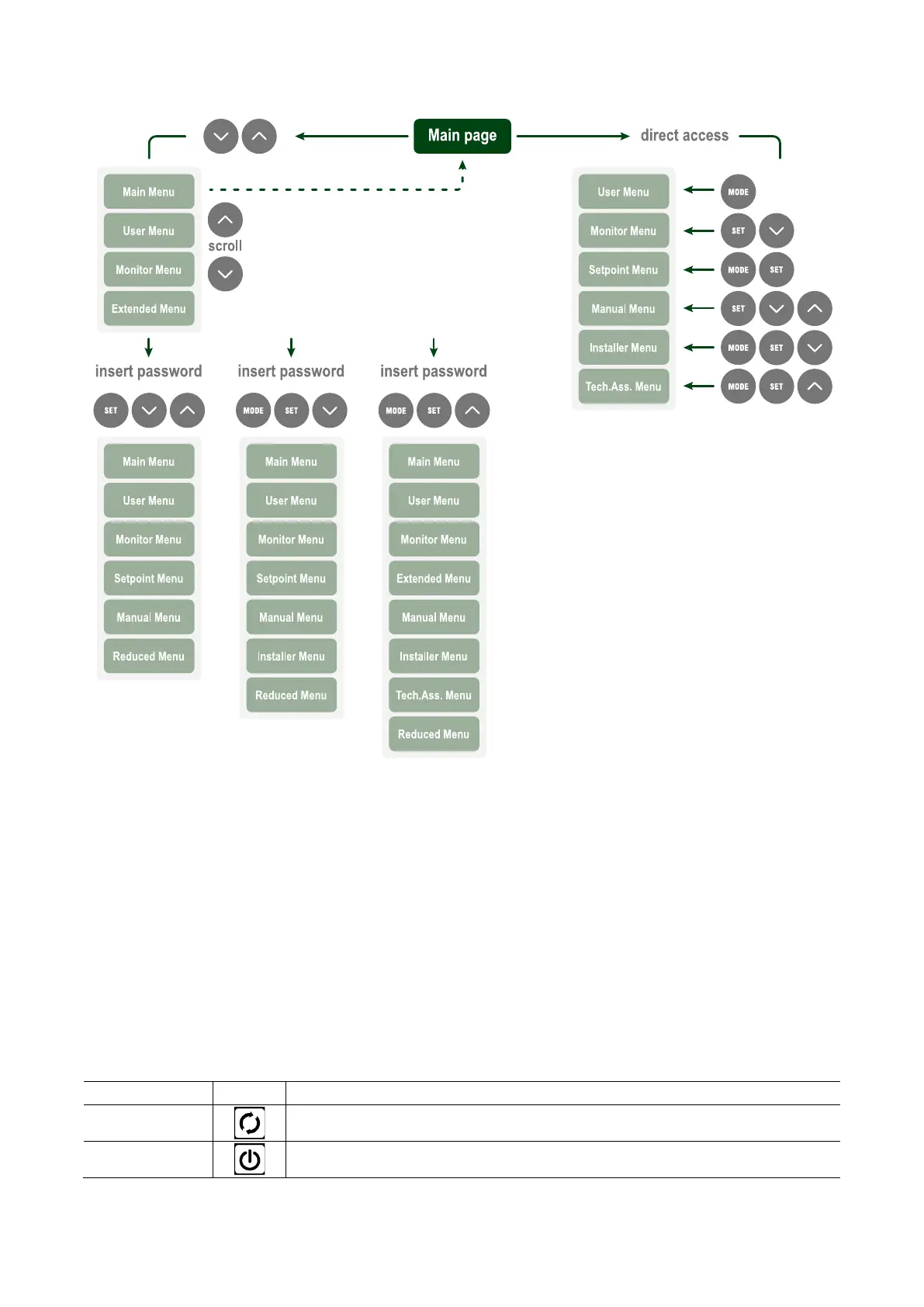
Fig. 20: Diagram of possible menu accesses
13.1.4. Structure of the menu pages
When switched on, some presentation pages are displayed showing the name of the product and the logo, after which the main menu
appears. The name of each menu, whichever it may be, is always at the top of the display.
The following always appear on the main page:
Status Icons
: description in Table 7
Auxiliary Functions Icons
: description in Table 8
: value in bar or psi depending on the set unit of
: value in l/min or gal/min depending on the unit of measure
: value in kW of the power absorbed by the device.
In the frame at the bottom of the screen, present on all pages, the
following always appear:
Status Label: status labels are described in Table 9;
Blocking Error Description / Alarm Description: caption placed
after the FAULT / WARNING label and consisting of the error / alarm
acronym and a brief description.
Motor revs: value in rpm.
Pressure: value in bar or psi depending on the set unit of measure.
The list of Errors and Alarms can be found in Table 20 and in Table 21 at chapter 13.3 Protection systems.
Active
Motor running
Stopped
Motor stopped



 To Next Page