Page 26 of 56
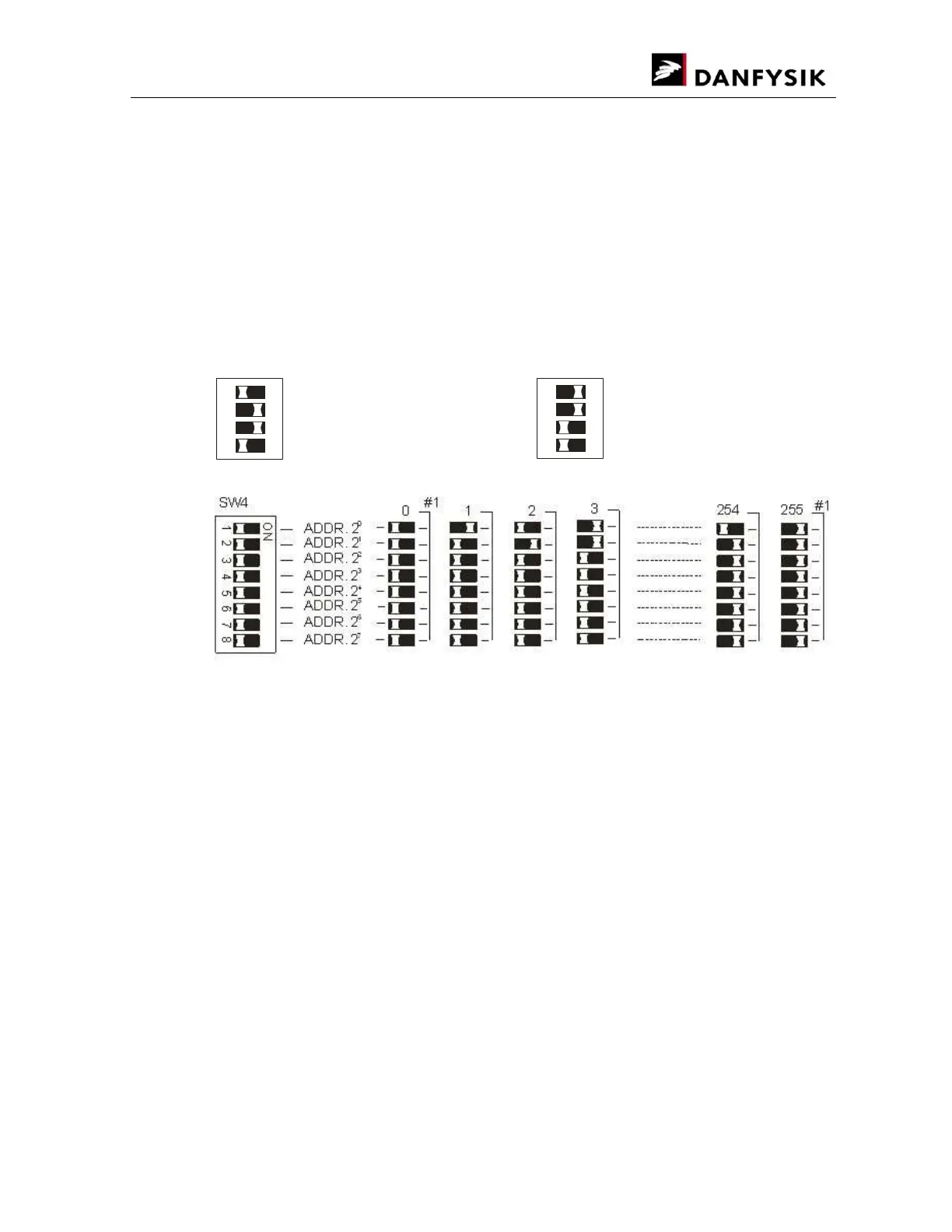
3.3.1.2. ADDRESS LINE SET UP (Esc<ADR)
When using the RS422 or RS485 standard for serial communication, Remote or Local, it is
possible to attach a specific address to the line for multidrop connection.
LOCAL line addressing can be used for controlling more power supplies with one M-Panel. (SW
no. 4 in the M-Panel must be ON). Grounding problems must to be taken into account to avoid
communication problems due to noise and high differential voltages that may jam the input
signals.
REMOTE line addressing can be used for controlling more power supplies through one serial line
(one PC). Grounding problems must to be taken into account to avoid communication problems
due to noise and high differential voltages that may jam the input signals.
ON
ON
1
2 3
4
1
2 3
4
6 3
#1: Selecting address 0 or 255 always equals addressed channel.
Default setting after “COLD BOOT”
Local Line: Address 0
Remote Line: Address 0


 To Next Page