Dascom DC-7600 User Guide V1.0
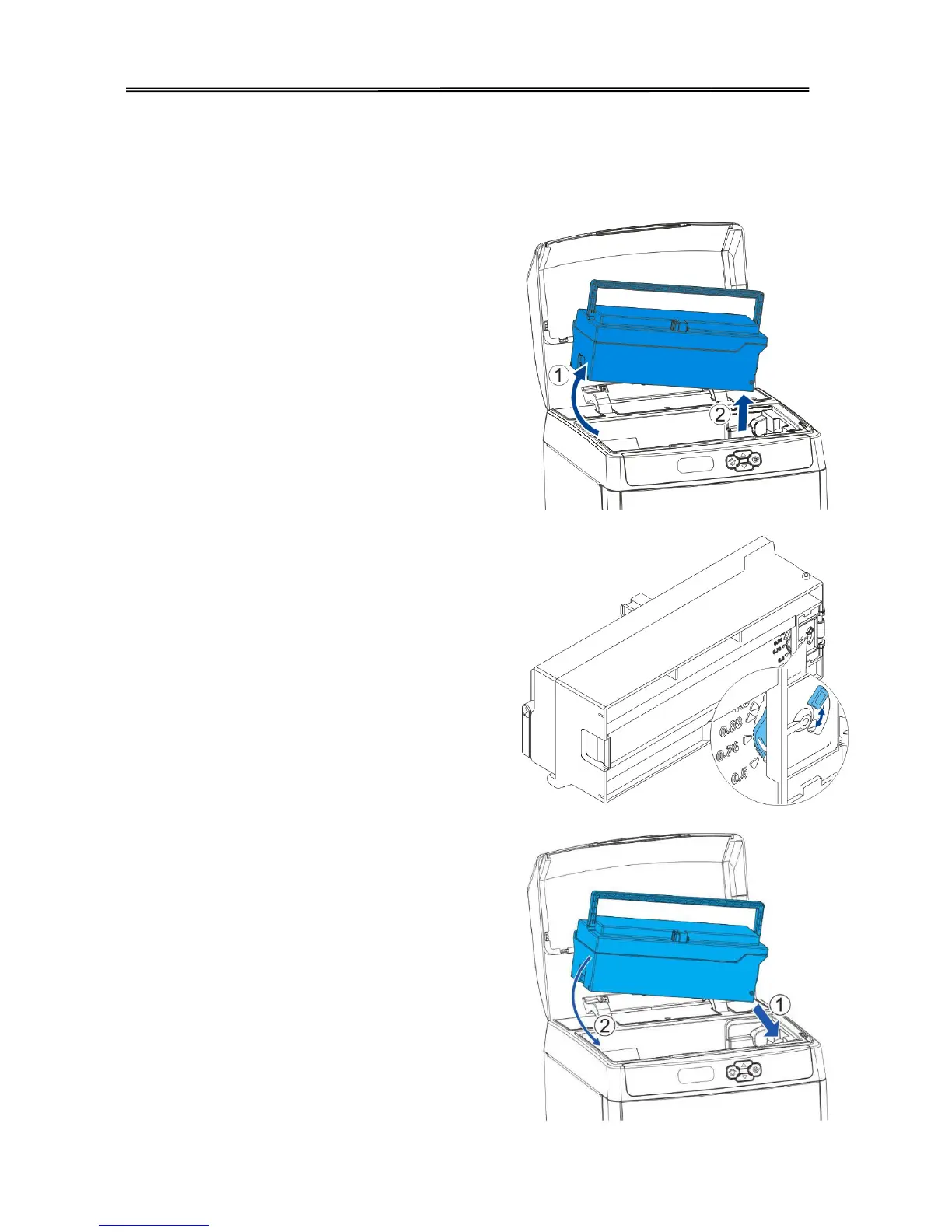
2.1.3 Adjust the card inlet according to the thickness of the cards
The factory default supports 0.76mm (30mil) card thickness. Confirm the correct thickness
setting before installing new cards to the card cassette.
(1) Open the printer top cover. Remove the card
cassette. Hold the card cassette handle
left end first. Then pull out the whole
feeder.
(2) Take out all stored cards, if any.
nderneath the card cassette
right and left to adjust the card inlet.
- The number corresponding to the position of
the knob indicates the size of the open gap.
-When you don’t’ want the card pass, turn the
knob to the right.
-When you have multiple cards pass, turn the
knob to the left.
(4)Put the card cassette in place, close the top
cover.
A○
1E
A
Firstly, press the right side of the card
cassette into the printer;
A○
2E
A
Then, press the left side of the card cassette



 To Next Page