EASYSENSE Q3+ and Q5+ DO185 (2)
Upon completion of a timing event the elapsed time will be displayed in milliseconds on
the LCD display.
•
If recording Time at A or Stopwatch A to A connect a digital sensor to Input 1:A.
If recording Time from A to B connect a pair of digital sensors to Input 1:A and 2:B.
• If the display is turned off, press any button to wake up
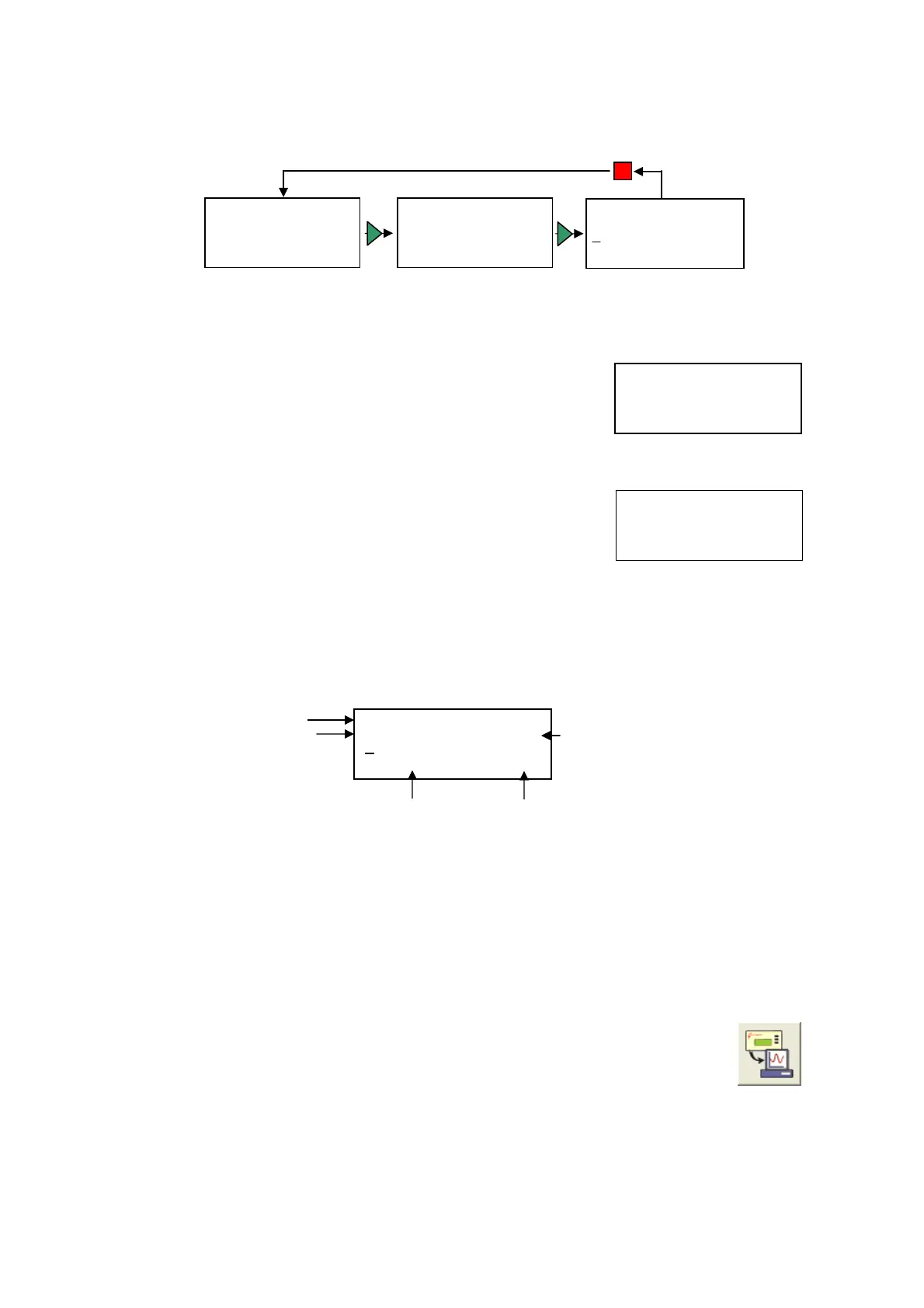
EASYSENSE Q. Use the blue buttons (▲▼) to scroll
the menu until the pointer is pointing at Timing.
• Press the green button ►to select.
• Use the blue buttons (▲▼) to scroll the pointer until it is
pointing at either Stopwatch A to A, Time at A or Time
from A to B. Press the green button ►to select.
EASYSENSE Q will be ready to start taking measurements. When a signal change
from the digital sensor/sensors is received, the timing measurement will be displayed
in seconds (s) on the LCD screen. EASYSENSE Q will then be ready to take the next
measurement.
Example:
The second line shows the current reading, the # number indicates the number of the
reading. The blue (▲▼) buttons can be used to scroll back and forward through the
readings already taken, the # number will indicate the reading number of the
measurement shown. The bottom line shows the average measurement and number
of readings used to calculate this average.
• Press the red button to finish or cancel any pending timing event. Press the green
button ►to return to the main menu.
• The data recorded will be stored as a data set, which can be downloaded
to the computer for display and analysis using Retrieve remote from
the Home page in the EASYSENSE software.
The collected data is a time measurement. For the software to be able to perform
calculations e.g. speed, velocity or acceleration, it is necessary to enter the parameters
EasyLog Stopwatch A to A
► Time at A
Time from A to B
► Timing
Switch off
System
Time at A
= 0.00000 s #0
t=0.000000 s n=0
Stopwatch A to A
► Time at A
Time from A to B
The reading number of this measurement
Time at A
= 0.00000 s #0
t = 0.000000s n=0
The average measurement over this number of readings
What you are measuring
The measurement
Easy Log
► Timing
Switch off
System
© Data Harvest Group Ltd.
14


 To Next Page