EASYSENSE Q3+ and Q5+ DO185 (2)
Ways to capture data with EASYSENSE Q 3+ or 5+
There are different ways that EASYSENSE Q can be used to collect data.
1. PC connected.
In this mode EASYSENSE Q is entirely driven by the software on the host
computer. The data from the sensors is transmitted immediately to the computer
and displayed on the computers screen using the applications in the EASYSENSE
software. This method of collection is useful for many classroom-based
experiments. See page 19.
2. Stand alone.
In this mode EASYSENSE Q is used to display, collect and store data while
disconnected from the computer. Data can be:
a. Displayed on the LCD screen (but not stored) using Meter mode.
b. Displayed, collected and stored using EASYSENSE Q’s logging menu
options e.g. EasyLog, Snapshot or Timing.
c. Setup via Setup Remote in the EASYSENSE software to log data for a set
time period. See page 23.
The data collected is stored in EASYSENSE Q’s memory to be retrieved later by the
computer (see page 24).
Up to 8 sets of data can be stored in EASYSENSE Q’s memory. Once eight sets
have been stored, EASYSENSE Q will overwrite the earliest data set with the
newest.
Using EASYSENSE Q 3+ or 5+ without a computer
EASYSENSE Q has no ON switch. To ‘switch’ on press any button on the panel.
Notes:
• If EASYSENSE Q is operating on battery power and is idle, it will automatically switch itself
off (after nine minutes with Bluetooth On, two minutes with No Bluetooth or Bluetooth Off).
Press any button to resume operation.
• EASYSENSE Q will not auto switch off when accepting power from either the USB port or a
mains power supply.
Timing
Switch off
System
► Meter
Snapshot
Easy Log
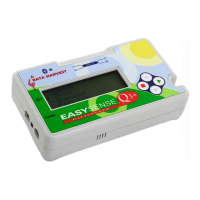
EASYSENSE Q has a menu of different options
available, which are displayed on the built-in LCD
screen. There are four working modes, which can be
used to collect data without being connected to the
computer. These are Meter, Snapshot, Easy Log
and Timing modes.
A menu option is selected by using the blue buttons to move the list up▲ or down ▼
until the pointer is pointing at the required option (the pointer stays in the same
position). Press the green ► button to select.
© Data Harvest Group Ltd.
8


 To Next Page