EASYSENSE Q3+ and Q5+ DO185 (2)
Updating EASYSENSE Q’s Firmware
Occasionally Data Harvest may release updated firmware which will contain
improvements or new features. Updates will be made available from the Data Harvest
website. To update the firmware of your EASYSENSE Q logger:
Step 1. Copy the English Firmware Update for either Q3+ (403x) or Q5+ (405x), as
appropriate, onto the hard disc of your computer and run the .exe.
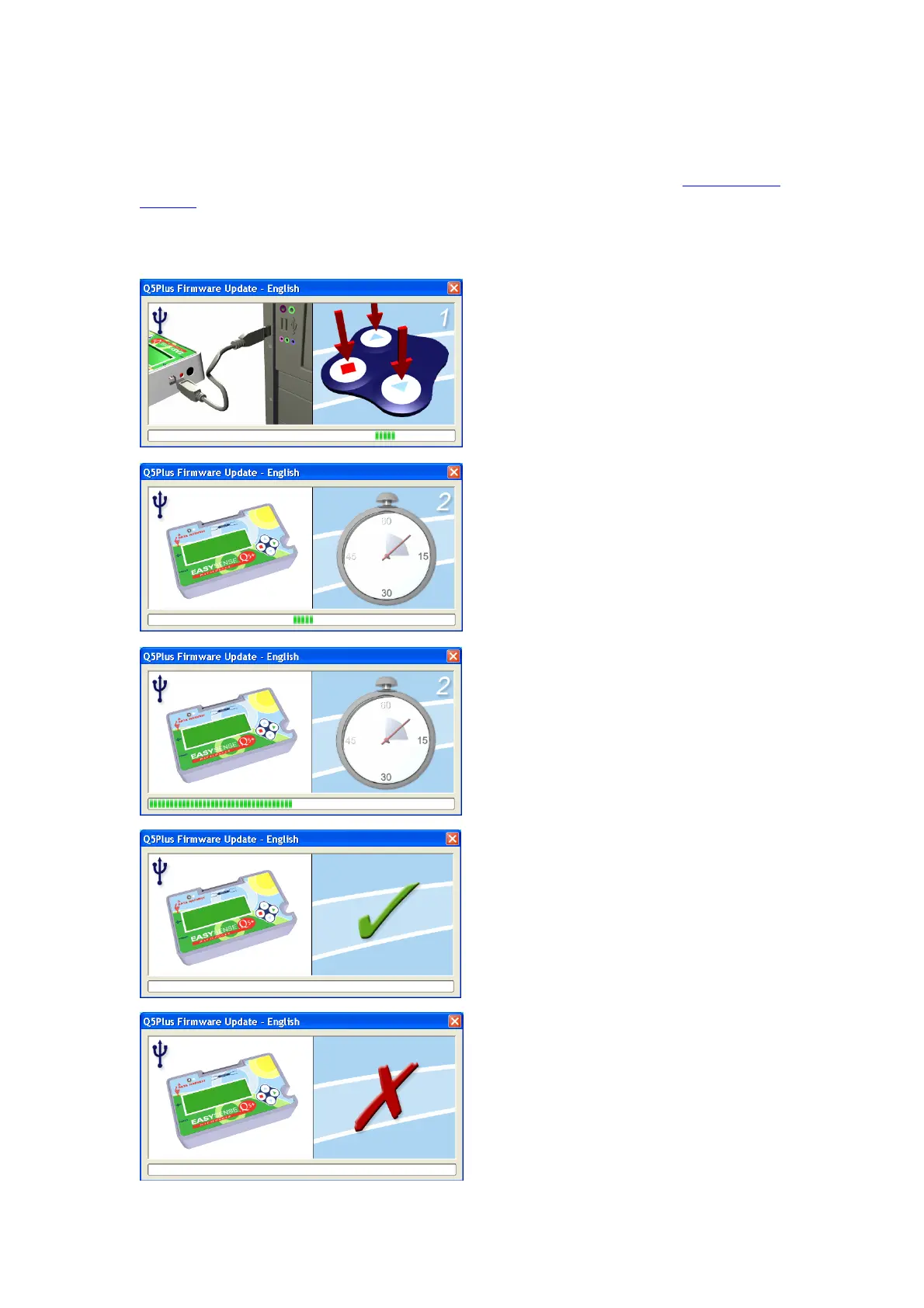
Step 2. Connect EASYSENSE Q to the
computer using the USB cable.
Step 3. Carry out a HARD RESET on Q
by holding down the red and both blue
buttons for a second, then release.
Wait for a few seconds.
A progress bar will indicate
EASYSENSE Q being programmed.
A tick will indicate if the process was
successful. Disconnect the EASYSENSE
Q logger.
If you wish to repeat these processes,
connect another EASYSENSE Q logger
and click on the update window to return
to the start screen (step 2).
A cross will indicate that an error
occurred. Click in the update window to
go back to start screen (step 2) and try
again.
Step 4. Exit the program.
© Data Harvest Group Ltd.
29


 To Next Page