EASYSENSE Q3+ and Q5+ DO185 (2)
Using EASYSENSE Q with Bluetooth
Requirements
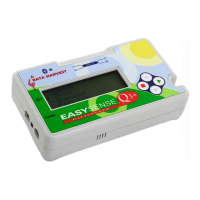
1) Your EASYSENSE Q must have a built in Bluetooth module. If it has there will be:
• A Bluetooth logo (above the Data Harvest
logo) on the top panel of the EASYSENSE Q
logger.
Bluetooth Logo
(on Bluetooth
loggers only)
Bluetooth LED indicator
• Bluetooth listed as a menu item in the System
menu (from the Main Menu select System).
Note: If Bluetooth is not fitted then it will list ‘No Bluetooth’.
2) Your Desktop or Laptop computer must be Bluetooth enabled. Bluetooth can be added
to a computer using an external adapter that plugs into a spare USB socket.
3) Your PC should be running Windows XP with Service Pack 2 or higher, which includes
its own Bluetooth stack software.
General Information
With Bluetooth technology your EASYSENSE Q logger can ‘talk’ wirelessly to your
computer over a distance of up to 10 metres.
Bluetooth will allow only one EASYSENSE Q logger to talk to one computer at a time.
It is not possible to connect an EASYSENSE Q logger simultaneously to multiple
computers.
When a USB cable is plugged into EASYSENSE Q it will automatically switch
Bluetooth Off.
Once paired EASYSENSE Q will store the electronic identity of the Bluetooth device it
was paired with, so it can automatically re-connect to the adapter/computer in the future.
It will only store the electronic identity of the device it was last paired with.
If you use a Bluetooth USB adapter then Windows XP will install a new set of drivers
each time the adapter is plugged into a new USB port. Each Bluetooth USB adapter
identifies itself to the computer as a different device so if you plug another adapter into
the same USB port then another set of drivers will be installed. The result of either of
these actions is a different COM port setting, which will need to be selected from
Interface in the File menu of the EASYSENSE software. For these reasons we strongly
recommend that an EASYSENSE Q logger is used with the same computer, with the
same Bluetooth USB adapter connected to the same USB port on the computer.
Note: You may find it useful to number the computer, EASYSENSE Q logger, Bluetooth adapter and
USB port to identify this combination.
Power
Power consumption is increased when Bluetooth is on. To check the number of hours
EASYSENSE Q could operate without a power supply attached, make sure Bluetooth is
on (blue LED lit), that the sensors to be used are connected, and then select Battery life
from the System menu.
© Data Harvest Group Ltd.
31


 To Next Page