System Installation and Configuration
96-30051-001 Rev. D3 DDN SFA12K (SFA OS 2.3.1) Hardware Installation & Configuration Guide | 25
3. Determine the nominal AC line voltage for the system. This is the value from the list
(200, 208, 220, 230, 240) that is closest to the average just computed.
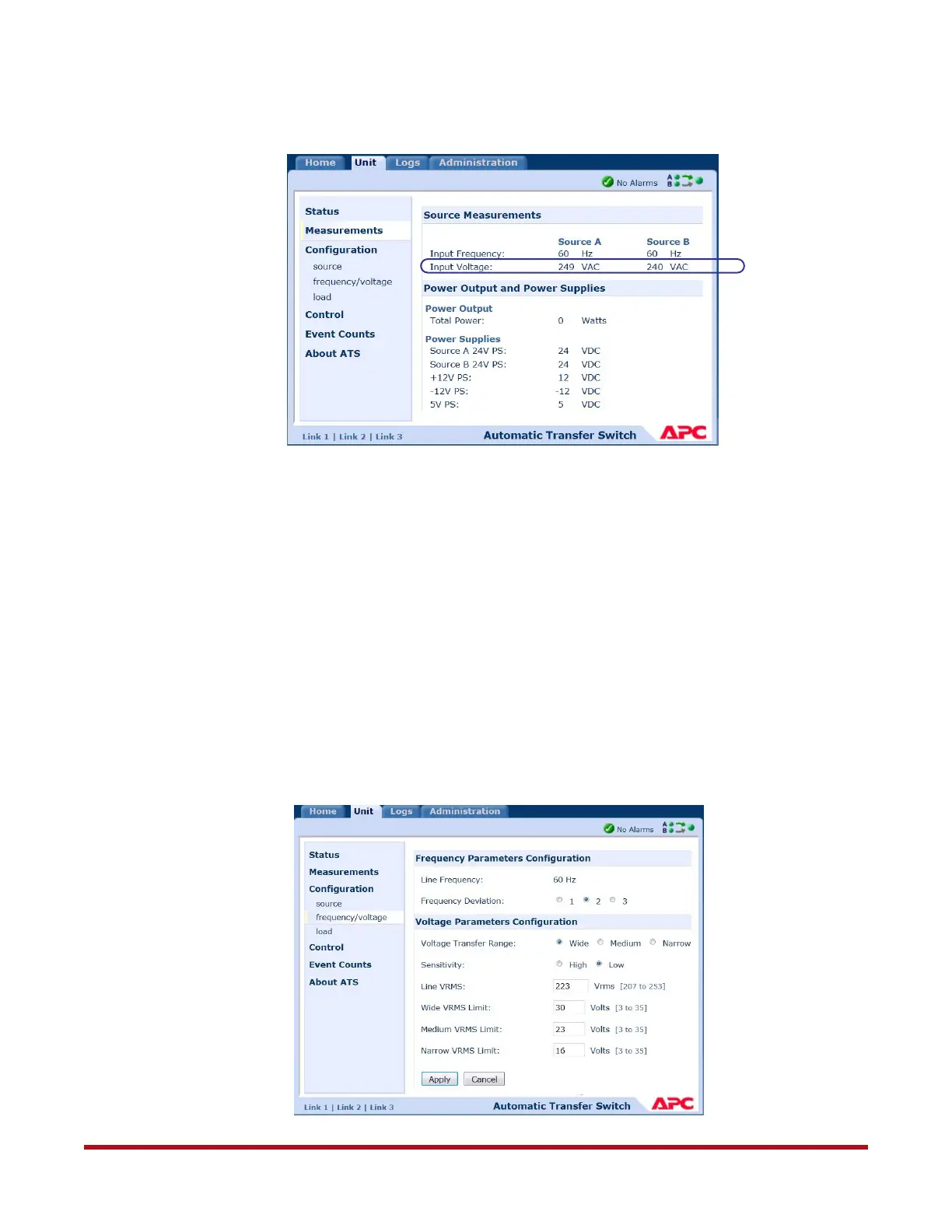
For example, using the data in Figure 16:
Source A Voltage = 249
Source B Voltage = 240
Average AC Line voltage = (249 + 240)/2=244.5
Nominal AC line voltage = 240 because that is the closest number to 244.5 from the list.
Note: Use this value when setting the BBUs’ nominal voltage (as described later in
Section 13).
4. Set the ATS Line VRMS:
❖ Go to Unit tab
❖ Select Configuration > Frequency/voltage (Figure 17)
Figure 16. Measuring AC Line Voltages
Figure 17. Configure Frequency/Voltage Parameters



 To Next Page