dCS Bartók DAC User Manual Software Issue 1.0x
February 2019
Bartok DAC Manual v1_0x Page 29 English version
Further suggestions
• If you wish, you can set the DAC to insert a DSD upsampling stage at the end of the PCM
oversampling sequence by setting the Unit Settings > Upsampling menu page to DSD (see page
43). This feature is active when the DAC receives PCM data only.
• If you are using a Rossini Master Clock, try turning the Dither feature on. Please refer to the Clock
manual for more information.
Renaming the digital inputs
The DAC’s inputs can be renamed to suit your particular system using a computer running a terminal
emulator program. The procedure using a Windows PC with TeraTerm is described here, but other
programs such as PuTTY or ZTerm can be used. If you have difficulty with this, please ask your
Dealer for help.
• Power up the DAC and a Windows PC.
• If necessary, download Tera Term from http://en.sourceforge.jp/projects/ttssh2/releases/ and install
it on your PC. (If the link is broken, please search for the latest version of Tera Term online.)
Set the DAC’s Unit Settings > RS232 menu page to the Text option.
• Use a USB-to-RS232 adapter cable to connect the
DAC’s RS232 port to one of the PC’s USB ports.
• Run ttermpro.exe.
• Click the Serial button – Tera Term will
automatically select the port connected to the
DAC. Click OK.
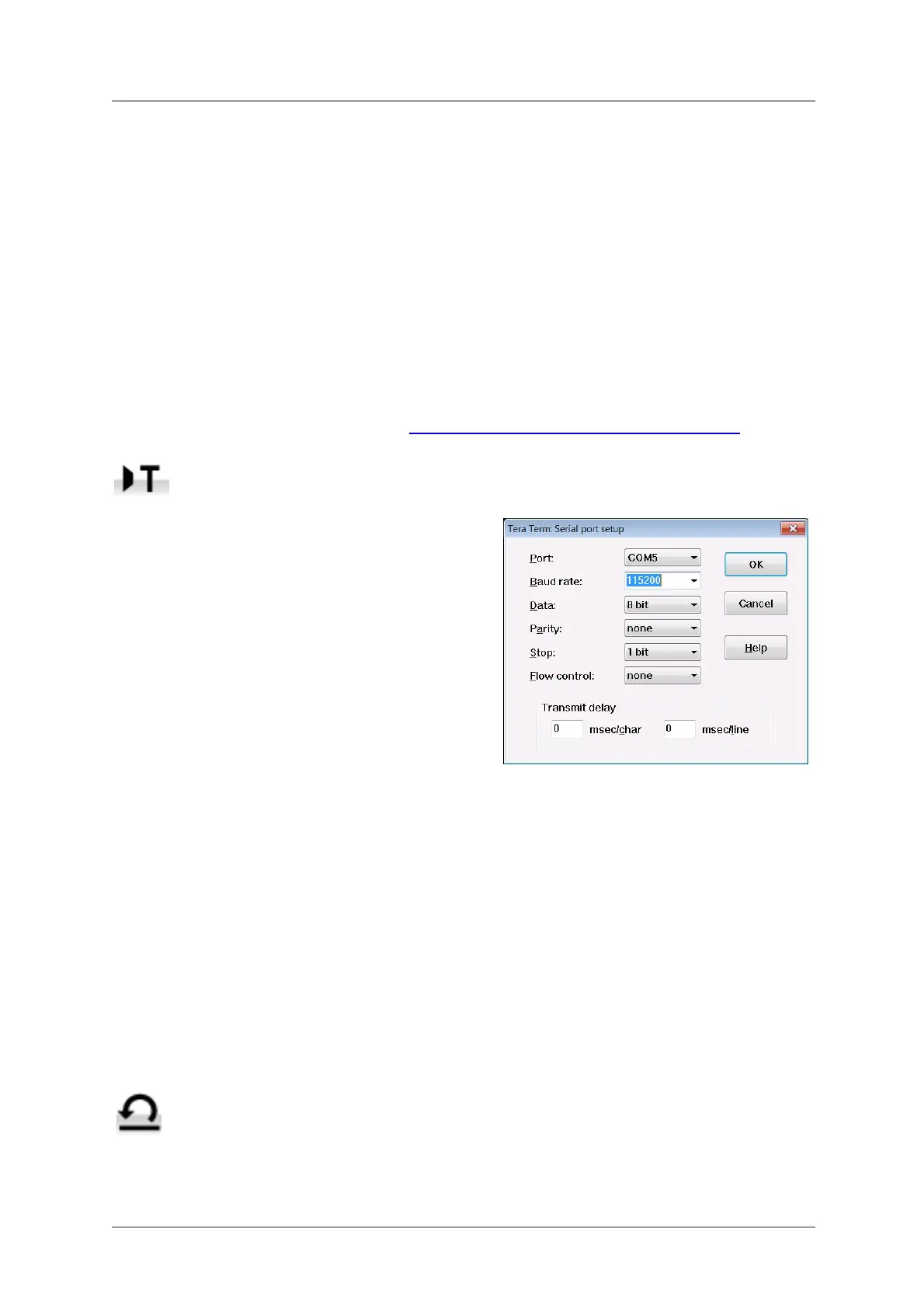
• Click Setup > Serial Port, set the Baud rate to
115200 and click OK.
• In the terminal window, type the command: NAME n = newname where:
- n is the number corresponding to the standard input name in the list below,
AES1
0
AES2
1
AES1+2
2
SPDIF1
3
SPDIF2
4
SPDIF3
5
Network
6
USB1
7
- newname is the personalised name you want to use for that input, such as CD-SACD, TV or
COMPUTER. It can be up to 8 characters long, consisting of:
capital letters A-Z, numbers 0-9 or + - / = . : ? ! @ &
• Press Enter.
For example:
- to rename the AES1+2 input to SACD, type: NAME 2 = SACD and press enter.
- to rename the SPDIF3 input to TV, type: NAME 5 = TV and press enter.
Later on, if you want to revert to the standard input names (AES1, SPDIF1, etc.), select
the Configuration > Reset Input Names menu page.
Your customised input names will be permanently deleted.



 To Next Page