dCS Bartók DAC User Manual Software Issue 1.0x
February 2019
Bartok DAC Manual v1_0x Page 30 English version
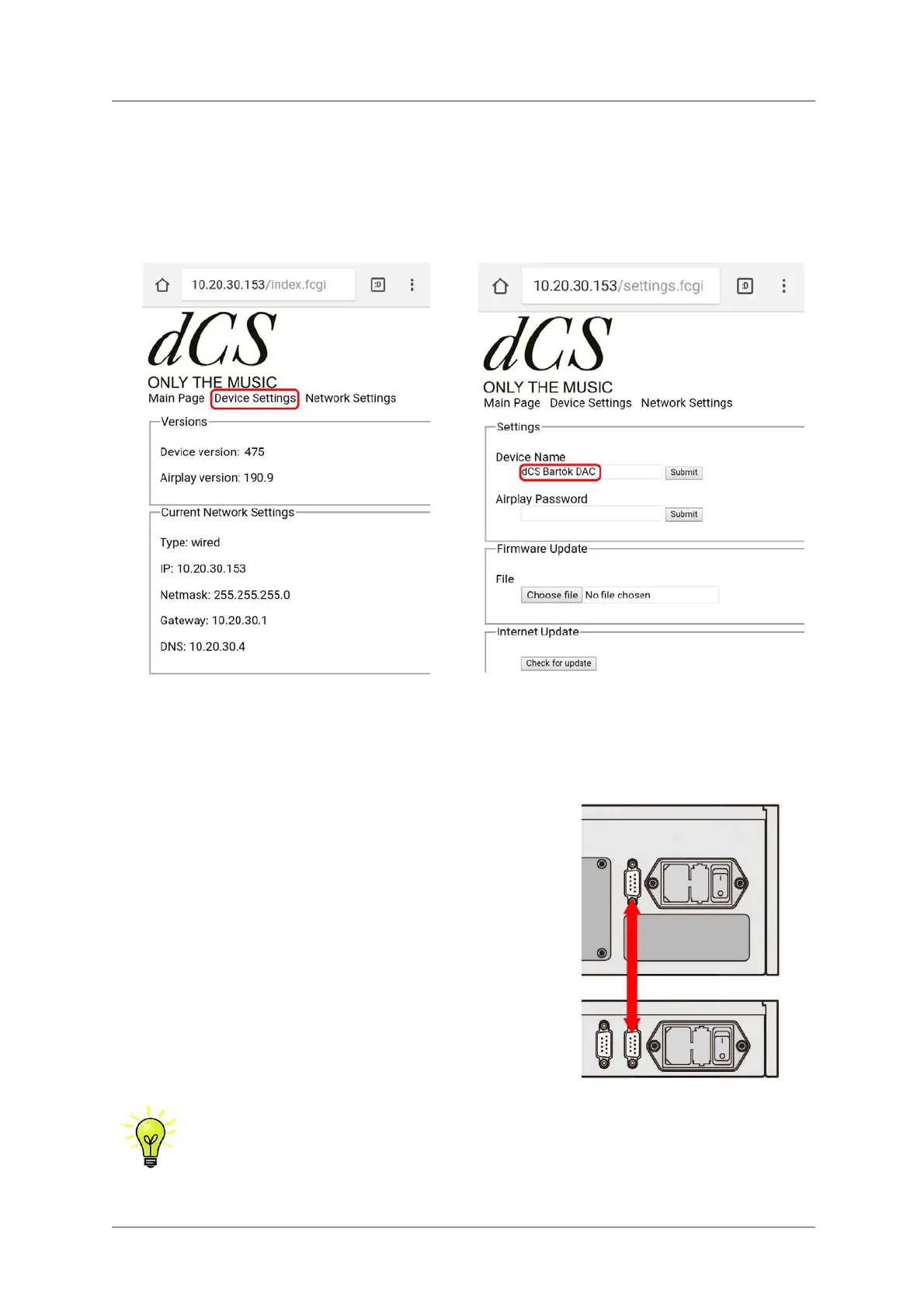
Renaming your Bartók DAC
To identify more than one Bartók DAC on the same network, you can change the network name of
each Bartók DAC as follows.
• Connect a PC, tablet or phone and the Bartók DAC to the same network.
• Press the Bartók’s Menu button 3 times, note the IP address of the unit, press the Power button
briefly to close the menu page.
• Open a web browser and go to the Bartók’s IP address – this opens the web client.
• Click or tap Device Settings.
• Click or tap the box under Device Name, enter the new name and click or tap Submit.
Power Link
Connecting the DAC’s RS232 port to the Rossini Clock’s
RS232 Loop port allows both units to be set to sleep / wake /
off by pressing the DAC’s Power button, or by one remote
control command.
A screened cable fitted with two 9-way female D-type
connectors wired pin-to-pin is required.
The Rossini Transport does not support this feature.
The Power Link feature will only work if both units are set to the same RS232 mode
(Text or Binary).
From completely off (not Sleep), if you switch the Clock on before the DAC, the units will
be automatically set to the same mode.



 To Next Page