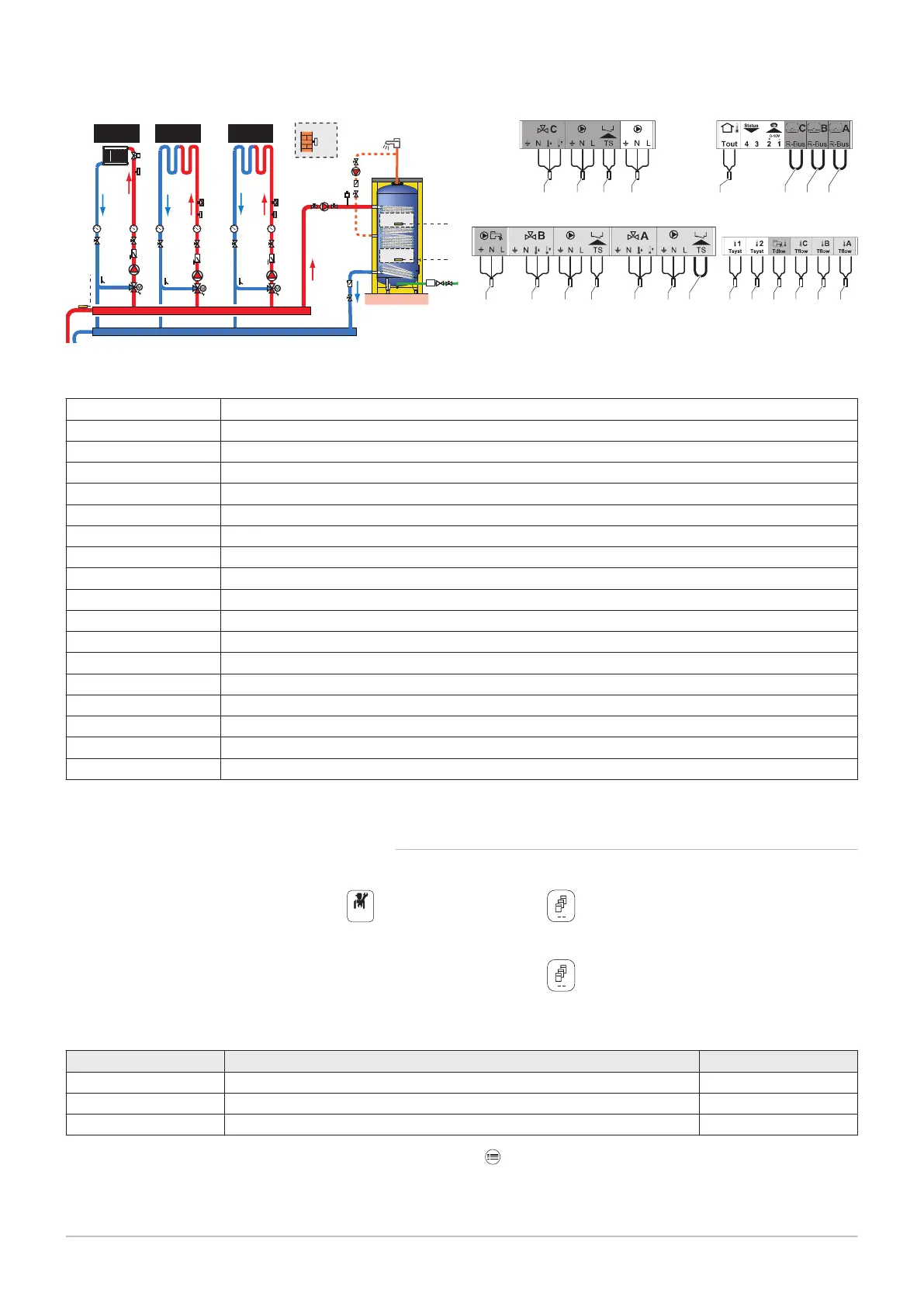
1. Make the connections on the master box.
Tab.10
1 Domestic hot water circulation loop pump
2 DHW booster pump
3 Domestic hot water temperature sensor, high position
4 Domestic hot water temperature sensor, low position
5 Flow temperature sensor after mixing valve
6 Pump for heating circuit with mixing valve
7 Three-way mixing valve
8 Outdoor temperature sensor
9 Safety thermostat with manual reset, for underfloor heating
10 Flow temperature sensor after mixing valve
11 Pump for heating circuit with mixing valve
12 Three-way mixing valve
13 Sensor for buffer tank or cascade flow
14 Safety thermostat with manual reset, for underfloor heating
15 Flow temperature sensor after mixing valve
16 Pump for heating circuit with mixing valve
17 Three-way mixing valve
99 Bridging
2. Make the S-BUS connection to the three generators.
6.3.2
System configuration
For this hydraulic configuration, certain parameters must be adapted.
1. Select the Cascade Producer Manager Algicon.
2. Select Enable master func.
3. Select Yes.
4. Select the Cascade Producer Manager Algicon.
5. Check the following parameters:
Tab.11
Code Description EEC-01
NP006 Cascade Type Traditional
NP009 CascInterStageTime 4
NP011 CascadeTypeAlgo Temperature
6. Press the key.
7. Select Installation Setup.
Fig.12
17
12
11
16
10
9
15
14
6
7
5
1
2
3
4
CIRCA CIRCB CIRCC
8
13
2
1
12 7
17
3 413 15 10 599611 9
16 14
8
999999
6 Connecting diagrams and configuration
7703592 - v02 - 14062018 21


 To Next Page