30
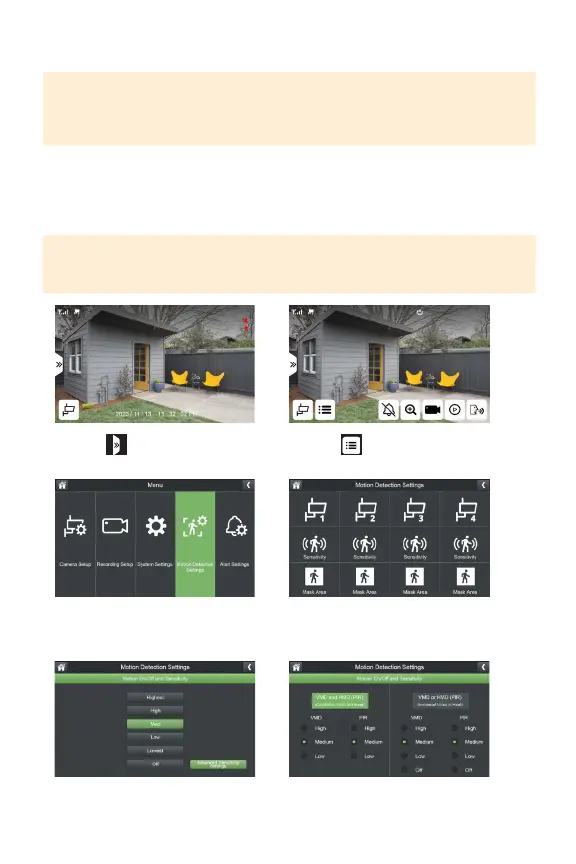
ADVANCED SENSITIVITY SETTINGS
IMPORTANT: These settings are based on the average home and environment.
Typically, no setting change is required. If you are experiencing a signicant
amount of inaccurate motion notications, based on your environment, you can
customize this setting.
VMD:VideoMotionDetectionAlgorithm,optimizesmotiondetectionatawider
rangeandlongerdistances.
HMD/PIR:PassiveInfraredSensor,optimizesmotiondetectioninshortdistances
triggeredbylargeobjectssuchascarsandhumans.
TIP: Shadows will trigger motion alerts if you select VMD or PIR. To avoid alerts
from shadows, select both VMD and PIR. The default setting for medium, is to
reduce false alerts.
1. Select
3.SelectMotionDetectionSettings
5.SelectAdvancedSensitivitySettings 6.Selectyourpreferredsettings.
*Repeat for each camera.
2. Select
4.SelectSensitivityforthecamera
youwanttoadjustthesettingsfor.



 To Next Page