21
Main Menu
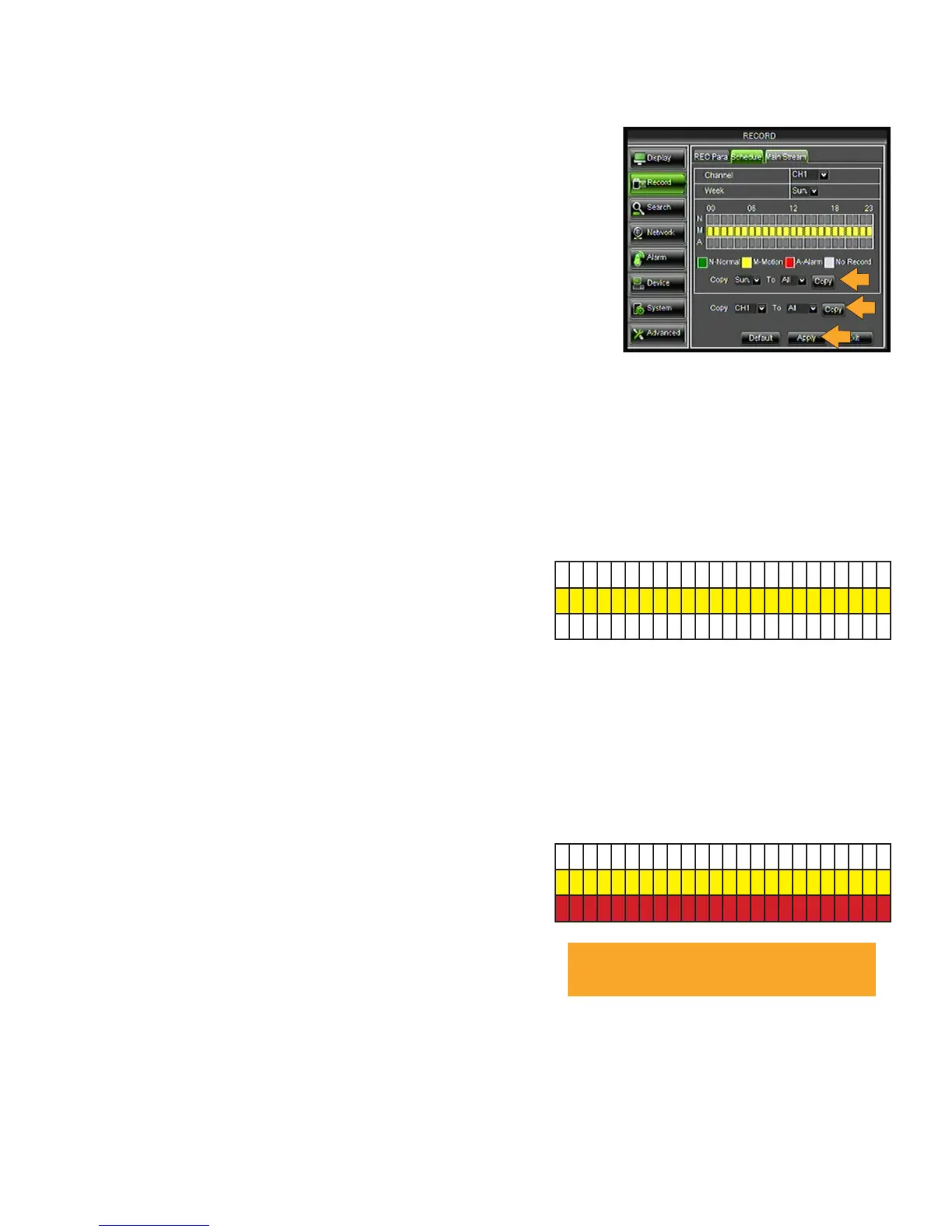
*Quickly copy your settings to other days of the week and/or channels:
COPY settings from one day to other/all days:
1. Select the COPY drop down list and choose a day, i.e. Sun
2. Select the TO drop down list to select one or ALL days of the week.
3. Click the COPY button. The settings will now be copied to your
specified day(s).
4. Click APPLY at the bottom of the screen to save your changes.
COPY settings from one camera to other cameras:
1. Select the COPY drop down list and choose a camera number.
2. Select the TO drop down list to select a camera number or ALL cameras.
3. Click the COPY button. The settings will now be copied to your specified camera(s).
4. Click APPLY at the bottom of the screen to save your changes.
Motion Record
Each camera selected records mouvement at the times you select.
1. Select the CHANNEL drop down list and choose a
camera number.
2. Select the WEEK drop down list and choose a day of
the week.
3. M-Motion allows you to record motion events at
specified times. One click highlights the individual box.
Each box represents one hour. To unselect, click the box
again. For example, to record 24/7 when motion occurs,
all boxes from 0 to 23 need to be YELLOW.
4. Click APPLY at the bottom of the screen to save your changes.
*Quickly copy your settings to other days of the week and/or channels (see instructions above).
Alarm Record
Each camera selected sounds an audible alert at the
times you select when motion is triggered.
1. Select the CHANNEL drop down list and choose a
camera number.
2. Select the WEEK drop down list and choose a day of
the week.
3. A-Alert allows you to set and audible alert when motion
events occur. One click highlights the individual box.
Each box represents one hour. To unselect, click the
box again. For example, to set alerts 24/7 when motion
occurs, all boxes from 0 to 23 need to be RED.
4. Click APPLY at the bottom of the screen to save your changes.
*Quickly copy your settings to other days of the week and/or channels (see instructions above).
00 06 12 18 23
N
M
A
00 06 12 18 23
N
M
A
* See ALARM section of manual for additional
alarm settings.



 To Next Page