29
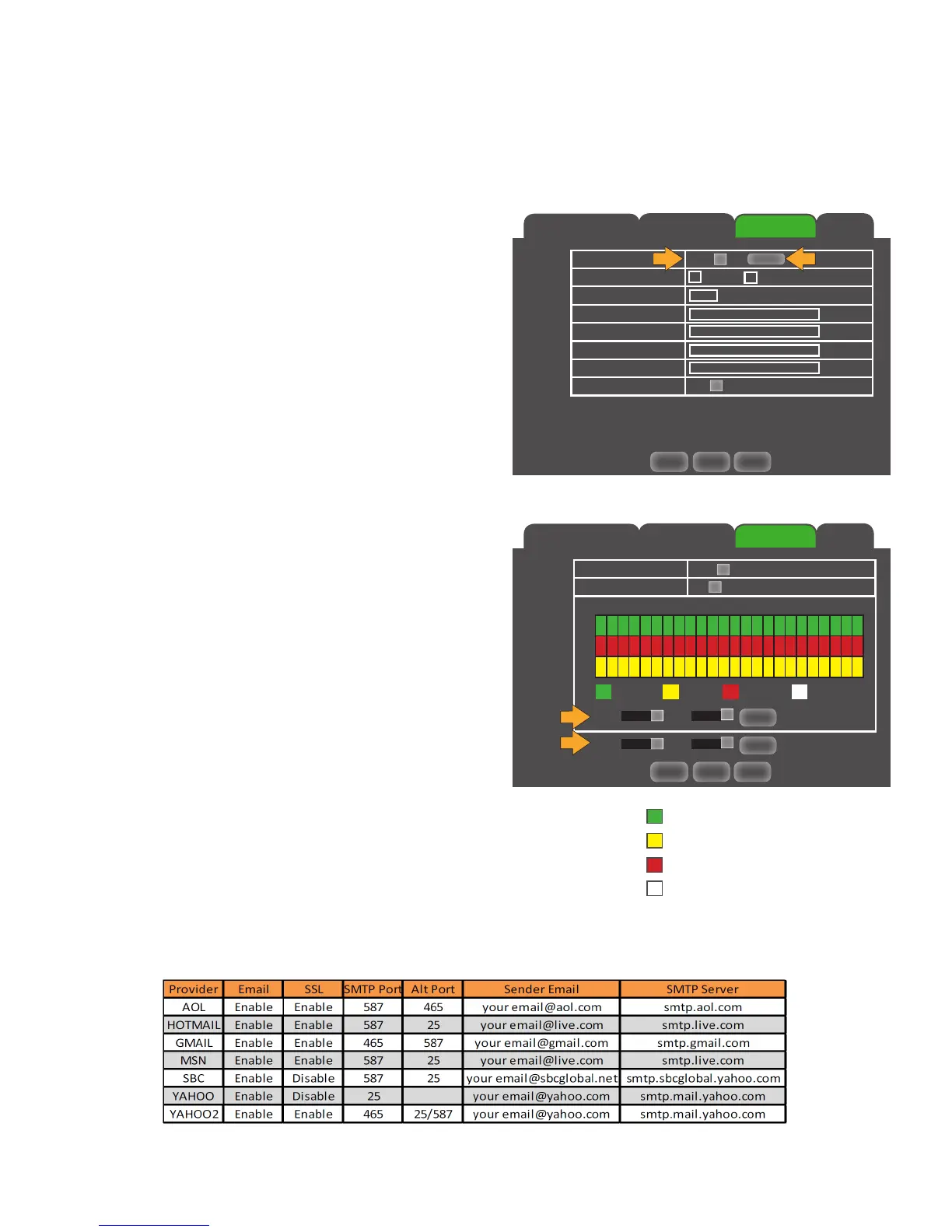
M-Motion (Green) Settings for motion recording
A-Alarm: (Yellow) External alarm alerts
Exception: (Red) Video loss, HD failure
No Send (Transparent) No email
Main Menu
Email Tab
The EMAIL tab allows you to set up your email so that you can receive notifications when alerts occur. The email
schedule allows you to customize when email alerts will be sent.
Setting up your EMAIL notifications on the DVR:
1. Select the EMAIL drop down list and choose ENABLE.
2. Left click the SCHEDULE button, an email notification
schedule will appear.
3. Customize when email alerts will be sent.
COPY settings from one day/camera to other day / cameras:
1. Select the COPY drop down list and choose a
day / camera number.
2. Select the TO drop down list to select a day / camera
number or ALL days / cameras.
3. Click the COPY button. The settings will now be copied to
your specified day(s) / camera(s).
4. Click APPLY at the bottom of the screen to save
your changes.
Receiving EMAIL notifications:
1. Select the EMAIL drop down list and choose ENABLE.
2. Click the ENABLE box next to SSL.
3. Select the SMTP Server box and input the SMTP server
address provided by your email provider.
(Gmail SMTP address: smtp.gmail.com).
4. Select the SENDER EMAIL box and input the email in
which the email notification will be coming from.
5. Select the SENDER PWD box and input the password for
the sending email account.
6. Select the RECEIVER EMAIL box and input the email in which the email
notification will be going to.
• The SENDER EMAIL and the RECEIVER EMAIL can be the same email.
7. Select the INTERVAL drop down box and select the email frequency
(1min, 3min, 5min,10min).
8. Click APPLY at the bottom of the screen to save your changes.
Network
Sub Stream Email
DDNS
Default Apply Exit
Email Enable
SSL Disable Enable
SMTP Port 00025
SMTP Server
Sender Email
Sender PWD
Receiver Email
Interval 3 min
›
›
Schedule
Network
Sub Stream Email
DDNS
Default Apply Exit
›
›
Copy
Copy
CH1
To
All
›
›
Copy
Copy
Sun.
To
All
Channel CH1
Week Sun.
00 06 12 18 23
M
E
A
›
›
M-Motion A-Alarm Exception No Send
Email Schedule



 To Next Page