23
Main Menu
Search
This option allows you to search through your previously recorded footage and find footage recorded from particular
dates and times. You can access the VIDEO SEARCH menu by pressing PLAY on the remote control, PLAYBACK on the
FUNCTION TOOLBAR or going to the MAIN MENU and select SEARCH.
Record Search Tab
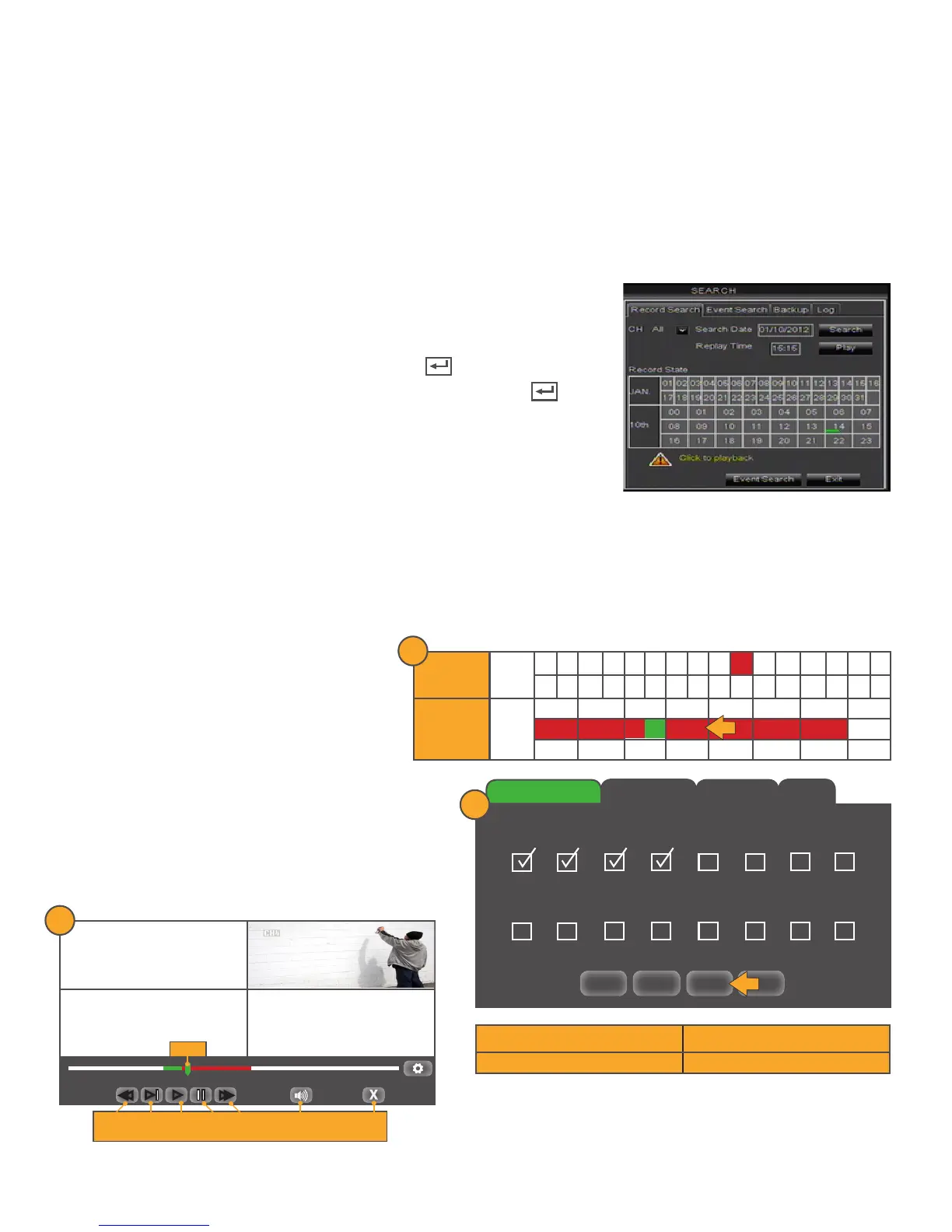
Access and playback footage from a particular date and time:
1. Select the CH drop down list and choose a camera number that you
would like to search for recorded footage.
2. Left click in the DATE field, the keyboard will open.
3. Enter the search date, then click the ENTER key .
4. Enter the search time (if applicable), then click the ENTER key .
5. Click the SEARCH button.
• Once you have searched for a particular date, you can view times
and footage from each day of that month. The box outlined in RED
indicates the search date.
• The days and times that have Motion/Alarm recorded footage are RED in the time schedule.
• The days and times that have Schedule Recording are GREEN in the time schedule.
• If the time is not red or green, it means there was no recording during that time.
• To view other days or times that have footage, double click on the day in the calendar.
Example:
Search Date: January 10th recordings
• 8am to 10:30 am = Motion/Alarm events
• 10:30am to 11am = Normal events
• 11am to 2pm = Motion/Alarm events
1. Left click on the desired date to view/play
recorded events.
2. A screen will appear with all of the available
cameras. Select the cameras that you would
like to view footage.
3. Click PLAY and footage will start playing.
All = Select all cameras Clear = Clears all selected cameras
Play = Plays footage from selected cameras Exit = Back to Record Search Tab
JAN
01 02 03 04 05 06 07 08 09 10 11 12 13 14 15 16
17 18 19 20 21 22 23 24 25 26 27 28 29 30 31
10th
00 01 02 03 04 05 06 07
08 09 10 11 12 13 14 15
16 17 18 19 20 21 22 23
10
Days of the
month
Hours of the
day (24 hr
schedule)
1
CH2 01/11/2014 11:15:04 AM
00:00:00 00:00:00
►►
►►
►
►
REW / SLOW FF / PLAY / PAUSE / FF VOL EXIT
X 2,4,8,16 X 2,4,8,16
CH1
CH3 CH4
SLIDER
3
Record Search
Event Search Backup
Log
All Clear Play Exit
01 02 03 04 05 06 07 08
09 10 11 12 13 14 15 16
2



 To Next Page