Home
Dell
Laptop
Alienware 18
Page 69 (Procedure)
Dell Alienware 18 - Procedure
119 pages
Manual
Save Page as PDF
To Next Page
To Next Page
To Previous Page
To Previous Page
Loading...
Removing
the
Display
Panel |
69
Procedure
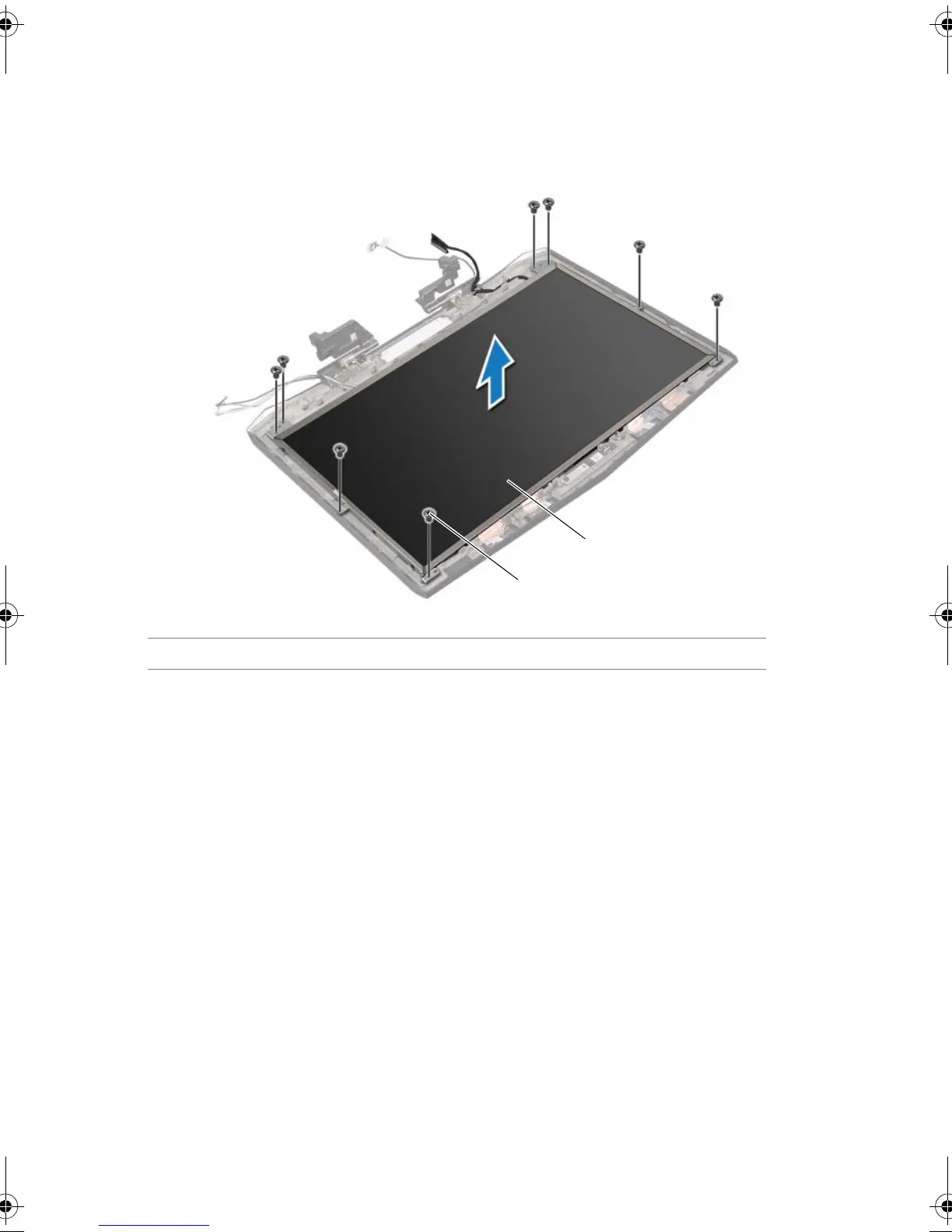
1
Remove the screws that secure
the display panel to the display back-cover.
2
Lift the display panel off
the display back-cover.
1
screws (8)
2
display panel
1
2
Bo
ok.b
ook Page 69
Fr
i
d
ay, Ju
ne 28, 2
013
11:
10 AM
68
70
Table of Contents
Main Page
Default Chapter
3
Table of Contents
3
Before You Begin
11
Turn off Your Computer and Connected Devices
11
Safety Instructions
12
Recommended Tools
12
After Working Inside Your Computer
13
Removing the Base Cover
14
Procedure
14
Replacing the Base Cover
15
Procedure
15
Postrequisites
15
Removing the Battery Pack
16
Procedure
16
Replacing the Battery Pack
17
Procedure
17
Postrequisites
17
Removing the Memory Module(S)
18
Prerequisites
18
Procedure
19
Replacing the Memory Module(S)
20
Procedure
20
Postrequisites
21
Removing the Optical Drive
22
Prerequisites
22
Replacing the Optical Drive
24
Procedure
24
Postrequisites
24
Removing the Hard Drive(S)
25
Prerequisites
25
Procedure
26
Replacing the Hard Drive(S)
28
Procedure
28
Postrequisites
28
Removing the Fans Cover
29
Prerequisites
29
Procedure
29
Replacing the Fans Cover
30
Procedure
30
Postrequisites
30
Removing the Video-Card Heat-Sink Fan(S)
31
Prerequisites
31
Procedure
31
Replacing the Video-Card Heat-Sink Fan(S)
33
Procedure
33
Postrequisites
33
Removing the Processor Heat-Sink Fan
34
Prerequisites
34
Procedure
34
Replacing the Processor Heat-Sink Fan
35
Procedure
35
Postrequisites
35
Removing the Coin-Cell Battery
36
Prerequisites
36
Procedure
37
Replacing the Coin-Cell Battery
38
Procedure
38
Postrequisites
38
Removing the Palm Rest
39
Prerequisites
39
Procedure
40
Replacing the Palm Rest
42
Procedure
42
Postrequisites
42
Removing the Msata Card
43
Prerequisites
43
Procedure
43
Replacing the Msata Card
44
Procedure
44
Postrequisites
44
Removing the Power-Button Board
45
Prerequisites
45
Procedure
45
Replacing the Power-Button Board
46
Procedure
46
Postrequisites
46
Removing the Status-Light Board
47
Prerequisites
47
Procedure
48
Replacing the Status-Light Board
49
Procedure
49
Postrequisites
49
Removing the Keyboard
50
Prerequisites
50
Procedure
51
Replacing the Keyboard
53
Procedure
53
Postrequisites
53
Removing the Macro Keyboard
54
Prerequisites
54
Procedure
54
Replacing the Macro Keyboard
55
Procedure
55
Postrequisites
55
Removing the Display Assembly
56
Prerequisites
56
Procedure
56
Replacing the Display Assembly
60
Procedure
60
Postrequisites
60
Removing the Camera Module
61
Prerequisites
61
Procedure
62
Replacing the Camera Module
63
Procedure
63
Postrequisites
63
Removing the Display Bezel
64
Prerequisites
64
Procedure
64
Replacing the Display Bezel
65
Procedure
65
Postrequisites
65
Removing the Display Hinges
66
Prerequisites
66
Procedure
66
Replacing the Display Hinges
67
Procedure
67
Postrequisites
67
Removing the Display Panel
68
Prerequisites
68
Procedure
69
Replacing the Display Panel
72
Procedure
72
Postrequisites
72
Removing the Logo Board
73
Prerequisites
73
Procedure
74
Replacing the Logo Board
75
Procedure
75
Postrequisites
75
Removing the Display-Light Boards
76
Prerequisites
76
Procedure
77
Replacing the Display-Light Boards
78
Procedure
78
Postrequisites
78
Removing the Speakers
79
Prerequisites
79
Procedure
80
Replacing the Speakers
81
Procedure
81
Postrequisites
81
Removing the Subwoofer
82
Prerequisites
82
Procedure
83
Replacing the Subwoofer
84
Procedure
84
Postrequisites
84
Removing the Sound Board
85
Prerequisites
85
Procedure
86
Replacing the Sound Board
87
Procedure
87
Postrequisites
87
Removing the Video-Card Heat-Sink(S)
88
Prerequisites
88
Procedure
88
Replacing the Video-Card Heat-Sink(S)
90
Procedure
90
Postrequisites
90
Removing the Video Card(S)
91
Prerequisites
91
Procedure
91
Replacing the Video Card(S)
93
Procedure
93
Postrequisites
93
Removing the Processor Heat-Sink
94
Prerequisites
94
Procedure
94
Replacing the Processor Heat-Sink
95
Procedure
95
Postrequisites
95
Removing the Processor Module
96
Prerequisites
96
Procedure
97
Replacing the Processor Module
98
Procedure
98
Postrequisites
99
Removing the System Board
100
Prerequisites
100
Procedure
101
Replacing the System Board
103
Procedure
103
Postrequisites
103
Entering the Service Tag in the BIOS
104
Removing the Wireless Mini-Card
105
Prerequisites
105
Procedure
106
Replacing the Wireless Mini-Card
107
Procedure
107
Postrequisites
108
System Setup
109
Overview
109
Entering System Setup
109
System Setup Screens
110
System Setup Options
110
Boot Sequence
117
Changing Boot Sequence for the Current Boot
118
Changing Boot Sequence for Future Boots
118
Flashing the BIOS
119
Other manuals for Dell Alienware 18
Specifications
1 page
Quick Start Guide
2 pages
Related product manuals
Dell Alienware 14
109 pages
Dell Alienware 17
128 pages
Dell Alienware 13
119 pages
Dell Alienware 15
2 pages
Dell Alienware 17 R4
133 pages
Dell Alienware 17 R5
151 pages
Dell Alienware 15 R3
26 pages
Dell Alienware 13 R3
78 pages
Dell Alienware 17 R3
146 pages
Dell Alienware 15 R4
140 pages
Dell Alienware 13 R2
4 pages
Dell Alienware x16 R1
101 pages












 To Next Page