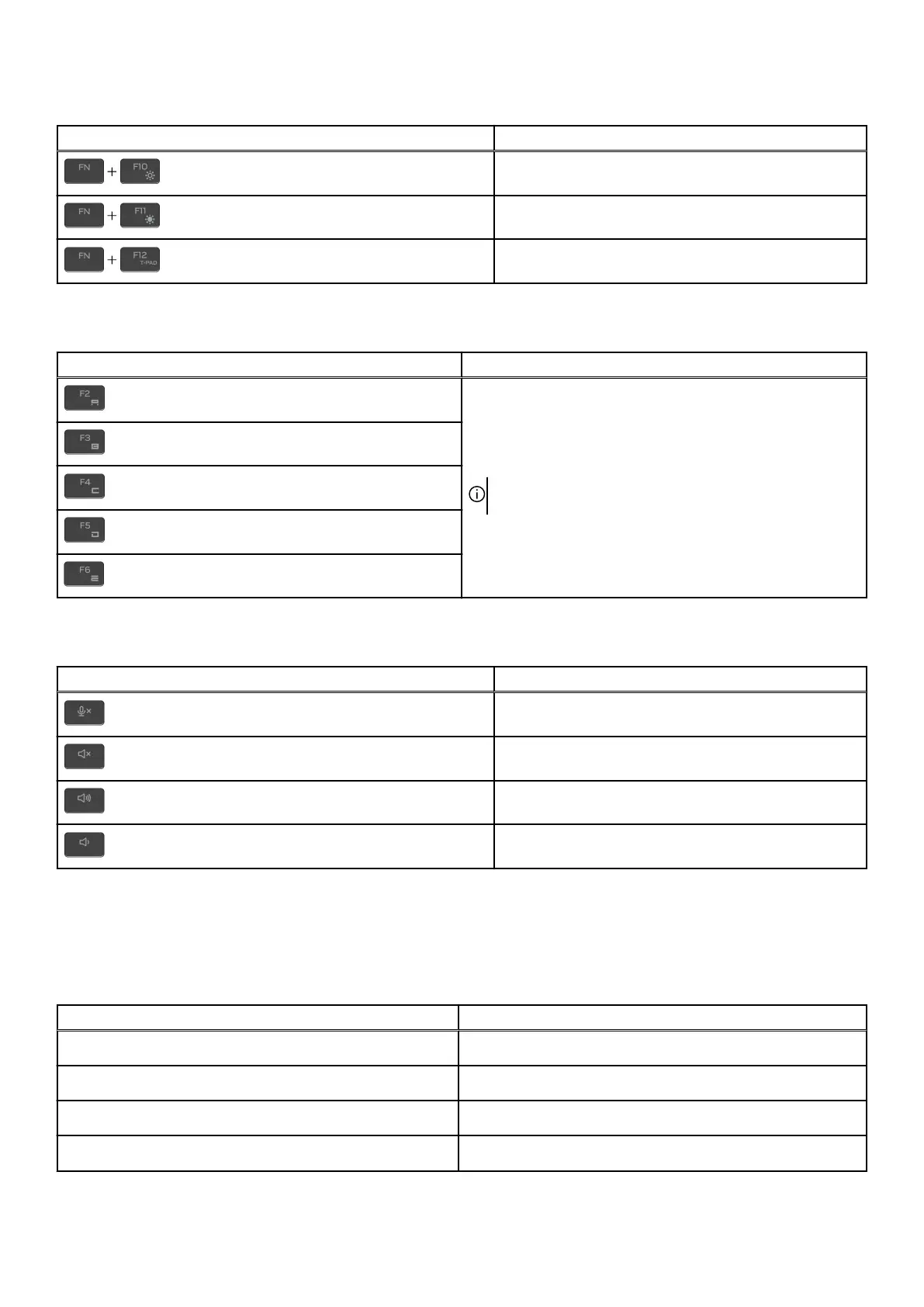
Table 13. List of keyboard shortcuts(continued)
Keys Description
Decrease display brightness
Increase display brightness
Disable or enable touchpad
Your computer comes with pre-programmable macro keys that enable you to perform multiple actions with a single key press.
Table 14. List of Macro keys
Keys Description
Macro keys
NOTE: You can configure modes and assign multiple tasks
for the macro keys on the keyboard.
Your computer comes with dedicated keys that enable you to control audio features of the computer with a single key press.
Table 15. List of keys to control audio features
Keys Description
Mute microphone
Mute speakers
Increase volume
Decrease volume
Camera
The following table lists the camera specifications of your Alienware m18 R2.
Table 16. Camera specifications
Description Values
Number of cameras
One
Camera type
One FHD-RGB Infrared camera
Camera location
Front camera
Camera sensor type
CMOS sensor technology
20










 To Next Page