Steps
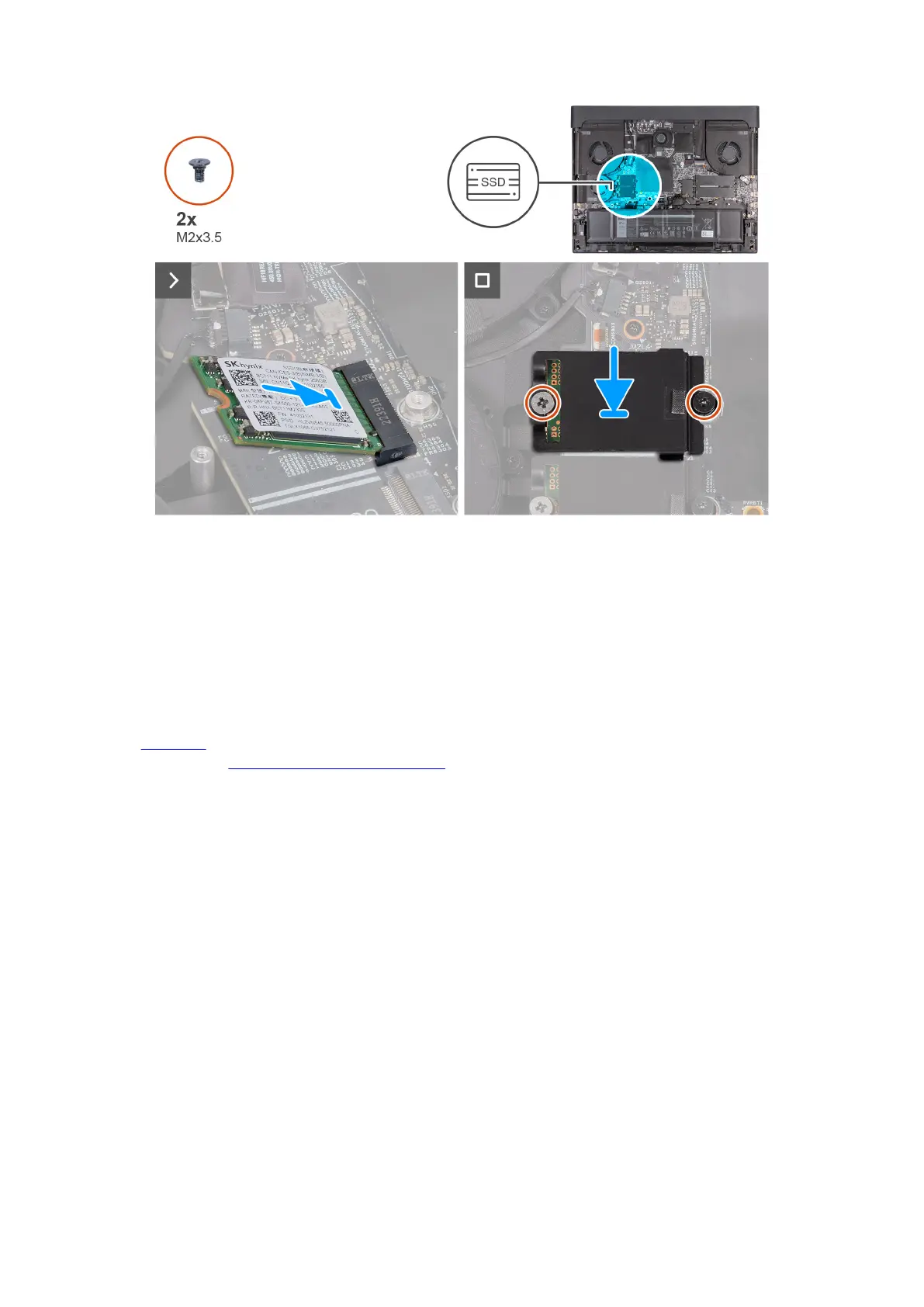
1. Align the notch on the M.2 2230 solid-state drive with the tab on the M.2 card slot (SSD3 or SSD4) on the system board.
2. Slide the M.2 2230 solid-state drive into the M.2 card slot (SSD3 or SSD4) on the system board.
3. Align and place the solid-state drive thermal shield on the solid-state drive.
4. Align the screw hole on the solid-state drive thermal shield with the screw hole on the solid-state drive and palm-rest and
keyboard assembly.
5. Replace the two screws (M2x3.5) that secure the M.2 2230 thermal shield to the palm-rest and keyboard assembly.
Next steps
1. Install the
base cover.
2. Follow the procedure in After working inside your computer.
Procedure to move the screw mount in SSD slot one and two
About this task
This computer supports two solid-state drive form factors in SSD slot one and two:
● M.2 2230
● M.2 2280
Steps
1. Unscrew the screw-mount from the palm-rest and keyboard assembly.
2. Slide the screw-mount into the other screw-mount slot on the palm-rest and keyboard assembly.
45










 To Next Page