NOTE: Repeat the steps to install any other memory module into your computer.
NOTE: The securing clips should revert to a locked state. If you do not hear the clicking sound, take out the memory module
and reinstall it.
Next steps
1. Install the
base cover.
2. Follow the procedure in After working inside your computer.
Solid-state drive
Removing the M.2 2280 solid-state drive in slot one and slot two
Prerequisites
1. Follow the procedure in Before working inside your computer.
2. Remove the base cover.
About this task
NOTE: This procedure is applicable only to computers shipped with an M.2 2280 solid-state drive installed in M.2 slot one
(SSD1) and M.2 slot two (SSD2).
NOTE: The M.2 card installed on M.2 slot one (SSD1) and M.2 slot two (SSD2) depends on the configuration ordered.
Supported card configurations:
● M.2 2230 solid-state drive
● M.2 2280 solid-state drive
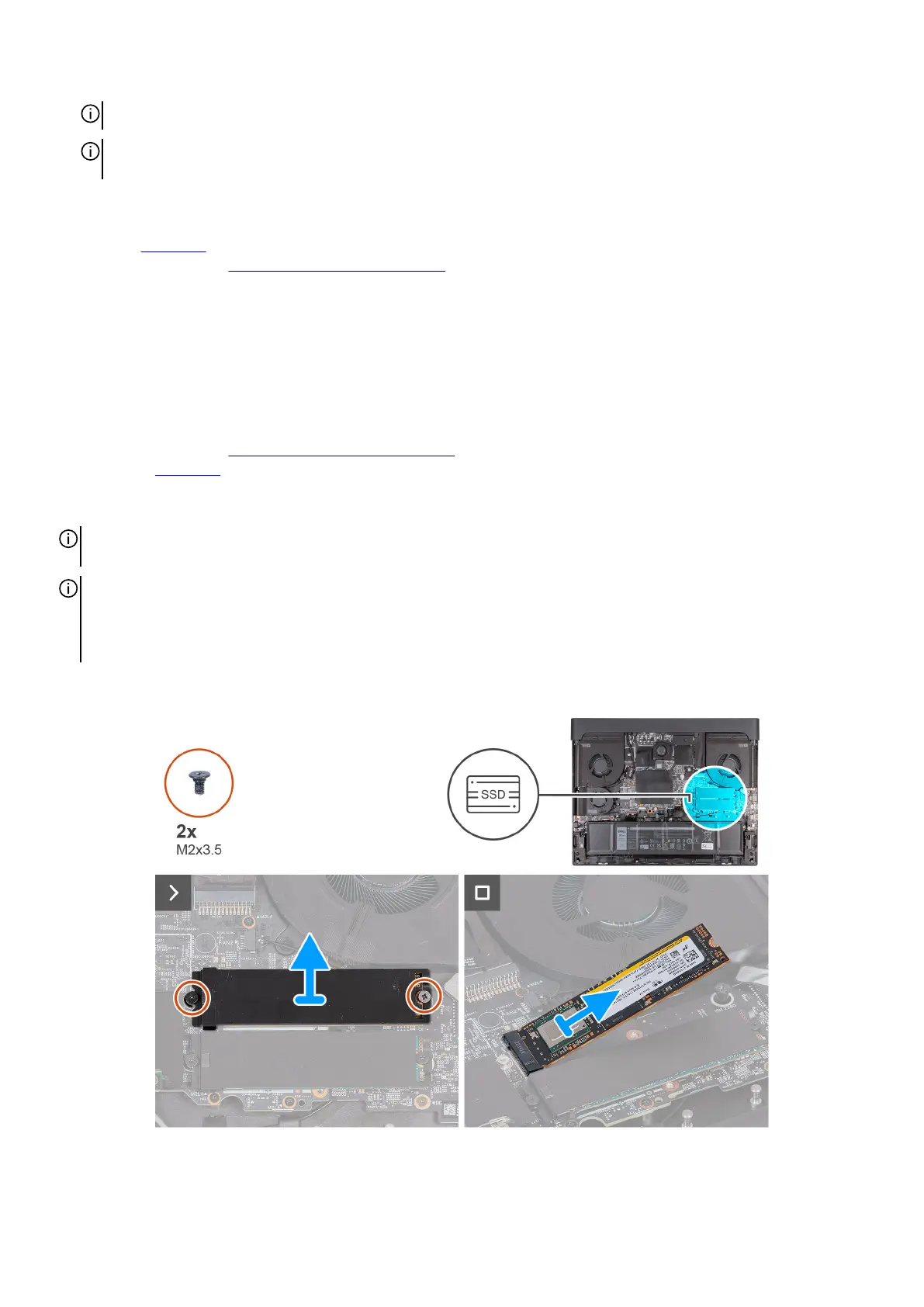
The following image indicates the location of the M.2 2280 solid-state drive in slots one and two and provides a visual representation
of the removal procedure.
42










 To Next Page