About this task
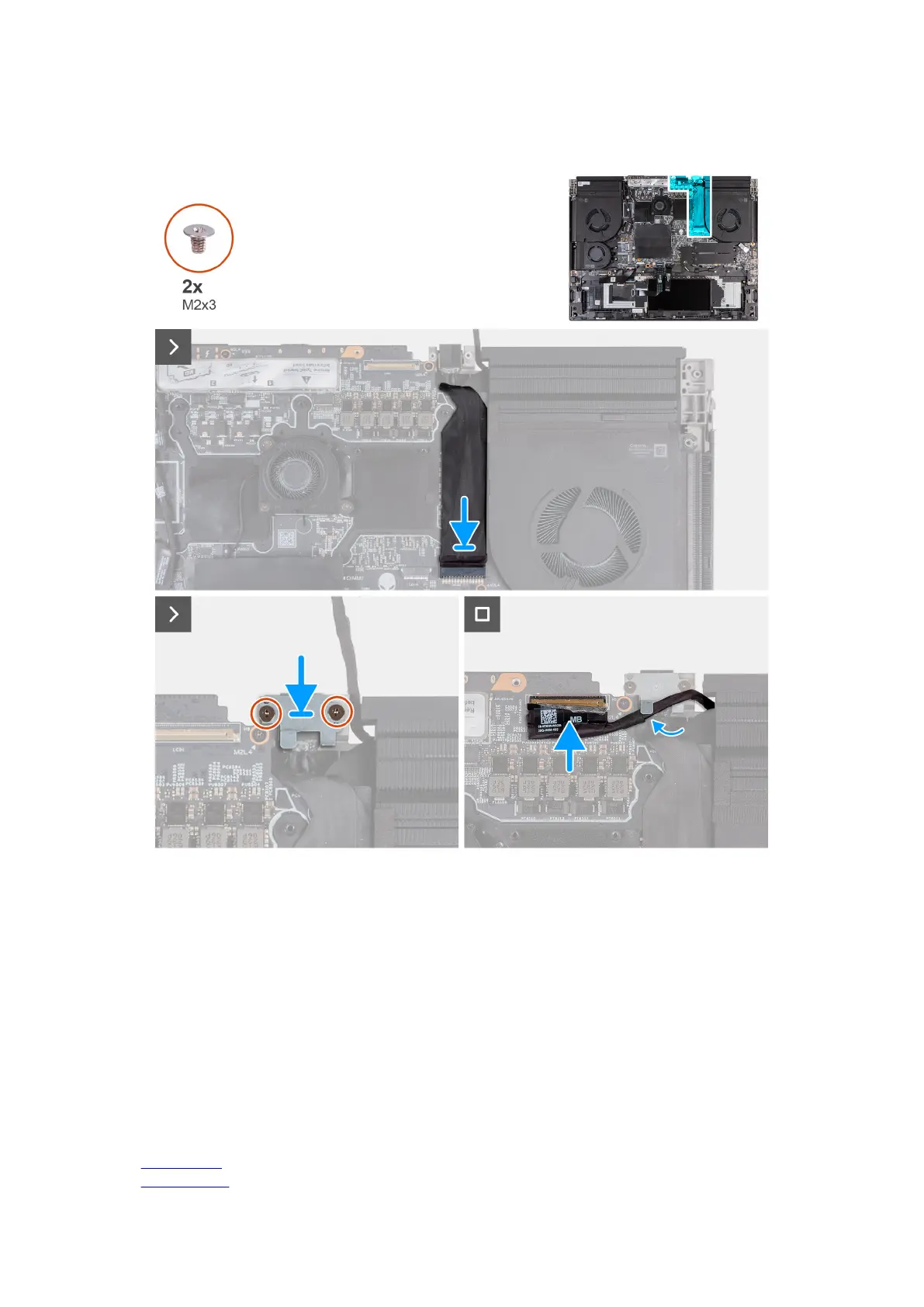
The following images indicate the location of the power-adapter port and provide a visual representation of the installation
procedure.
Steps
1. Slide the power-adapter port into the slot on the palm-rest and keyboard assembly and adhere the power-adapter port cable to
the system board.
2. Connect the power-adapter port cable to the connector (DCIN1) on the system board.
3. Place the power-adapter port bracket on the power-adapter port.
4. Align the screw holes on the power-adapter port bracket with the screw holes on the palm-rest and keyboard assembly.
5. Replace the two screws (M2x3) that secure the power-adapter port bracket to the palm-rest and keyboard assembly.
6. Route the display cable from the routing guides through the slot on the palm-rest and keyboard assembly.
7. Adhere the display cable to the system board.
8. Connect the display cable to the connector (LCD1) on the system board and close the latch to secure the cable.
9. Adhere the tape that secures the display-cable connector latch to the system board.
Next steps
1. Install the
top heat-sink.
2. Install the rear I/O cover.
68










 To Next Page