Display Assembly: Dell Latitude E4300 Service Manual
file:///C|/Biz%20Client/2015/Lola%20(Defect%20Fix)/display.htm[5/25/2015 11:14:10 AM]
1. Follow the instructions in What You Need to Know For Your Safety.
2. Remove the display assembly (see Removing the Display Assembly).
3. Remove the display bezel (see Removing the Display Bezel
).
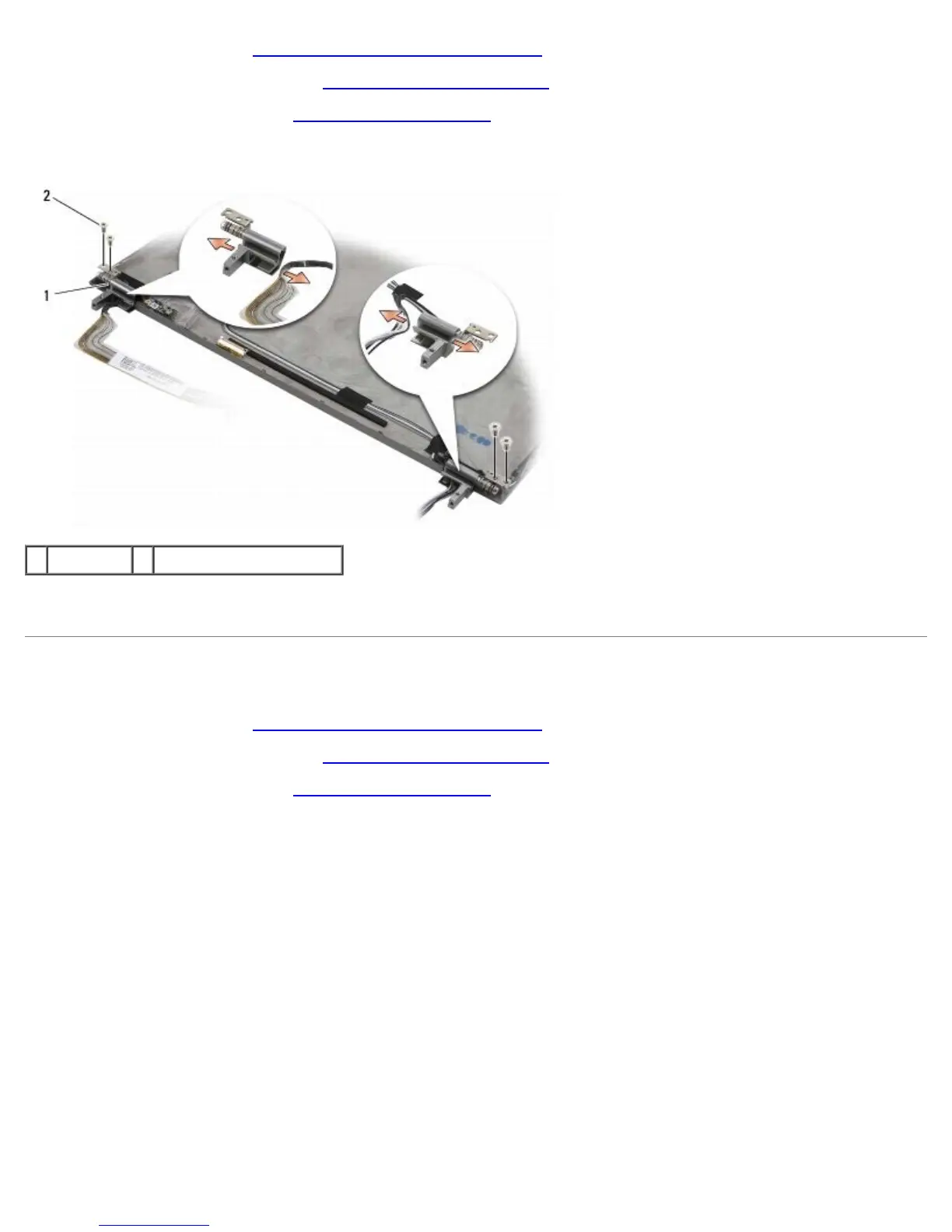
4. Remove the four M2.5 x 5-mm screws (two per side) that secure the display hinges to the display back cover.
1 hinges (2) 2 M2.5 x 5-mm screws (4)
5. Free the hinges from the display cable (left side) and display antenna cables (right side).
Removing the Display Panel
1. Follow the instructions in What You Need to Know For Your Safety.
2. Remove the display assembly (see Removing the Display Assembly
).
3. Remove the display bezel (see Removing the Display Bezel
).
4. Remove the four M2 x 3-mm screws securing the display brackets (two on each side of the display panel).















 To Next Page