140 Adding and Replacing Parts
FILE LOCATION: C:\Projects\Spears\SpearsHTML\parts.fm
DELL CONFIDENTIAL – PRELIMINARY 7/18/07 - FOR PROOF ONLY
Optical Drive
CAUTION: Before you begin any of the procedures in this section, follow the
safety instructions in the Product Information Guide.
Removing the Optical Drive
1
Follow the procedures in "Before You Begin" on page 135.
2
Turn the computer over.
3
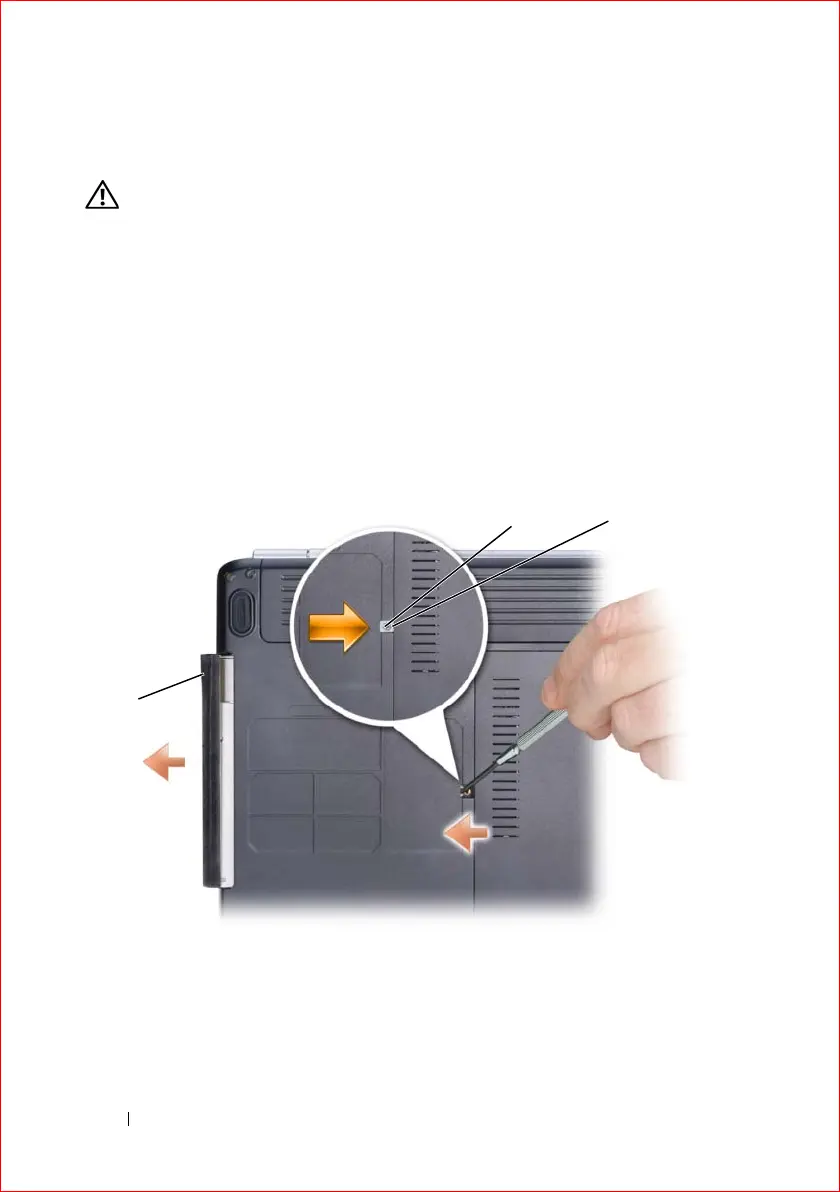
Remove the locking screw from the optical drive.
4
Using a plastic scribe, push the notch to release the optical drive from the
bay.
5
Slide the optical drive out of the bay.
1 locking screw 2 notch
3 optical drive
2
3
1













 To Next Page