Chapter 12 Description of Parameter SettingsC2000
12.1-02-1
02 Digital Input/Output Parameter This parameter can be set during operation.
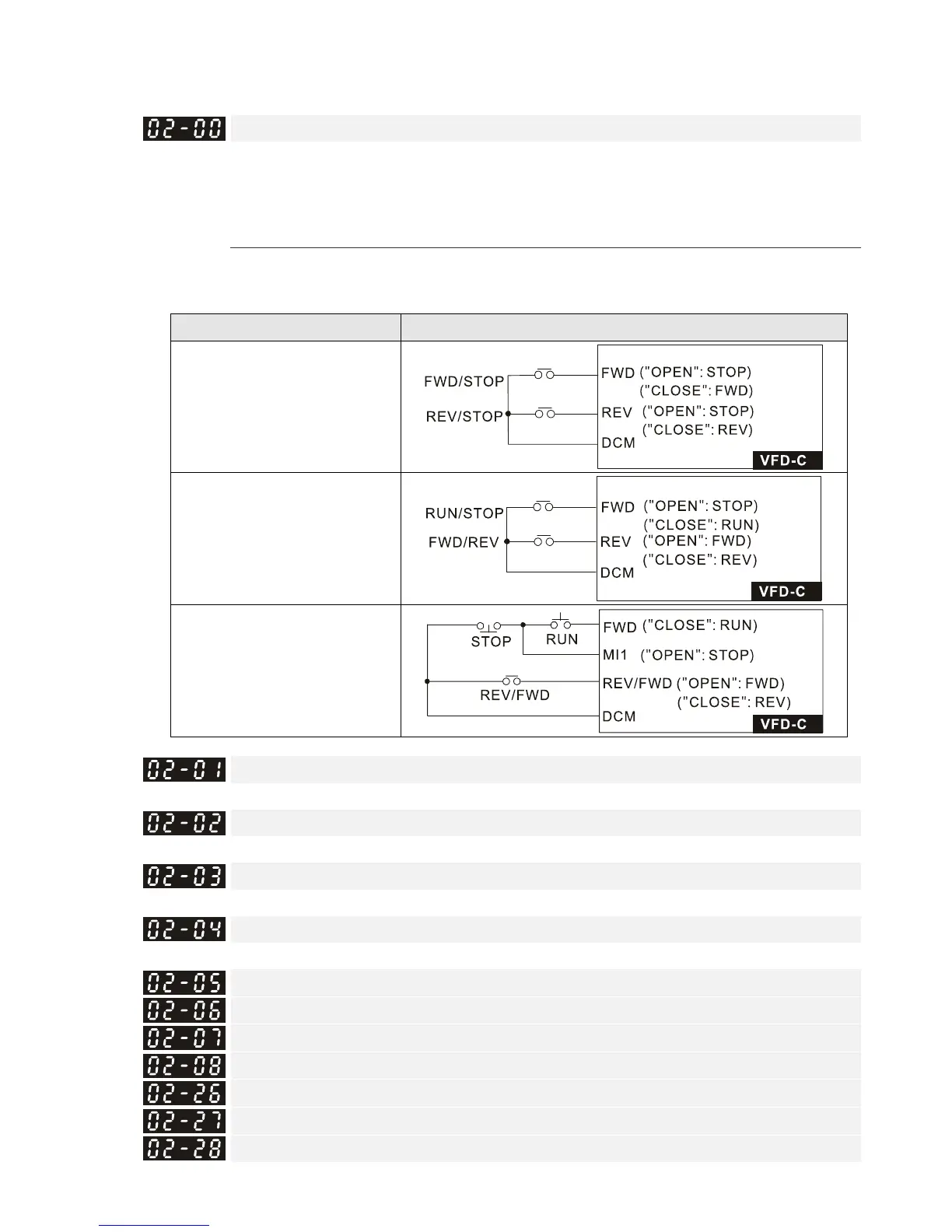
Two-wire / Three-wire Operation Control
Default: 0
Settings 0: Two-wire mode 1, power on for operation control
1: Two -wire mode 2, power on for operation control
2: Three-wire, power on for operation control
This parameter sets the configuration of the terminals (Pr.00-21=1 or Pr.00-31=1) which control
the operation. There are three different control modes listed in the following table.
Pr.02-00 Control Circuits of the External Terminal
Settings: 0
2-wire mode 1
FWD/STOP
REV/STOP
Settings: 1
2-wire mode 2
RUN/STOP
REV/FWD
Settings: 2
3-wire operation control
Multi-function Input Command 1 (MI1)
Default: 1
Multi-function Input Command 2 (MI2)
Default: 2
Multi-function Input Command 3 (MI3)
Default: 3
Multi-function Input Command 4 (MI4)
Default: 4
Multi-function Input Command 5 (MI5)
Multi-function Input Command 6 (MI6)
Multi-function Input Command 7 (MI7)
Multi-function Input Command 8 (MI8)
Input terminal of I/O extension card (MI10)
Input terminal of I/O extension card (MI11)
Input terminal of I/O extension card (MI12)










 To Next Page