Chapter 12 Description of Parameter SettingsC2000
12.1-06-4
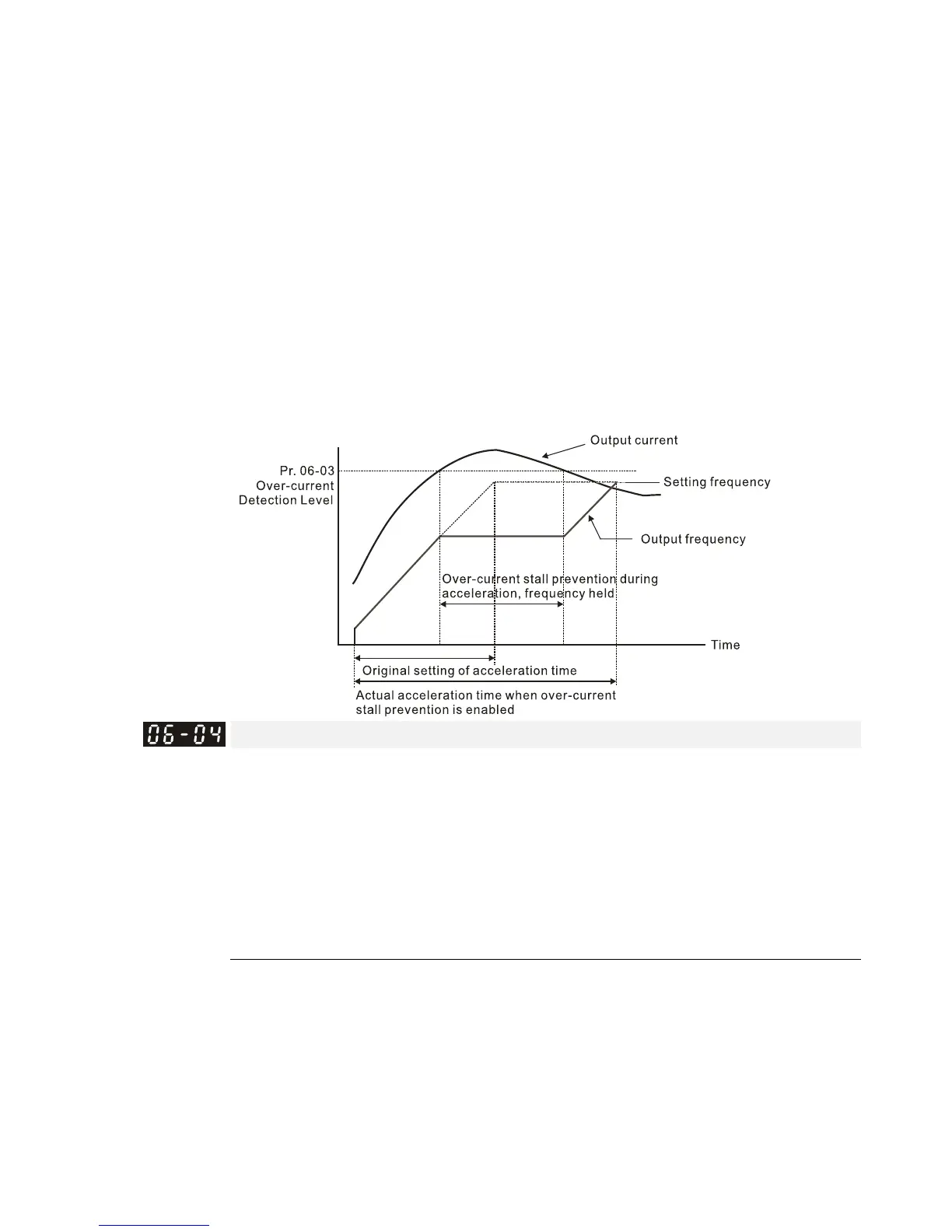
When you enable the over-current stall prevention, the drive’s acceleration time is longer than the
setting.
When the over-current stall prevention occurs because the motor capacity is too small or
operates in the default, decrease the Pr.06-03 setting value.
When you encounter any problem with the acceleration time, refer to the following guides for
troubleshooting.
1. Increase the acceleration time to a suitable value.
2. Set Pr. 01-44 Auto Acceleration / Deceleration Setting to 1, 3 or 4 (auto-acceleration).
Related parameters:
Pr. 01-12, Pr. 01-14, Pr. 01-16, Pr. 01-18 Acceleration Time 1–4
Pr. 01-44 Auto Acceleration / Deceleration Setting
Pr. 02-13–02-14 Multi-function Output 1 (RY1 and RY2)
Pr. 02-16–02-17 Multi-function Output (MO1 and 2)
Over-current Stall Prevention during Operation
Settings 230V/460V series
Normal duty: 0–160% (100%: drive’s rated current) Default: 120
Heavy duty: 0–180% (100%: drive’s rated current) Default: 120
575V/690V series
Light duty: 0–125% (100%: drive’s rated current) Default: 120
Normal duty: 0–150% (100%: drive’s rated current) Default: 120
Heavy duty: 0–180% (100%: drive’s rated current) Default: 150
This parameter only works in VF, VFPG, and SVC control modes.
This is a protection for the drive to decrease output frequency automatically when the motor
over-loads abruptly during constant motor operation.
If the output current exceeds the setting value for Pr. 06-04 when the drive is operating, the drive
decreases output frequency (according to Pr. 06-05) to prevent the motor from stalling. If the
output current is lower than the setting value for Pr. 06-04, the drive accelerates (according to Pr.
06-05) again to the setting frequency.



 To Next Page
 Loading...





