Chapter 12 Description of Parameter SettingsC2000
12.1-06-25
Low Current Setting Level
Default: 0.0
Settings 0.0–100.0 %
Low Current Detection Time
Default: 0.00
Settings 0.00–360.00 sec.
Low Current Action
Default: 0
Settings 0: No function
1: Warn and coast to stop
2: Warn and ramp to stop by the 2
nd
deceleration time
3: Warn and continue operation
The drive operates according to the setting for Pr. 06-73 when the output current is lower than the
setting for Pr. 06-71 and when the time of the low current exceeds the detection time for Pr. 06-72.
Use this parameter with the external multi-function output terminal 44 (for low current output).
The low current detection function does not execute when drive is in sleep or standby status.
Sets Pr. 06-71 low current level according to the drive’s rated current, the equation is Pr. 00-01
(drive’s rated current) x Pr. 06-71 (low current setting level)% = low current detection level (A).
The drive changes the setting for Pr. 00-01 (rated current) according to the setting for Pr. 00-16
(load selection).
PTC Type
Default: 0
Settings 0: PTC
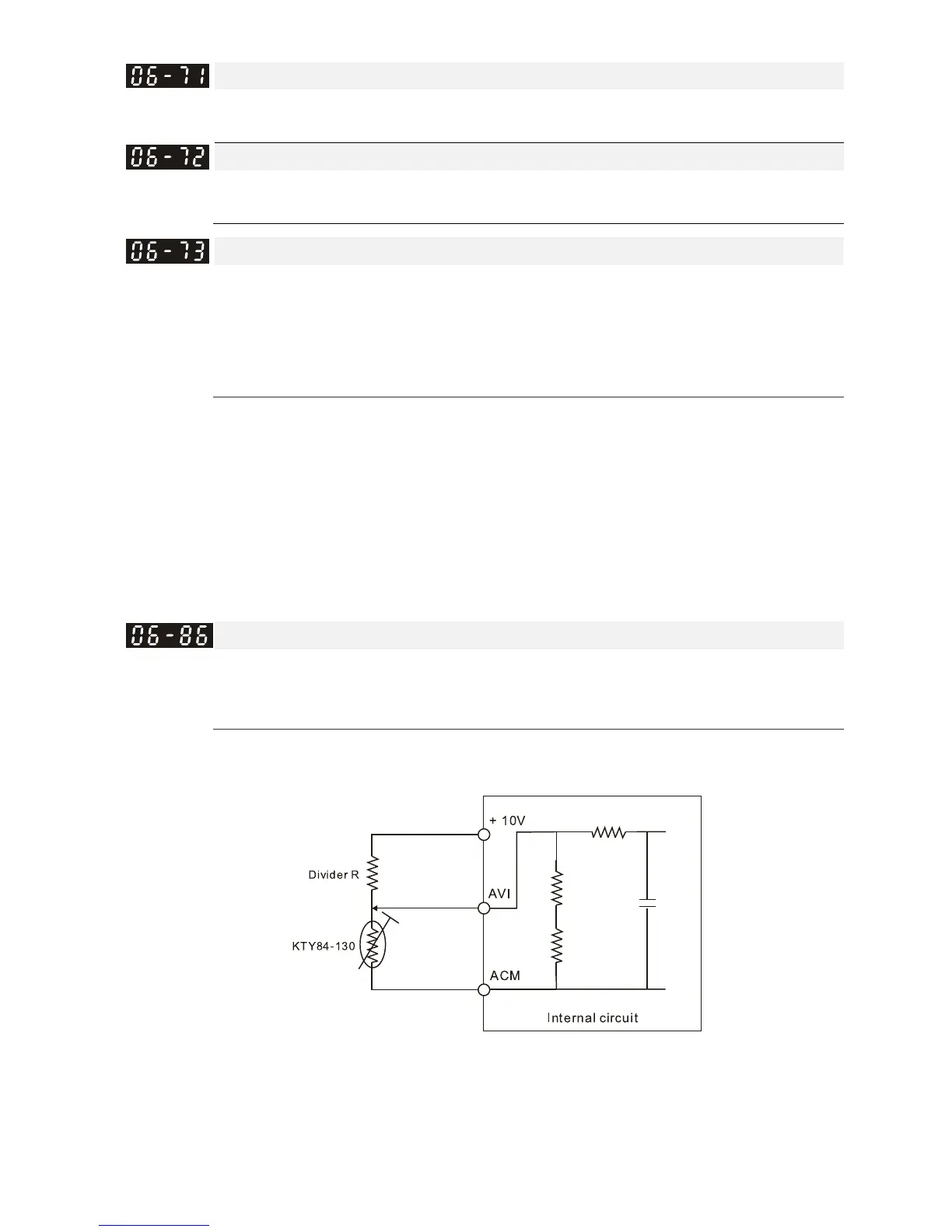
1: KTY84-130
When using KTY84-130, a divider resistance (2kΩ , power > 1/4W, ±0.1%) is needed.
Wiring diagram is as below:



 To Next Page
 Loading...





