User Manual DEV 1953
60 Copyright DEV Systemtechnik GmbH 2015-2017
5.5.5 Events Tab
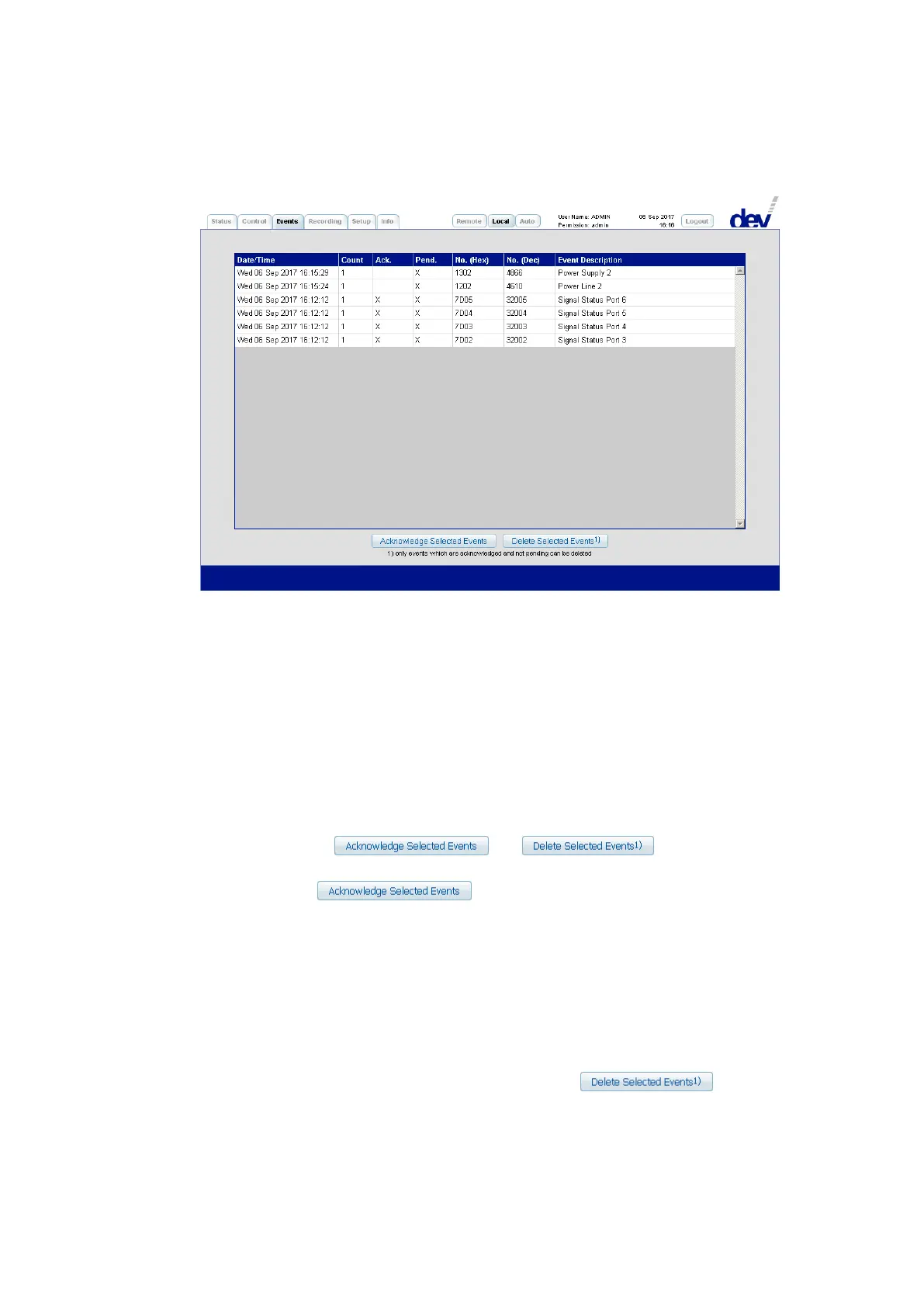
The Events Tab displays a table of the events that were detected by the device.
The different events are listed line-by-line, i.e. each event carries a Date/Time
stamp (in the format: "DDD DD MMM YYYY hh:mm:ss", here e.g. "Wed 06 Sep 2017 16:15:29")
informing about the last occurrence of that event. The second column is a Counter
reporting the number of occurrences of that event (here: "1"). The third column
denotes whether that event is Ack.nowledged ("X") or not (" ") (here e.g. " ", i.e.
<space>, meaning not acknowledged). The fourth column shows whether that event
is Pend.ing ("X") or not (" ") (here: "X", i.e. pending). The fifth and the sixth columns
inform about the error code No. in Hexadecimal (here e.g. "1302") and in Decimal
(here e.g. "4866") notation; the last column reports the related Event Description
string (here e.g. "Power Supply 2"), please refer to chapter 6.1.
Below, the buttons and are located:
An event can be acknowledged by highlighting (i.e. clicking on) the related line and
by operating the button afterwards. The intention of the
acknowledgement of an event is to provide means to mask out a pending event of
the Active Events Window in the Status Tab (chapter 5.5.3) and to stop the event
indication via device panel (chapter 3.1.1) and via Status Tab (chapter 5.5.3) if all
pending events in the table are acknowledged. If a confirmed event occurs again,
the counter in the table is increased and the acknowledgement is reset (i.e. the "X"
disappears, the Active Events Window reports the event again, and the event
indication via device panel and via Status Tab becomes active).
An acknowledged and not pending event can be deleted from the list by high-
lighting the corresponding line, followed by clicking on .
If a deleted event occurs again, a line is added at the beginning of the table.



 To Next Page