[User Settings] 3-19
[Fax Settings]
Specify the fax settings. For details on specifying the fax settings, refer to the
[Facsimile User’s Guide].
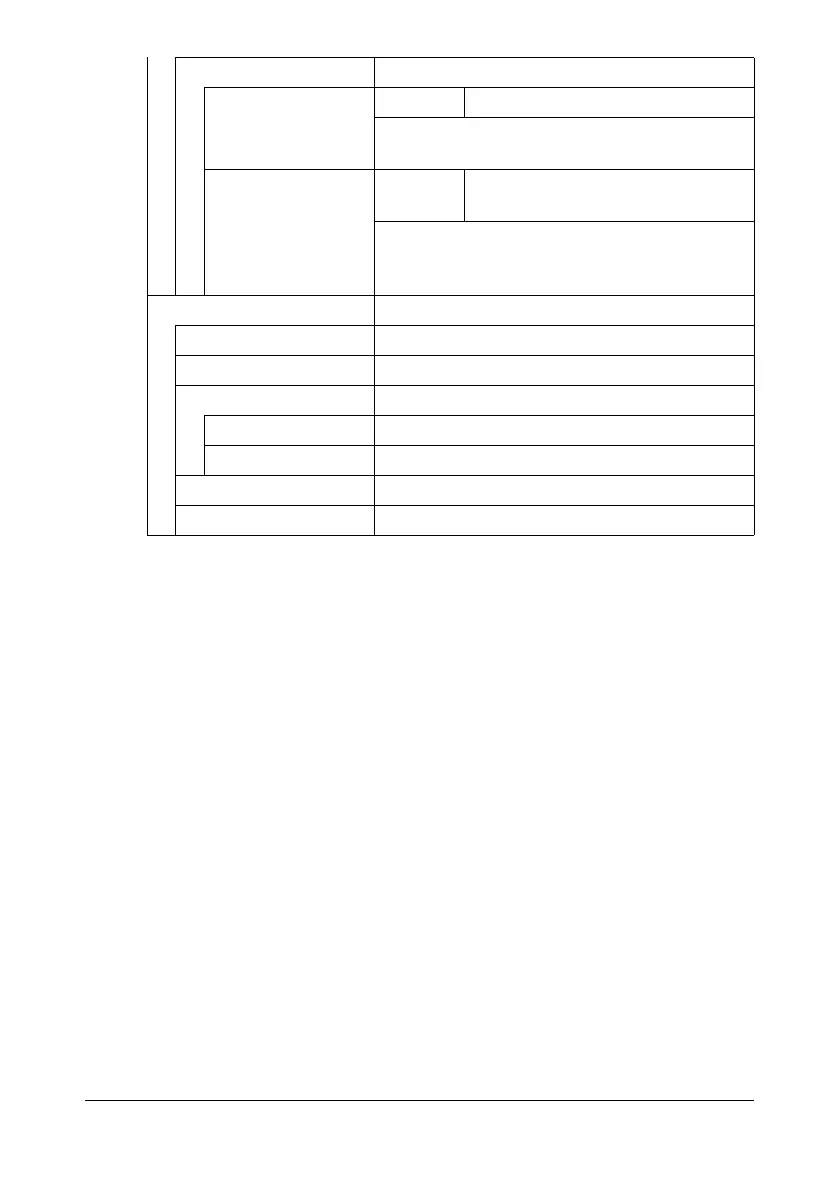
[Tray Mapping] Specify the Tray Mapping settings.
[Tray Mapping
Mode]
Settings [ON] / [OFF]
Select whether or not the Tray Mapping func-
tion is used.
[Logical Tray 0]-
[Logical Tray 9]
Settings [Physical Tray 1] / [Physical Tray
2] / [Physical Tray 3]
Select the tray that is used for printing when a
print job is received from another manufac-
turer’s printer driver.
[Report Print] Specify settings for printing the various reports.
[Config. Page] Prints information and status of this machine.
[Stats. Page] Prints the statistics page.
[Font List] Prints the font list.
[Postscript] Prints the PostScript font list.
[PCL] Prints the PCL font list.
[HDD Direct.] Prints the directory list for the hard disk.
[Counter List Print] Prints the list of counters.












 To Next Page