[Admin Settings]3-48
[Print Settings]
" All factory default values are shown in bold.
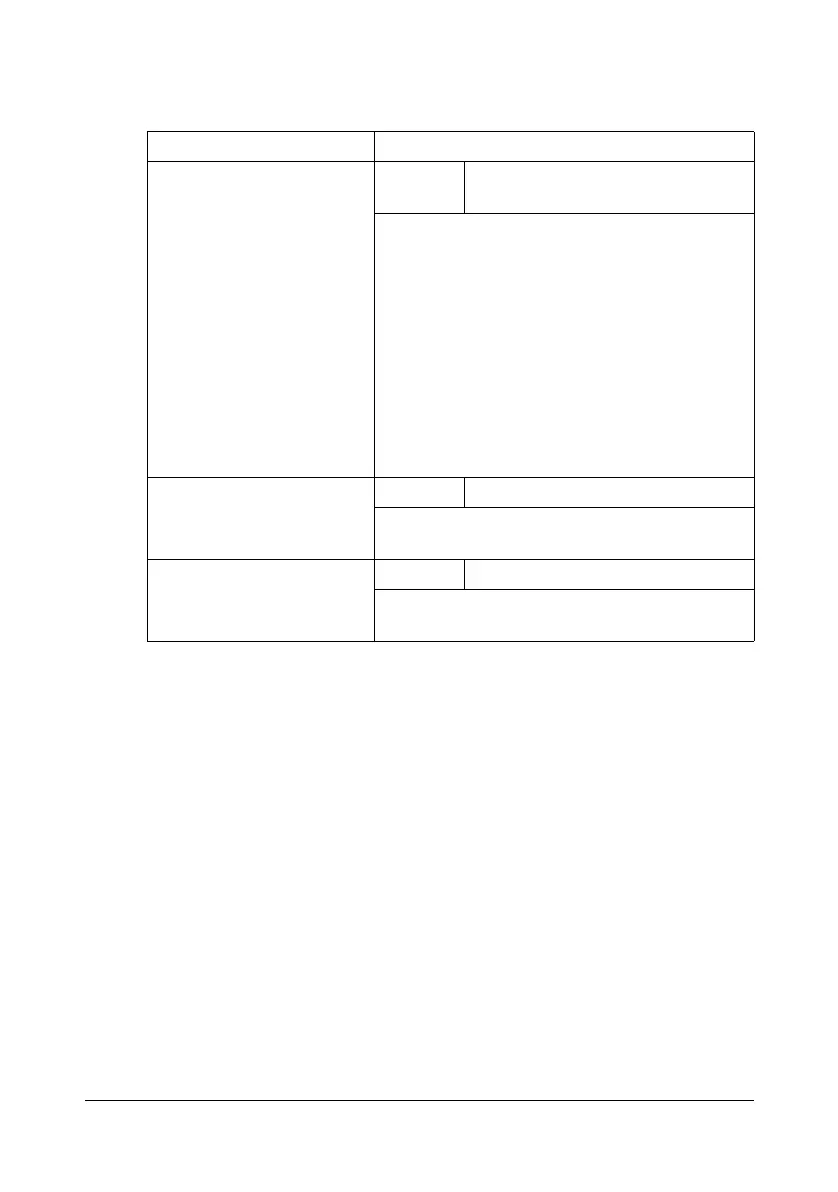
Item Description
[Grayscale Page] Settings [Auto] / [Grayscale Print] / [Color
Print]
Specify the operation to be performed for
black-and-white pages in a job specified for
color printing.
[Auto]: Printing is automatically performed
according to the first page of the job.
[Grayscale Print]: Black-and-white printing is
automatically performed depending on each
page.
[Color Print]: Color printing is performed, even
for a black-and-white page.
[Startup Page Setting] Settings [ON] / [OFF]
Select whether or not a startup page is printed
when the machine is turned on.
[Auto Continue] Settings [ON] / [OFF]
Select whether or not printing continues when
a size error occurs during printing.












 To Next Page