Emulator
The emulator provides a side-screen displaying the current virtual-stick/switch states as
well as the Channel output that would be received by the servos
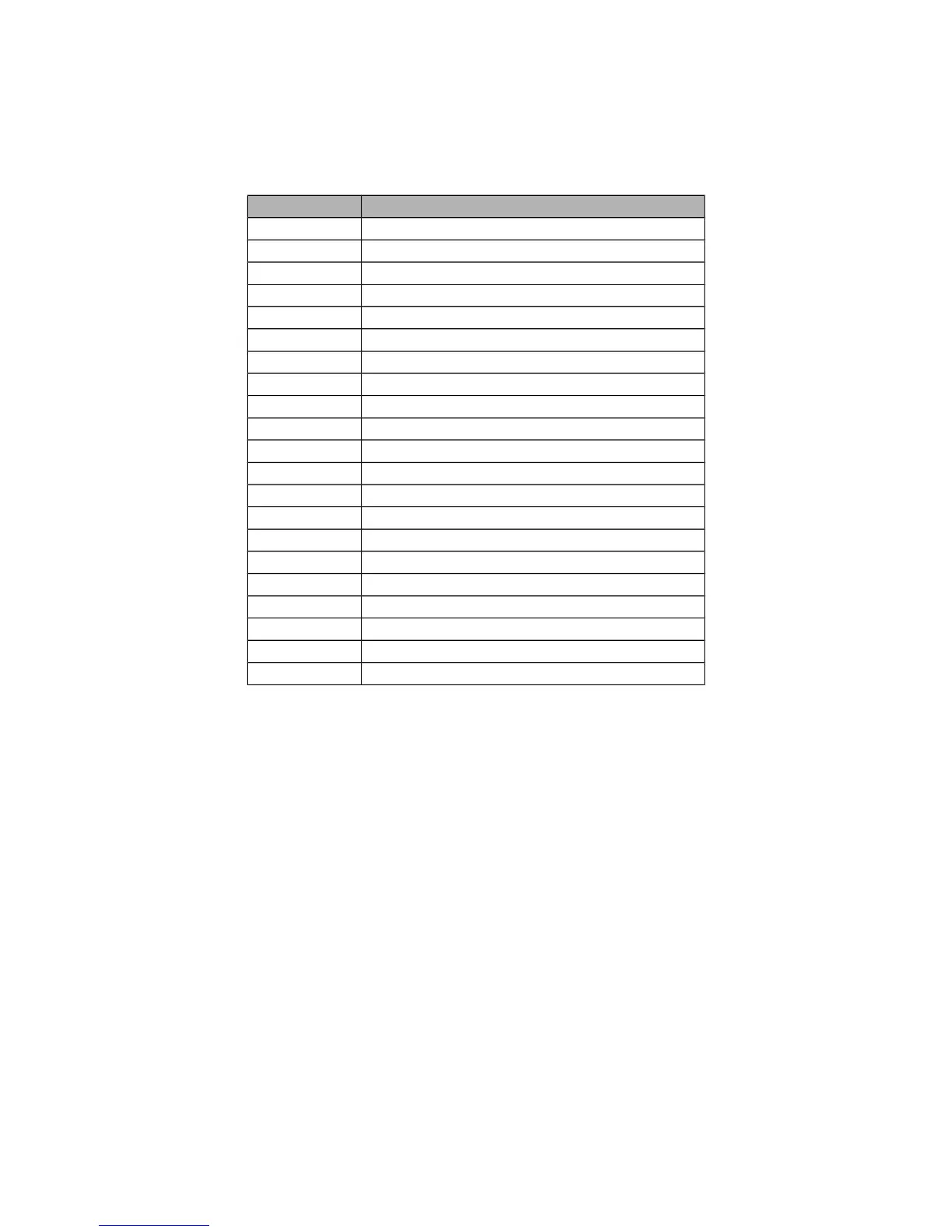
The emulator controls are as follows (based an an English keyboard):
Button Action
q/a Left-Vertical stick (Throttle in mode 2)
Q/A Left-Vertical trim
w/s Left-Horizontal stick (Rudder in mode 2)
W/S Left-Horizontal trim
e/d Right-Vertical stick (Elevator in mode 2)
E/D Right-Vertical trim
r/f Right-Horizontal stick (Aileron in mode 2)
R/F Right-Horizontal trim
z Gear
x Rudder Dual-Rate switch
c Elevator Dual-Rate switch
v Aileron Dual-Rate switch
b Mix 0/1/2 switch
n FMode 0/1/2 switch
\ Power off
Left-arrow Left
Right-arrow Right
Up-arrow Up
Down-arrow Down
Enter Ent
Escape Exit
Version Page
The Deviation release version can be accessed by selecting the Configuration icon from
the main page, and moving left one page. It is also possible to enable USB from this
page. Note that doing so should never be done while the model is bound, as USB will
disrupt signal transmission!
Page | 10


 To Next Page