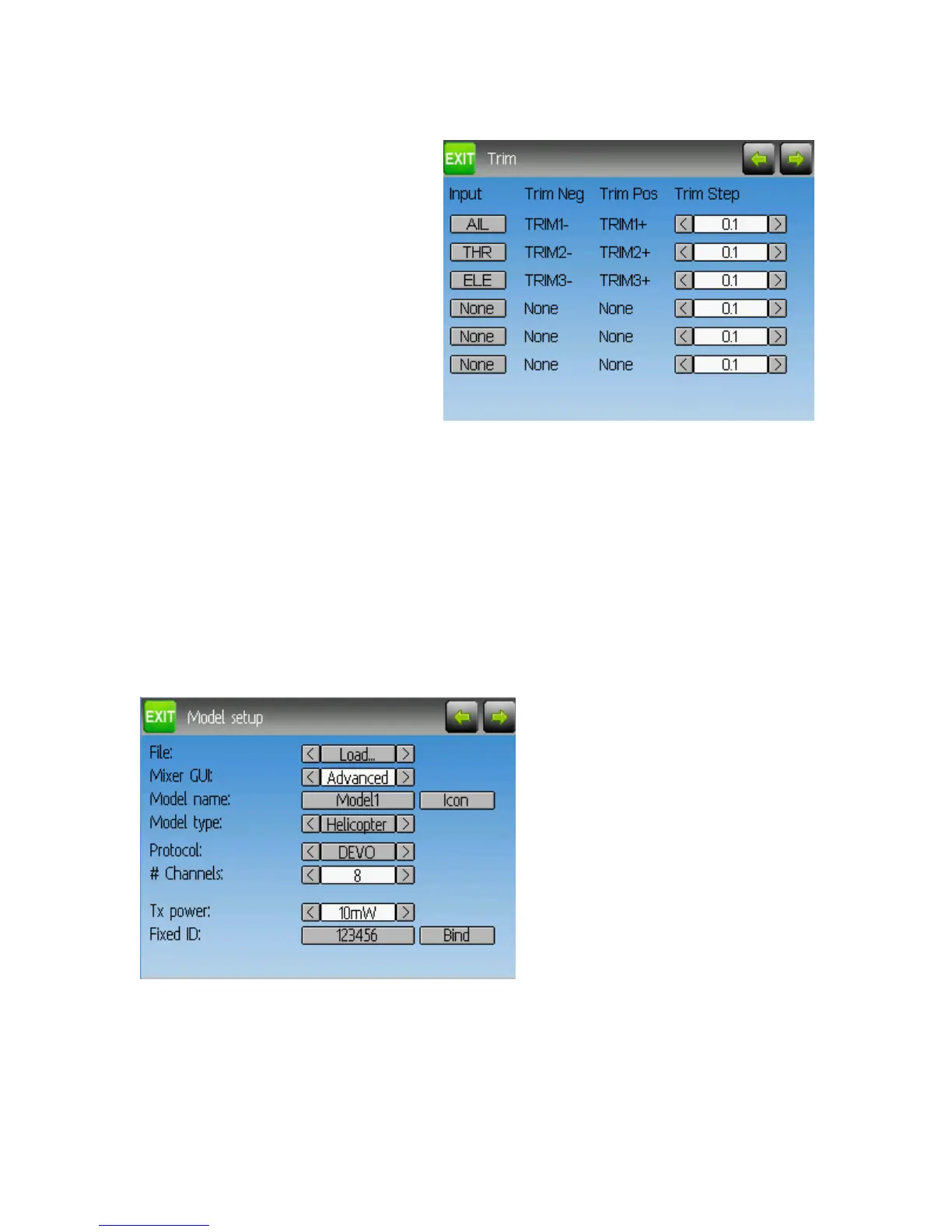
Trims and Virtual Inputs (Standard & Advanced GUI)
The trim page allows assigning the
trim buttons and trim step, as well as
configuring buttons to work as virtual
inputs.
If the ‘Input’ field is set to an input
stick, then the trim is applied as part of
the mixer, and will operate as a typical trim control. If the ‘Input’ field is set as a channel
or virtual-channel output, the value is applied directly to the channel output. In this case,
the selected ‘Pos’ and ‘Neg’ buttons can operate as a virtual stick to control an output
channel.
The Trim-step defines how sensitive the trims are to input. The maximum number of
trim steps is +/-100. So a step size of 0.1 will allow a full +/- 10% of trim adjustment on
the servo.
Model Page (Standard & Advanced GUI)
The model page provides various model configuration options.
File: The File spin-box allows loading a new model, copying the existing model to a new
location, resetting the current model to the default (all configuration is lost), and loading
templates (see Predefined Templates)
Page | 22


 To Next Page