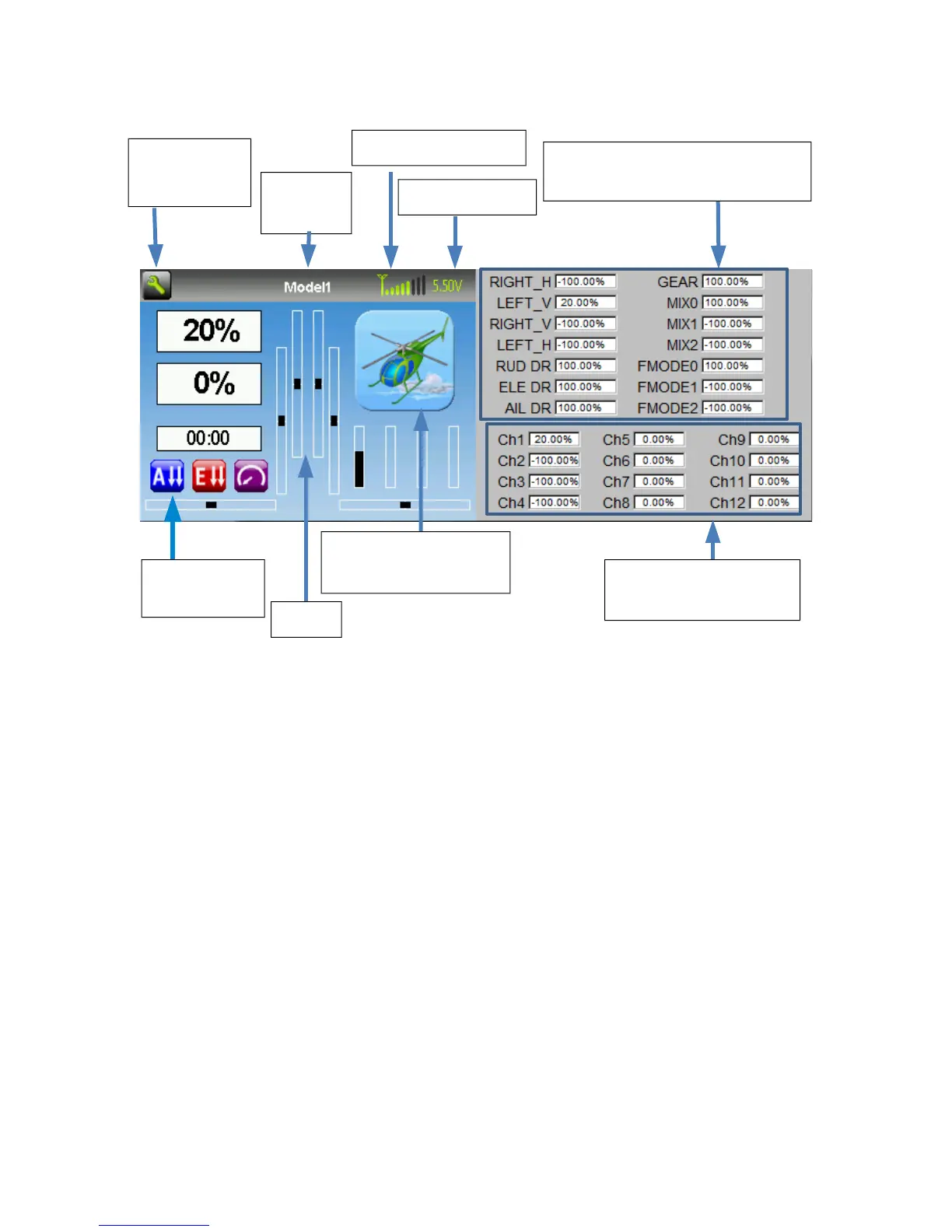
Main Page
Tx Options: Selecting this icon provides access to the main-page configuration screen;
the Channel-Test screen; telemetry output; the frequency scanner; and USB mode
Current Model: Selecting the model-name provides access to the Load-Model screen for
quick-model switching
Transmitter Power: This indicates the currently selected transmitter power. It is
configured from the Model Configuration page
Battery Voltage: Numerical representation of current Tx battery state
Configurable Displays: These can be text-boxes contacting input, channel, telemetry, or
timer data; bar graphs displaying channel data; or icons displaying specific states (e.g.
gear, flaps,…)
Trims: The trim display can be configured to show 0, 4 or 6 trims
Model Configuration: Selecting the model icon provides access to the model
configuration pages
Page | 8
Channel Output values
(Emulator Only)
Battery voltage
Current
Model
Click to edit
Tx Options
Configurable
displays
Trims
Click to enter
Model Configuration
Transmitter Power
Raw input (stick/switch values)
(Emulator Only)


 To Next Page