LT-2320
21
SERVICE
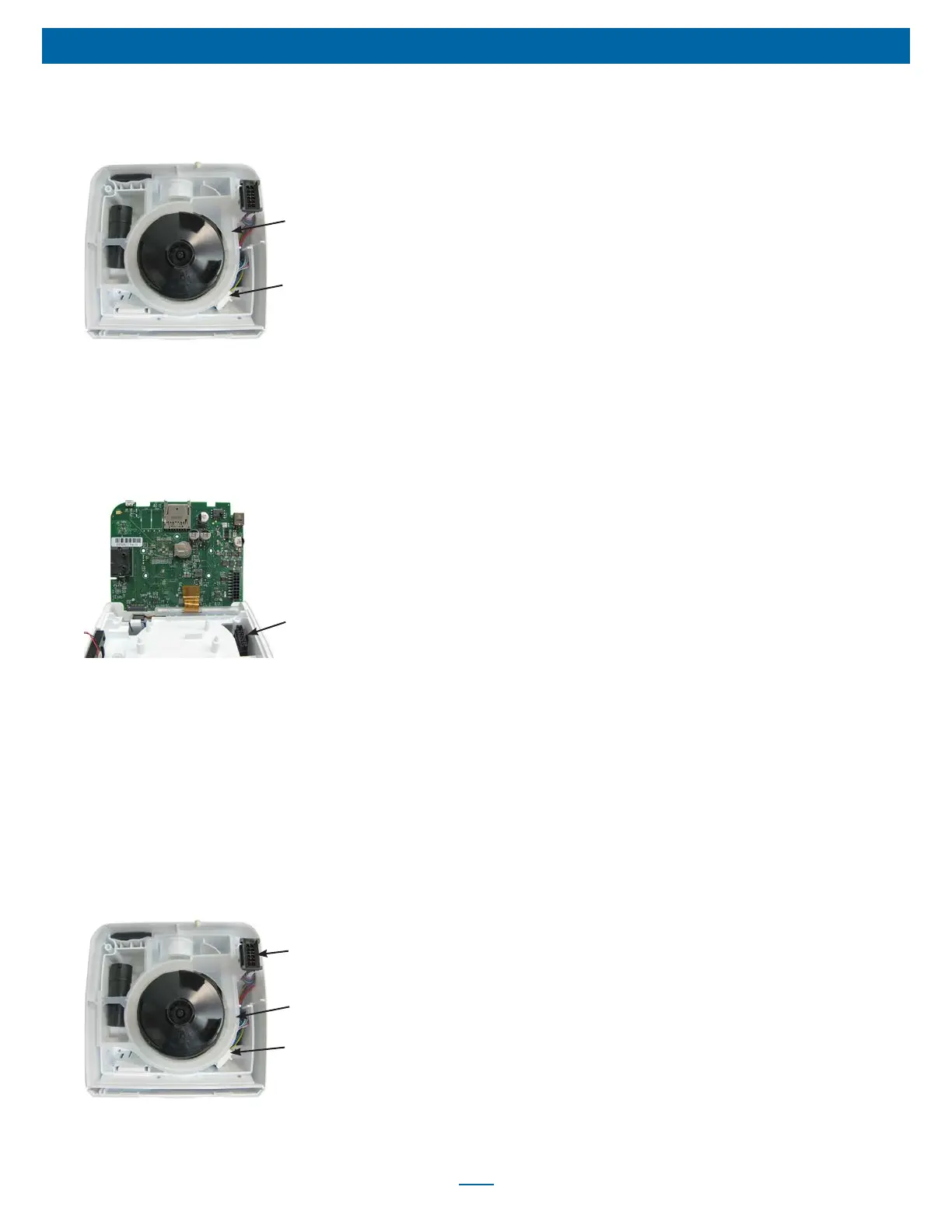
To Remove and Replace Main Wire Harness
1. Remove bottom cover using instructions listed previously.
2. Disconnect blower wire harness connector.
Chassis Manifold
Blower Wire
Harness Connector
3. Remove chassis manifold.
4. Remove PC Board using instructions listed previously and set
aside PC Board with Keypad attached in a safe, clean location.
5. Pull main wire harness out from bottom of unit.
6. Insert top end of new wire harness through chassis. Ensure that
latch on connector for PC board is facing toward the outside of
the unit.
Connector Latch Near
Outside of Unit
7. Replace PC Board using instructions listed previously.
8. Replace top cover using instructions listed previously.
9. Place CPAP on work surface with bottom of unit facing upward.
Orient large wire harness connector so that the red wires are
facing the back of unit and insert into connector restraint.
10. Install chassis manifold ensuring that it is seated properly on top
of the chassis frame.
11. Insert the blower wire harness into the notch or cut out in the
chassis manifold and then connect it to the main wire harness.
12. Fold the blue, green and yellow wire harness under its connector
and insert the harness wires and connector into the connector
restraint located to the left of the notch in the silicone manifold.
Notch in Chassis
Manifold
Blower Wire
Harness Connector
Large Wire Harness
Connector
13. Replace bottom cover using instructions listed previously.













 To Next Page