LT-2320
29
To Remove and Replace Heater Wire Harness
1. Remove the humidier chamber from the DV6HH base (cradle).
2. Disconnect the humidier module from the top of the heater.
3. Turn the base (cradle) over so that the bottom of the unit faces
up and remove four T-10 screws.
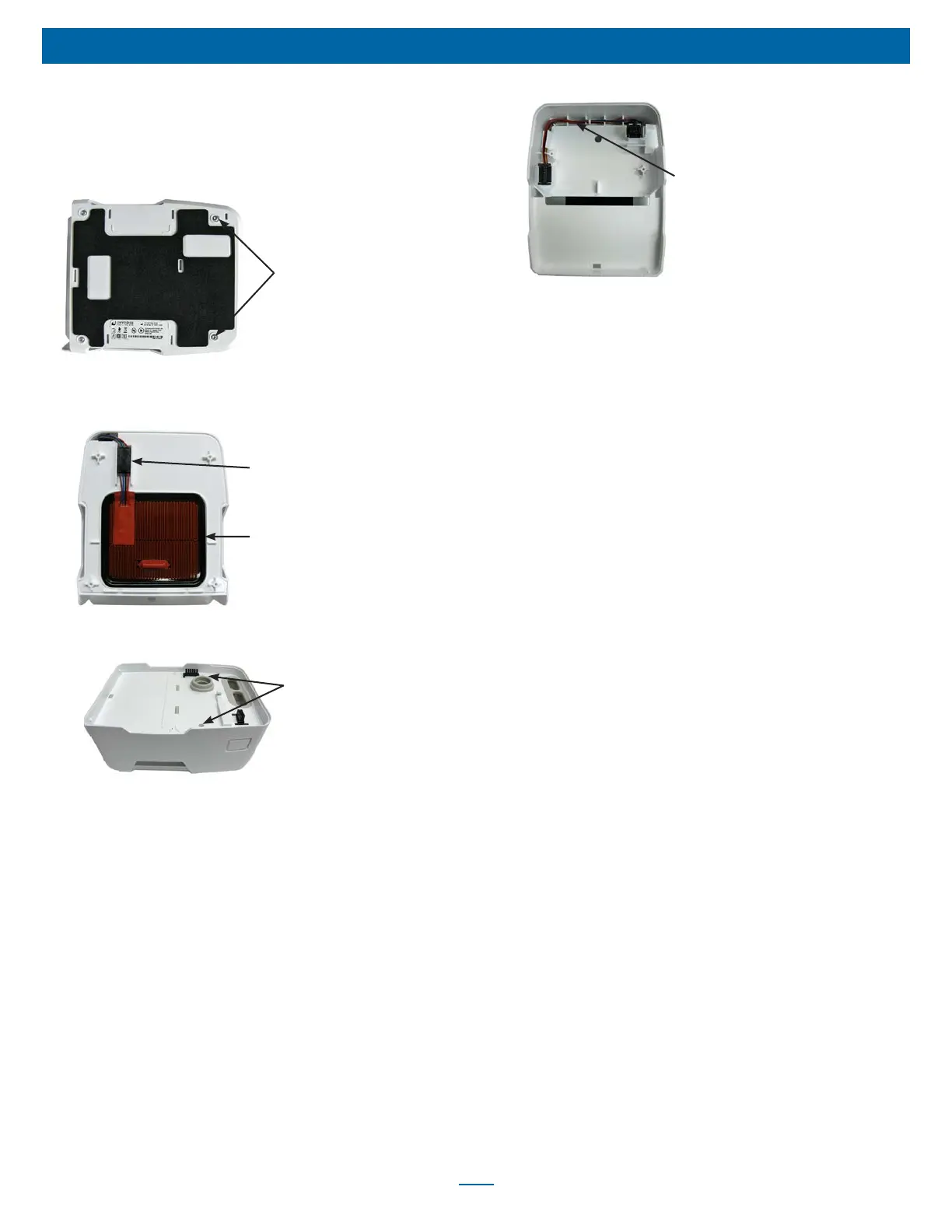
Humidifier Base
Screws X4
4. Lift the bottom cover off the unit.
5. Disconnect heater plate wire harness connector and remove
heater plate.
Wire Harness Connector
Heater Plate
6. Turn the base (cradle) over so that the top of the unit faces up
and remove two T-10 screws.
Top Cover Screws
7. While holding latch release button in, carefully lift top cover off
heater base (cradle).
8. Remove wire harness by pulling it out through top of unit.
9. Insert end of new wire harness down through base (cradle).
10. Insert heater plate and reconnect wire harness connector. Then,
insert connector into connector restraint ensuring wires are not
twisted.
11. Replace bottom cover and secure using four T-10 screws.
12. Turn the base (cradle) over so that the top of the unit faces
upward.
13. Position upper portion of wire harness in top of base (cradle)
using restraints to secure harness.
Wire Harness
14. Position top cover on base (cradle) and push down until it snaps
into place.
15. Ensure that the silicone manifold is oriented properly and not
twisted.
16. Replace two T-10 screws.
17. Reconnect the humidier module to the top of the heater
18. Slide the humidier chamber into the heater base (cradle) until it
clicks into place.
SERVICE - DV6HH













 To Next Page