19Chapter 3: Home Screen Overview 19
Dexcom G6
®
System • Using Your G6
Chapter 3: Home Screen Overview
You will spend most of your time on the home screen. It gives you your G6 sensor
glucose readings (G6 readings) and trend information and gets you to other G6
functions.
The next section describes the home screen features. Later we review how to
interpret your G6 readings, trend arrows, and graph, followed by how to navigate to
other functions.
3.1 Home Screen Features
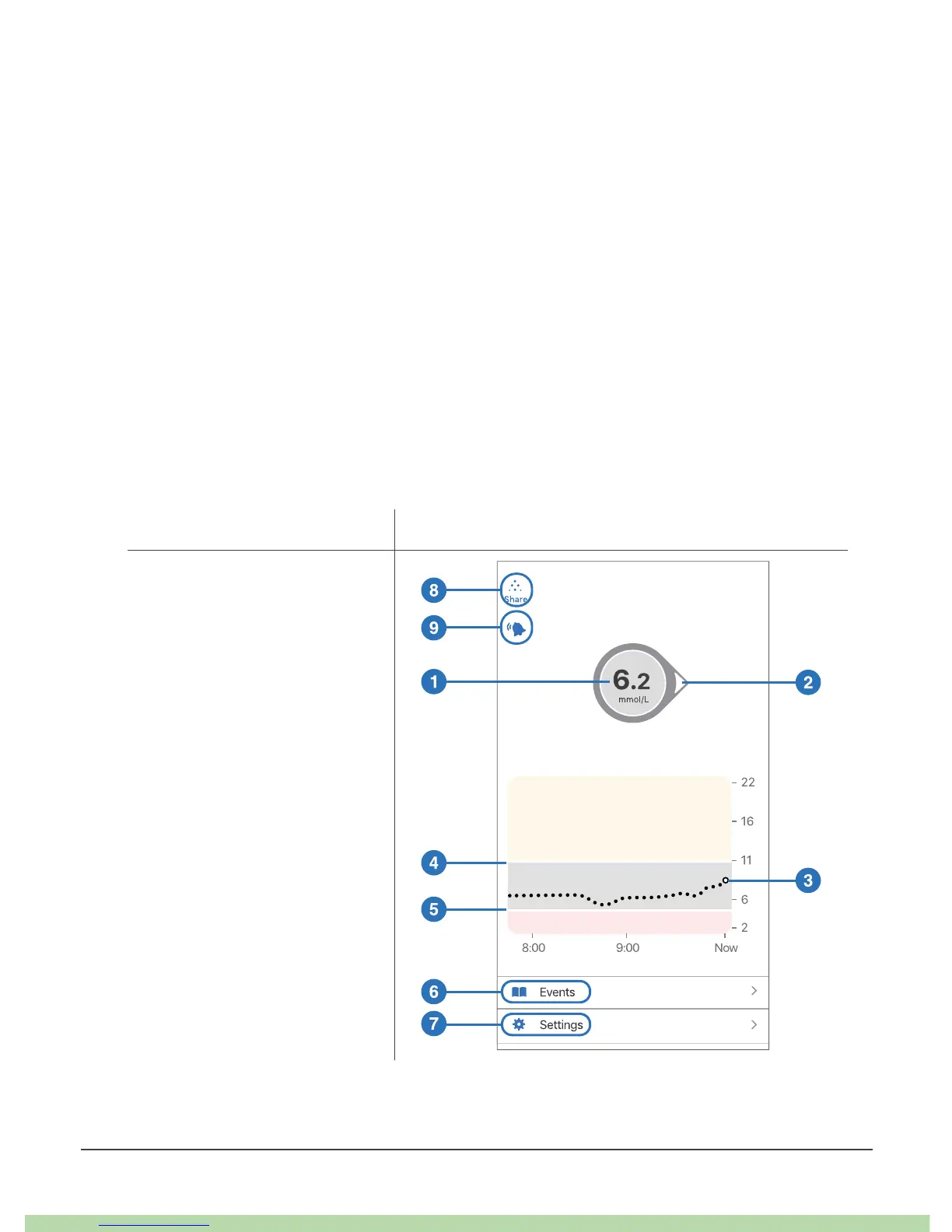
Below are home screens from the Apple app, Android app, and receiver. While the
sensor glucose information is the same, navigation is slightly different.
For a list of current compatible smart devices and operating systems, go to:
dexcom.com/compatibility.
Key Apple
Number and Arrow
1. G6 Reading
2. Trend Arrow
Graph
3. Current G6 Reading
4. High Alert Level
5. Low Alert Level
Navigation and Status
6. Events
7. Settings
8. Share
9. Always Sound status



 To Next Page