C/39
- ATTENTION: - Read the SAFETY REGULATIONS (contained in this manual) carefully for the safety of all personnel and your vehicle.
INTERNAL CAB VENTILATION
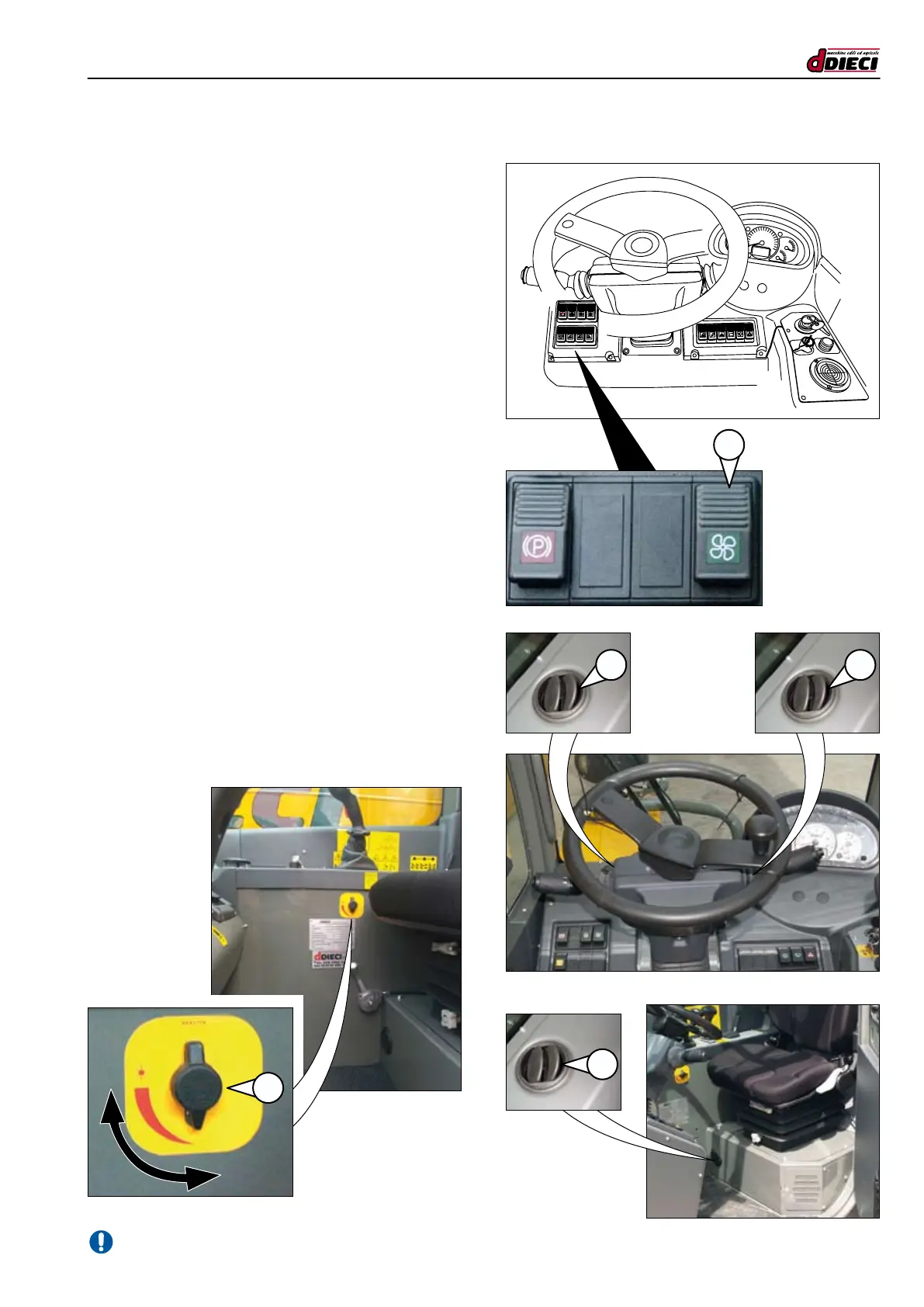
To activate ventilation, press the push button (g.73/C Pos.”1”).
The positions indicate, respectively:
- Off
- First speed
- Second speed
- To open the air vents (g.74/C, g.75/C, pos.”1”) press down
on one side of the vent and adjust the air ow direction with
the tabs or turning the vent itself.
- To close the vents, push the tabs until they are in a horizontal
closed position.
Air temperature adjustment
(g.76/C Pos.”1”)
To adjust the temperature of the air coming from the vents,
turn the knob (g.76/C Pos. “1”).
Turn the knob clockwise upwards to increase the temperature.
Turn the knob anti-clockwise downwards to decrease the
temperature, bringing it near the external one.
(g.76/C)
(g.74/C)
(g.75/C)
1
(g.73/C)
1
P
A
1
1
1


 To Next Page