C/22
Getting to Know and Using the Vehicle
Mod. Apollo
- ATTENTION: - Read the SAFETY REGULATIONS (contained in this manual) carefully for the safety of all personnel and your vehicle.
DASHBOARD LEVERS
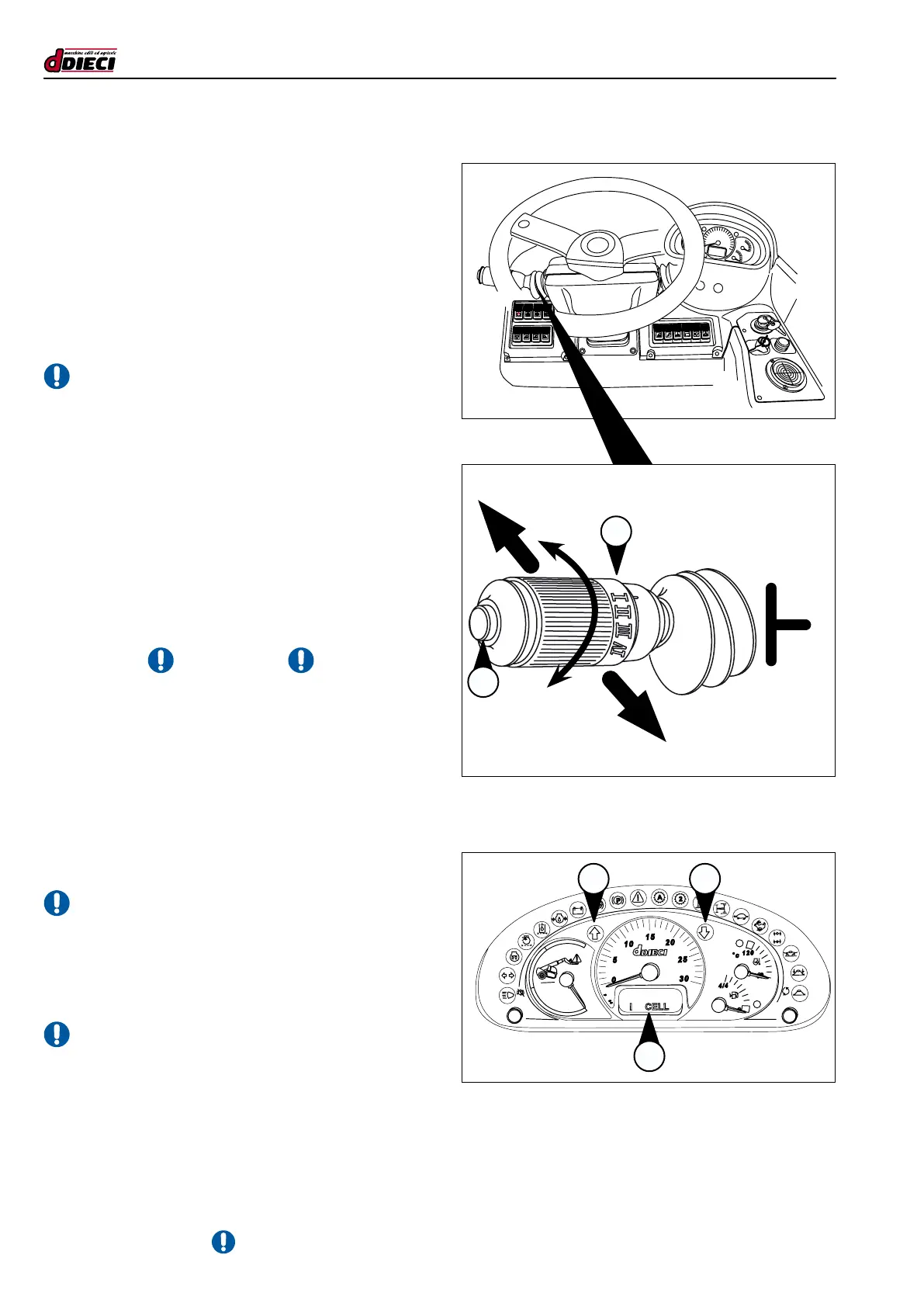
Forward / reverse gear selection lever
This lever “1” (g.31/C) allows the user to change direction
and use the horn. On the dashboard, the indicator lights that
indicate the direction in which the vehicle is travelling light up
(g. 32/C pos. “F-R”). If the indicator lights are switched off,
the vehicle is in neutral, the LCD display shows the letter “N”
(g.32/C pos.”1”). If the lever is kept in the intermediate posi-
tion, the gear is in neutral.
- ATTENTION:
To engage the FORWARD/ REVERSE gear, move the lever
upwards. This movement protects the lever from accidental
manoeuvres.
- Moving the lever to position “F” (fig. 31/C), the FOR-
WARD gear is engaged and the indicator light (g.32/C)
lights up.
- Moving the lever to position “R” (fig. 31/C), the RE-
VERSE gear is engaged and indicator light “R” (g.32/C)
lights up. When the reverse gear is engaged, an acous-
tic alarm is triggered.
- Pushing on the extremity of the lever activates the horn
(g.31/C pos.”2”)
- ATTENTION -
Lever movements are not active when:
- The parking brake is engaged.
- The operator is not seated correctly in the driver’s seat.
Procedure for changing direction:
- Reduce engine speed to a minimum and bring the vehi-
cle to a halt.
- Select the new direction.
- ATTENTION:
Direction reversal is not permitted at speeds exceeding 2 km/h.
If the forward/reverse gear selector is moved to a position
other than neutral when the parking brake is engaged, the
transmission will not work.
- ATTENTION:
The “rotary” function of the lever for gears change is not active.
(g.32/C)
(g.31/C)
RF
1
P
F
R
N
F
R
1
2


 To Next Page