DiGiCo S21
1-8
1.3.5 EQ View ...................................................................................
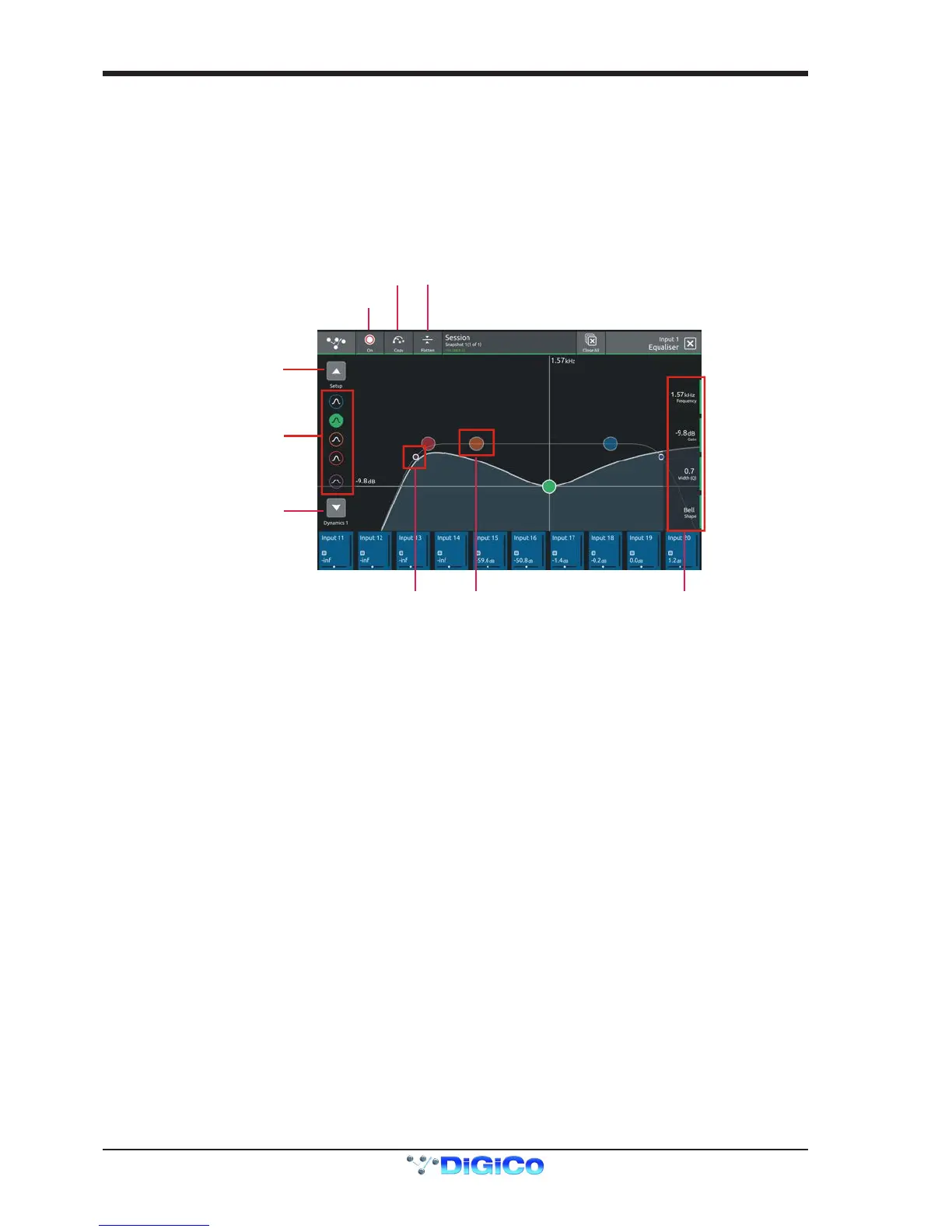
Touching the EQ area on either the Channel view or the Channel Setup will open the EQ expanded view.
The EQ band can be selected by touching the band icons on the left of the screen or by touching the bands on the EQ graph itself.
The graph has 2 modes, 4 band EQ or lters. Touch the relevant band and the adjust the parameters by dragging the band icon on the
graph.
While an EQ band is selected, it can be "pinched" on screen to adjust the Q setting.
The selected band's parameters can also be adjusted with the Master Rotaries to the right of the screen
The buttons in the top bar provide the following functions:
EQ On/Off
Copy EQ to another channel(s) - touch the button and select the destination channels from the channel picker - OK to conrm
Flatten EQ


 To Next Page