DiGiCo S21
1-12
1.3.9 Solo Channel Setup................................................................
The S21 has 2 Solo busses which have their own control channels in the console layout normally located on the 4th layer next to the
Matrix Output channels.
Note: Both Solo busses 1&2 are both sent permanently to the console headphone socket.
When no channels are soloed, the Master Buss (No Solo source) will always be sent to Solo Buss 1
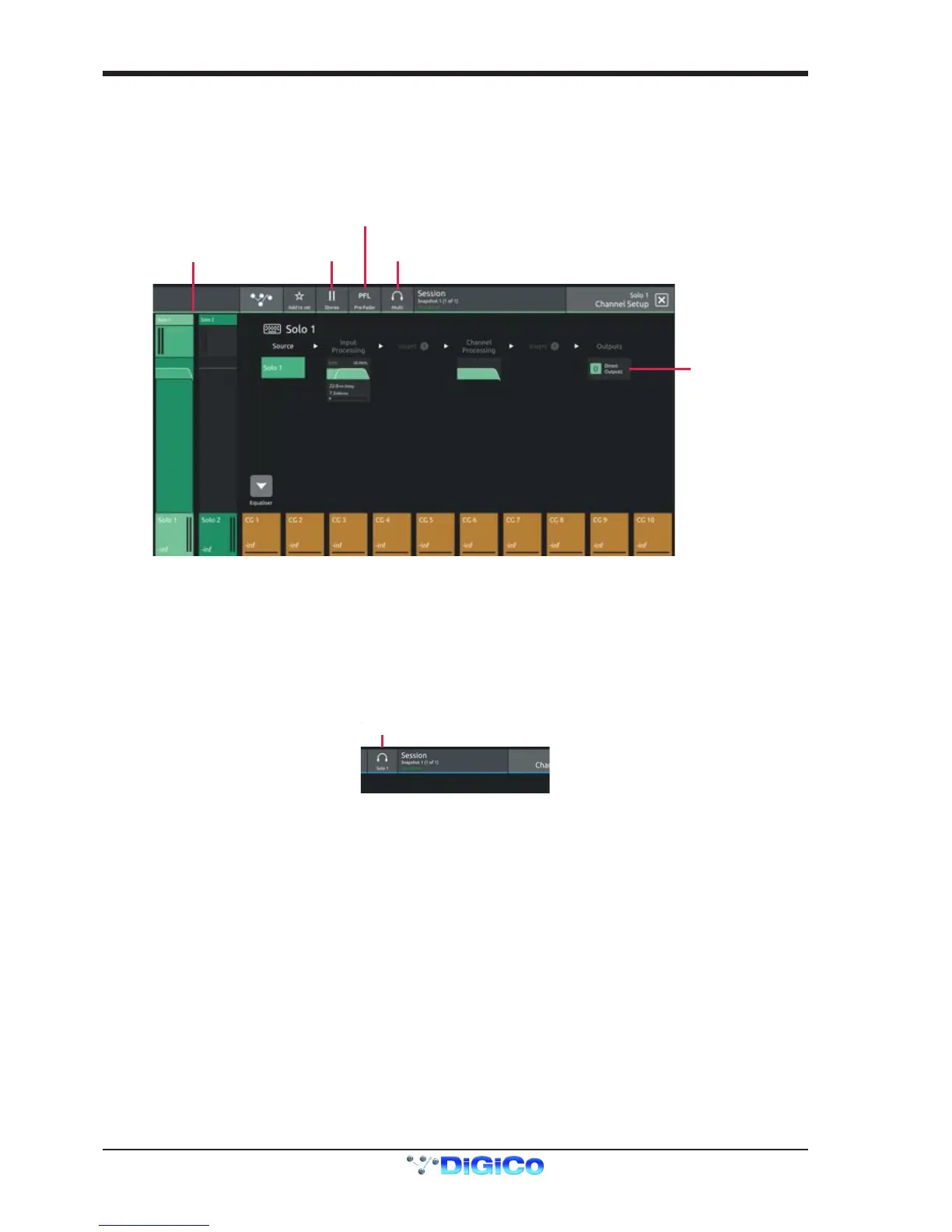
Touching the top of either Solo channel will open the relevant Solo setup view
Various Solo buss settings can be found in the top bar of this view
Solo busses can be switched Mono or Stereo
They can be set to PFL or AFL mode
They can be set to Multi Mode where multiple solos can be switched on at the same time or Single Mode where switching one solo on
will cancel previously active Solos
Any channel can be assigned to Solo Buss 1, 2 or both 1&2.
Open the channel setup view for any channel and there is a Solo buss assignment button in the top bar.


 To Next Page