1-21
DiGiCo S21
1-21
Matrix Inputs are selected by touching in the block at the top of the Matrix Input channel which is labelled No Input when it is not as-
signed. This opens the Matrix Input Routing View
Select the relevant internal port, rack or local I/O from the ports column and the select the required input socket from the socket display.
Close the view to return to the Matrix Inputs grid view.
To switch Matrix Nodes On/Off and control the send levels:
Select the required nodes by touching them on-screen - each selected node will be highlighted in orange.
If the Select Multiple button is active in the top bar then multiple nodes can be selected and adjusted at the same time.
Touching the Select Multiple button will activate Select Single mode which only allows one node to be selected at a time.
Once nodes are selected, they can be adjusted using the Touch/Turn control assigned to the 6th Master Rotary on the worksurface. This
is also lit in orange.
Push the rotary control to switch nodes On/Off and turn to adjust the Matrix Send levels.
When the adjustments are done, either touch the selected nodes individually to deselect them or touch the Clear Selection button in
the top bar.
1.5.9 System .....................................................................................
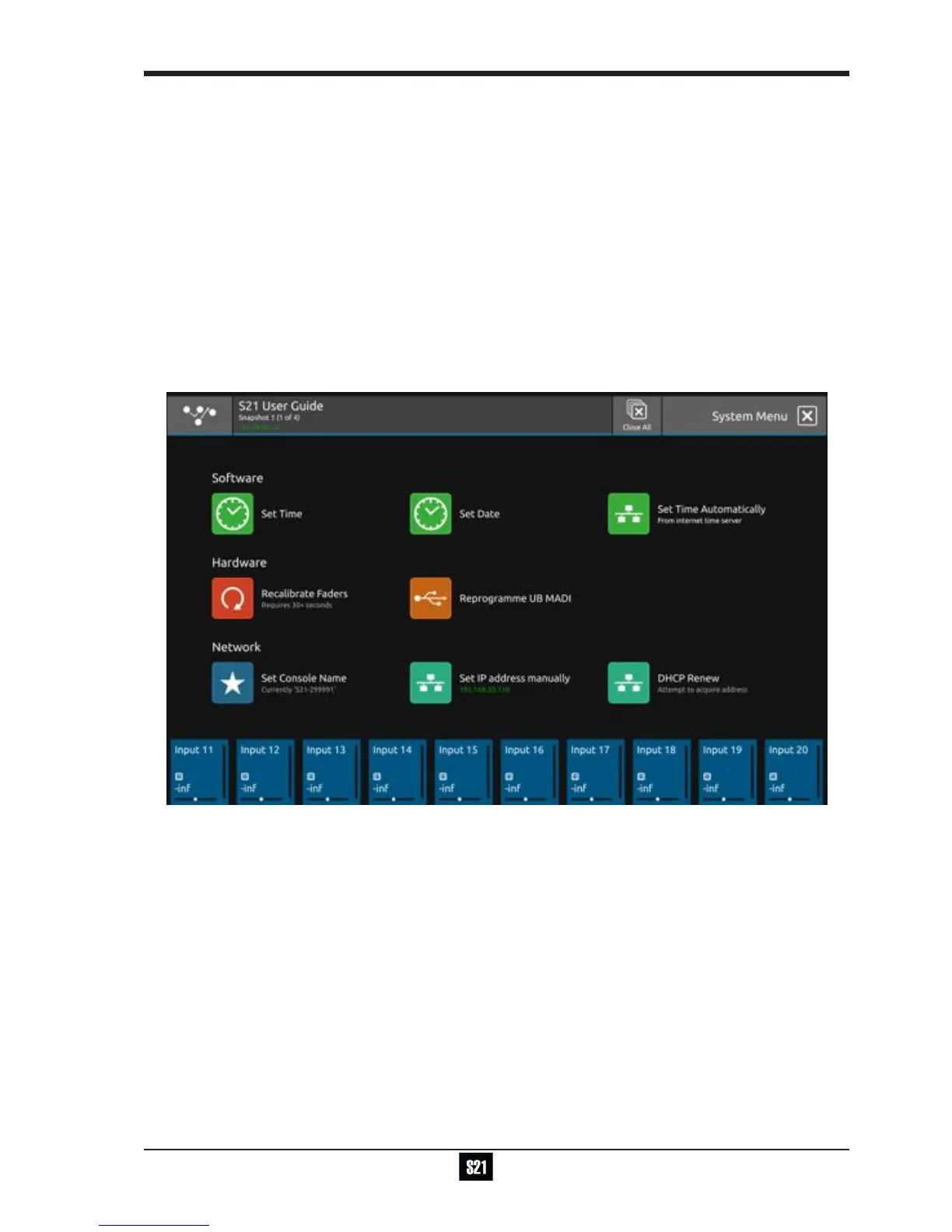
Touching the Main Menu > System button will display and allow the setting of various system level console functions.
NOTE: In normal operation there will seldom be any need to adjust any of these settings
There are options to manually set the time and date for the console.
This can also be done automatically but requires an internet connection with a DHCP server.
Faders can be calibrated which is a process that takes approx 30 seconds - please do not do this unless advised to do so by
DiGiCo Support
The UBMADI interface can be reprogrammed with new rmware if required - please do not do this unless advised to do so by
DiGiCo Support
The console name can be reset and the console's IP address set or renewed via DHCP - please do not do this unless advised to
do so by DiGiCo Support


 To Next Page