DiGiCo S21
1-10
1.3.7 Dynamics 2 View ....................................................................
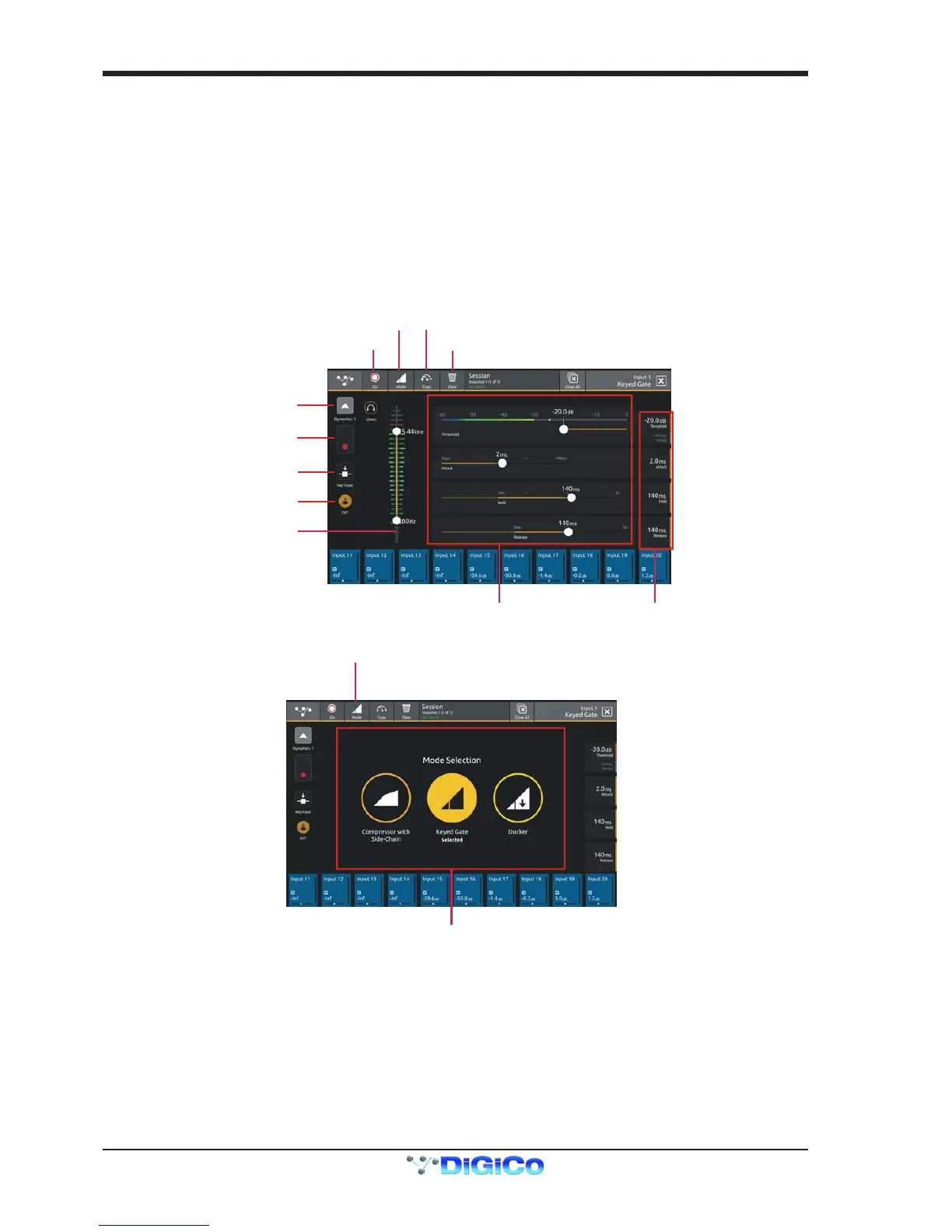
Touching the Dynamics 2 area on either the Channel view or the Channel Setup will open the Dynamics 2 expanded view.
Dynamics 2 can be a Keyed Gate, a Ducker or Single Band Compressor with Side Chain.
Touch the Mode button in the top bar to switch modes.
Dynamics module 2 provides side chain access via a selectable input - this can be used for external triggering.
Select the Source signal by touching the Key/Side Chain input button on the left of the screen and select a source from the standard
input routing list.Then use the Self/Ext button to activate this function.
Parameters can be adjusted on-screen or using the Master Rotaries to the right of the screen.
The buttons in the top bar also provide the following functions:
Dynamics Module On/Off
Copy Dynamics settings to another channel(s) - touch the button and select the destination channels from the channel picker - OK to
conrm
Reset Dynamics module


 To Next Page