1-17
DiGiCo S21
1-17
Snapshot Recall Safes
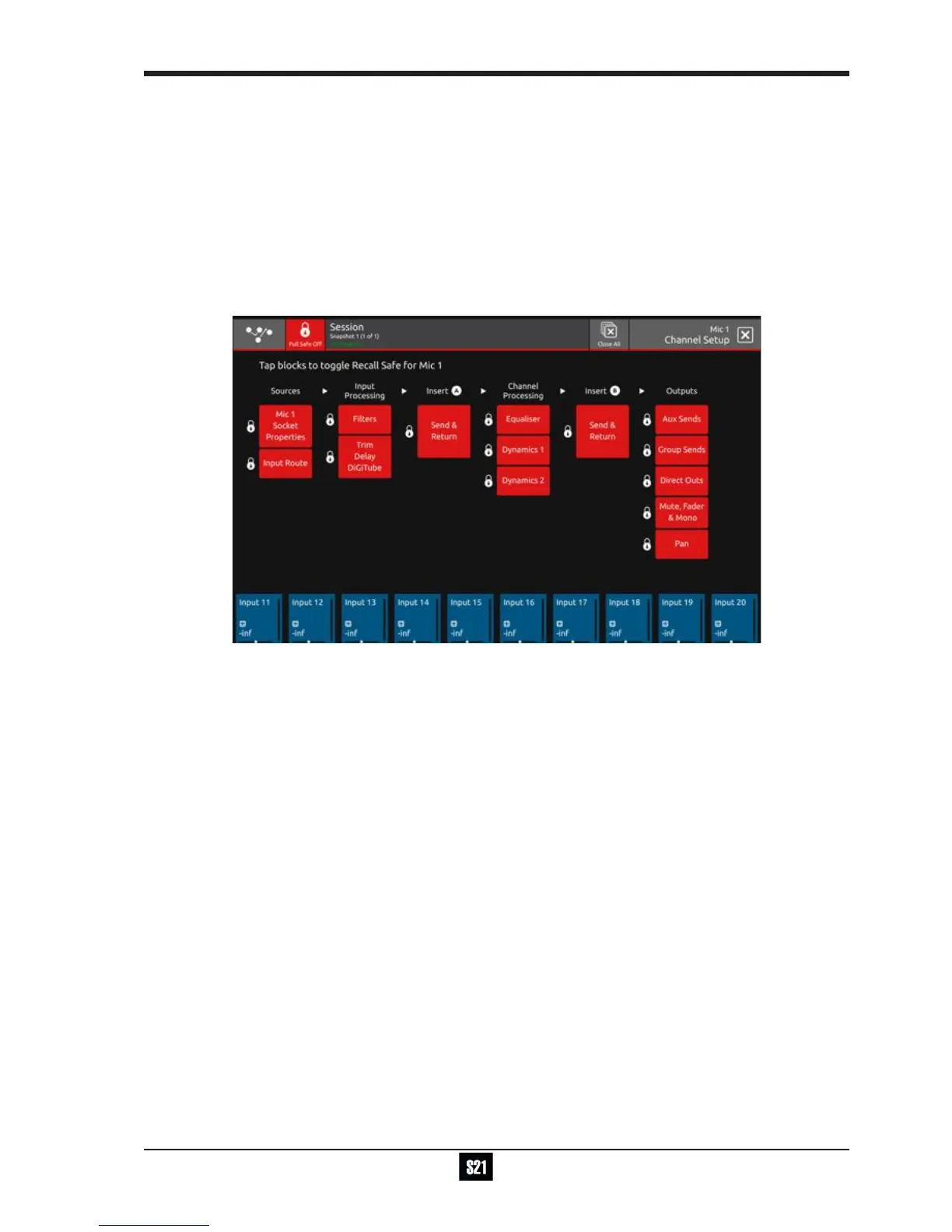
To prevent parameters from being recalled by Snapshots, use the Safe functions on each channel which are accessed through the
Channel Setup view Safes button in the top bar. If a parameter is Safe, it cannot be affected by any Snapshot Recall.
Each block represents a section of the channel as labelled - touch the block, it will be highlighted in red and the Safe will be applied.
Note: Socket Properties comprise Analogue Gain, +48V, Input Pad and AES SRC where appropriate.
These properties can apply to more than one input channel which is using the same input socket and therefore the
Safe state will automatically be the same on all channels that are sharing that socket
If there is no socket routed into the channel, the Safe function will not be available.
Note: Control Group membership and Buss Modes (Aux or Group) can be made Safe for any channel by activating the
Mute, Fader, Mono/Stereo block
There is also an Full Safe On/Off button in the top bar to Safe all of the channel parameters at the same time.
Safes are also available for individual FX units, Graphic EQ (globally) and individual Matrix Inputs.
The buttons to activate the functions are all located in the top bar of the relevant view.


 To Next Page