UTM-00339 | Rev 19
Page 215 of 253
DetNet South Africa Copyright © 2021
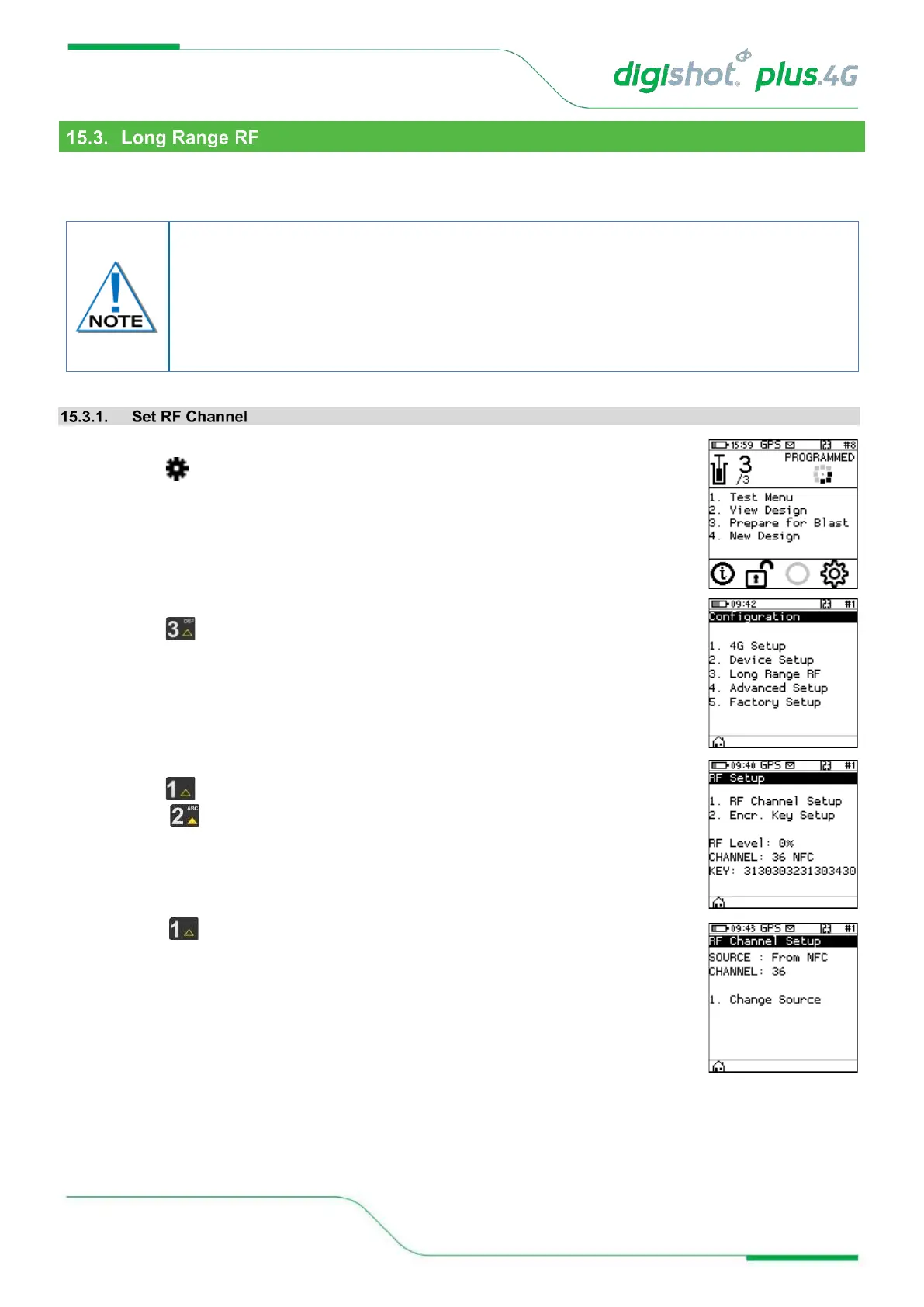
This function enables the user to manually select the region where the DigiShot
®
Plus 4G Commander will be
deployed, set the region specific RF Channel and set the Encryption Key.
1. Main Menu
• Press to select Configuration
2. Configuration Menu
• Press to select Long Range RF
3. RF Setup Menu
• Press to select RF Channel Setup
• Press to select Encryption Key Setup
• The current RF settings will be displayed at the bottom of the screen
4. RF Channel Setup
• Select to change source
• The current source will be displayed at the top of the screen
Communication will NOT be possible unless the channel, encryption key settings and
firmware version are the same on Base and Bench commanders. This will be automated
when the RF settings from NFC card is enabled, and the onus will thus not be on the user
to ensure matching settings, unless it needs to be altered. When the option to obtain RF
settings from card is enabled, simply swipe a yellow blast card in idle state and the system
will obtain the RF settings



 To Next Page