UTM-00339 | Rev 19
Page 198 of 253
DetNet South Africa Copyright © 2021
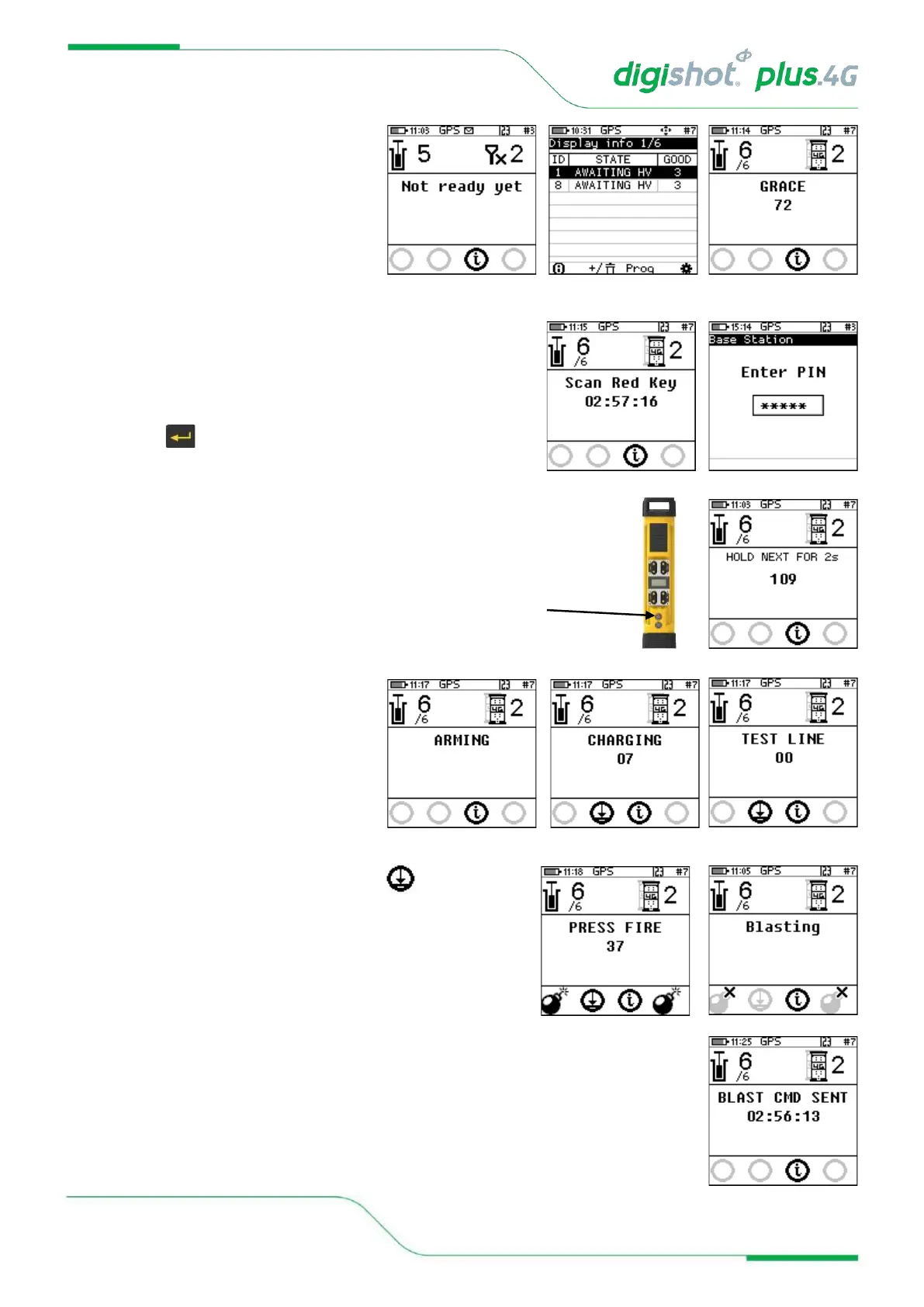
39. Remote Non-Synchronized Blast
• Wait if message “Not ready yet” is
displayed
• User will be prompted to Scan Key
once all the bench commanders are
out of grace period and ready to
blast.
• Once all the Bench Commanders are finished with grace countdown then user will prompted to scan the
Red keys
40. Scan Key
• Scan the RED BlastCard at the back of the DigiShot
®
Plus
4G Commander
• Enter the corresponding PIN
• Press to continue
• Press and Hold the NEXT button on the front of
the DigiShot
®
Plus 4G Commander for 2 seconds
• The DigiShot
®
Plus 4G Commander
will initiate arming and a 30-second
high-voltage charging period
followed by the 120-second blast
window.
41. To disarm the blast
• From the Base Commander press the button to
disarm the blast and resolve any issues
42. Press both FIRE-buttons (SoftKeys) on the CE4 Tagger
simultaneously to fire
• The Commander will send the blast command in numerical
Commander ID order.
BLASTING WILL TAKE PLACE
• Blast Command sent message will be displayed



 To Next Page