UTM-00339 | Rev 19
Page 61 of 253
DetNet South Africa Copyright © 2021
This menu will allow the user to adjust device specific settings. The following options are available:
1. Contrast
2. Brightness
3. Time Zone
4. Time Outs
5. Language
6. Units
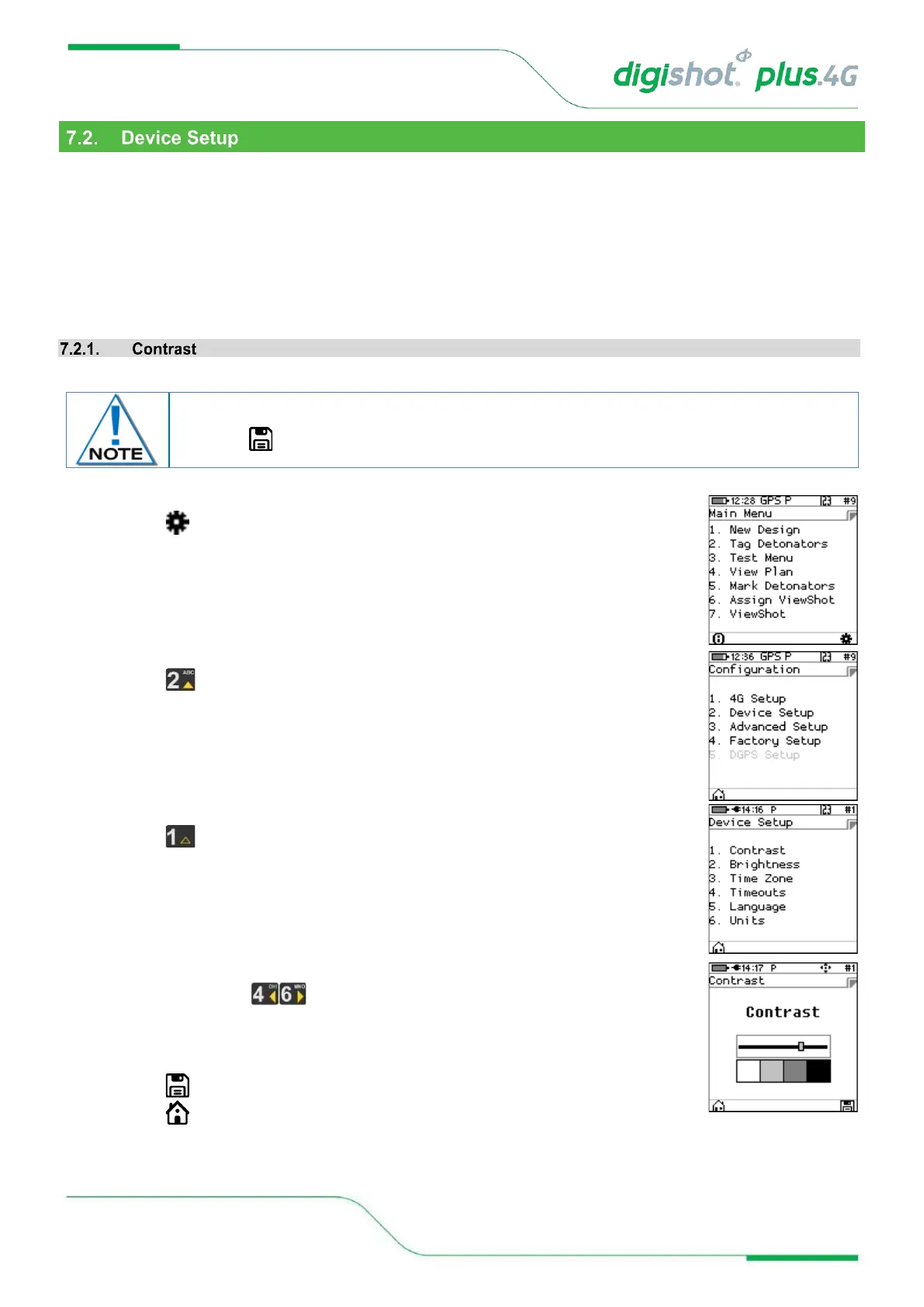
This function enables the user to adjust the LCD screen contrast.
1. Main Menu
• Press SoftKey to select Configuration Settings.
2. Configuration Settings Menu
• Press to select Device Setup.
3. Device Setup
• Press to select Contrast.
4. Contrast
• Use the arrow key to adjust contrast.
• Adjust to ensure the displayed contrast ‘blocks’ are distinguishable to allow viewing
‘greyed out’ versus ‘bold’ items. If the contrast is either too high or too low, these
font differences will not be notable.
• Press SoftKey to save.
• Press SoftKey to return to Main Menu.
The contrast adjusts as the value changes but the setting will only be saved permanently
when the SoftKey is pressed.



 To Next Page